Valid 70-765 Dumps shared by EduDump.com for Helping Passing 70-765 Exam! EduDump.com now offer the newest 70-765 exam dumps, the EduDump.com 70-765 exam questions have been updated and answers have been corrected get the newest EduDump.com 70-765 dumps with Test Engine here:
Access 70-765 Dumps Premium Version
(268 Q&As Dumps, 35%OFF Special Discount Code: freecram)
<< Prev Question Next Question >>
Question 154/168
You need to ensure that a user named Admin2 can manage logins.
How should you complete the Transact-SQL statements? To answer, select the appropriate Transact-SQL segments in the answer area.
Answer Area
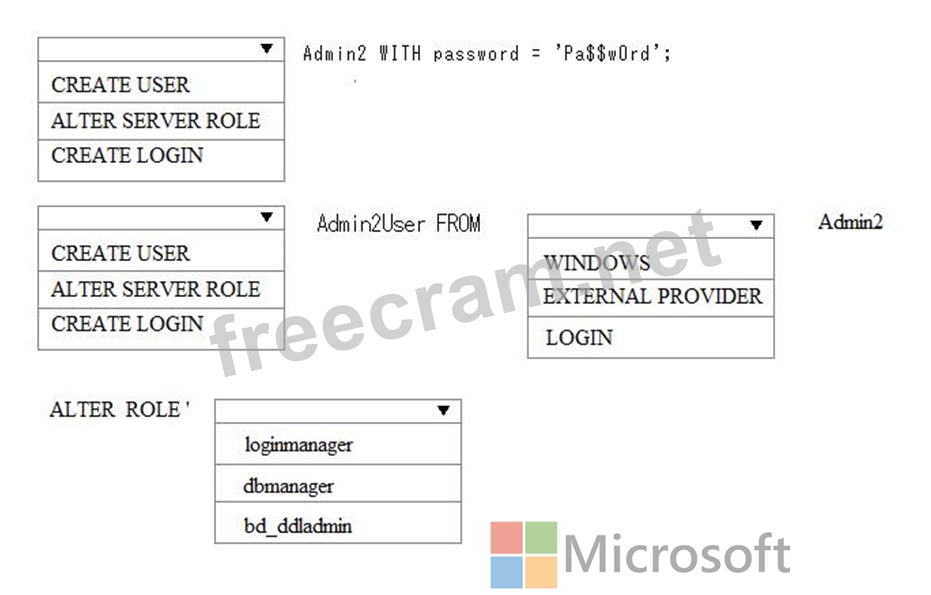
How should you complete the Transact-SQL statements? To answer, select the appropriate Transact-SQL segments in the answer area.
Answer Area
Correct Answer:
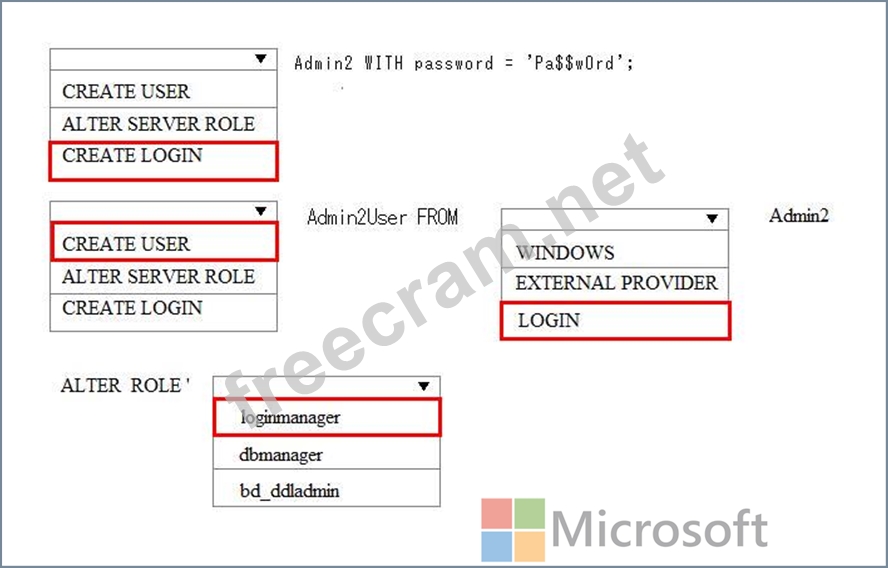
Explanation:
Step 1: CREATE LOGIN
First you need to create a login for SQL Azure, it's syntax is as follows:
CREATE LOGIN username WITH password='password';
Step 2, CREATE USER
Step 3: LOGIN
Users are created per database and are associated with logins. You must be connected to the database in where you want to create the user. In most cases, this is not the master database. Here is some sample Transact-SQL that creates a user:
CREATE USER readonlyuser FROM LOGIN readonlylogin;
Step 4: loginmanager
Members of the loginmanager role can create new logins in the master database.
References:
https://azure.microsoft.com/en-us/blog/adding-users-to-your-sql-azure-database/
https://docs.microsoft.com/en-us/azure/sql-database/sql-database-manage-logins


- Question List (168q)
- Question 1: You are a database administrator for a Microsoft SQL Server ...
- Question 2: You have a database named DB1 that contains a table named Ta...
- Question 3: A company has an on-premises Microsoft SQL Server 2016 envir...
- Question 4: You are building the database platform for a multi-tenant ap...
- Question 5: Note: This question is part of a series of questions that pr...
- Question 6: You are developing customized Microsoft Azure Resource Group...
- Question 7: You administer a Microsoft SQL Server 2014 server. One of th...
- Question 8: You create an availability group that has replicas named HA/...
- Question 9: You have a database named db1 and an application named App1....
- Question 10: Background You manage the Microsoft SQL Server environment f...
- Question 11: You plan to migrate a Microsoft SQL server instance between ...
- Question 12: You are using dynamic management views to monitor an SQL Ser...
- Question 13: You administer a Microsoft SQL Server 2014 instance that has...
- Question 14: You administer a Microsoft SQL Server 2014 Enterprise Editio...
- Question 15: You create a login named BIAppUser. The login must be able t...
- Question 16: You have a SQL Server 2016 database named DB1. You plan to i...
- Question 17: You use a Microsoft Azure SQL database as a data warehouse. ...
- Question 18: Note: This question is part of a series of questions that pr...
- Question 19: You have a Microsoft SQL Server instance that has a database...
- Question 20: You are migrating an on-premises Microsoft SQL Server virtua...
- Question 21: You have Microsoft SQL Server on a Microsoft Azure virtual m...
- Question 22: A company has an infrastructure that runs Microsoft SQL Serv...
- Question 23: You administer a Microsoft SQL Server 2014 database. You hav...
- Question 24: Note: This question is part of a series of questions that pr...
- Question 25: You administer a Microsoft SQL Server 2014 database that inc...
- Question 26: A company plans to deploy Microsoft SQL Server databases in ...
- Question 27: You have a Microsoft SQL server that manages all of your dat...
- Question 28: Note: This question is part of a series of questions that pr...
- Question 29: Your company has many Microsoft SQL Server instances hosted ...
- Question 30: You must optimize DB1 for queries that use unknown variables...
- Question 31: You plan to install Microsoft SQL Server 2014 for a web host...
- Question 32: You deploy a new Microsoft Azure SQL Database instance to su...
- Question 33: You administer a Microsoft SQL Server 2014 database named Co...
- Question 34: You plan to create an AlwaysOn availability group that will ...
- Question 35: Note: This questions is part of a series of questions that u...
- Question 36: Note: This question is part of a series of questions that us...
- Question 37: You plan to migrate a Microsoft SQL Server workload from an ...
- Question 38: A company runs Microsoft SQL Server 2017 in an on-premises e...
- Question 39: You have a table named Table1 that contains 500 million reco...
- Question 40: You are migrating an on-premises database server to Microsof...
- Question 41: You administer two instances of Microsoft SQL Server 2014. Y...
- Question 42: You have a Microsoft Azure SQL Database instance named Marke...
- Question 43: You have Microsoft SQL server on a Microsoft Azure virtual m...
- Question 44: You have an on-premises server that runs Windows Server 2012...
- Question 45: You have Microsoft SQL Server on a Microsoft Azure virtual m...
- Question 46: You use a Microsoft Azure SQL database as a data warehouse. ...
- Question 47: You administer a Microsoft SQL Server 2014 database instance...
- Question 48: You administer a Microsoft SQL Server 2014 instance that con...
- Question 49: Note: This question is part of a series of questions that pr...
- Question 50: You are designing a Windows Azure SQL Database for an order ...
- Question 51: You have Microsoft SQL Server on a Microsoft Azure Virtual m...
- Question 52: You plan to deploy an AlwaysOn failover cluster in Microsoft...
- Question 53: A company plans to run Microsoft SQL Server on Linux-based s...
- Question 54: Background You are managing a multi-tenant environment hoste...
- Question 55: You have an on-premises Microsoft SQL server that has a data...
- Question 56: You deploy a new Microsoft Azure SQL Database instance to su...
- Question 57: You administer a Microsoft SQL Server 2014 database that con...
- Question 58: Note: This question is part of a series of questions that pr...
- Question 59: You are migrating an on-premises Microsoft SQL Server instan...
- Question 60: You administer a Microsoft SQL Server 2014 database named Co...
- Question 61: A company has an on-premises Microsoft SQL Server environmen...
- Question 62: You administer a Microsoft SQL Server 2014 database. The dat...
- Question 63: You create a new Microsoft Azure subscription. You need to c...
- Question 64: User report that a query takes a long time to execute. The q...
- Question 65: A company hosts a default installation of Microsoft SQL Serv...
- Question 66: Settings Value VM size D3 Storage Location Drive E Storage t...
- Question 67: A company has an on-premises Microsoft SQL Server environmen...
- Question 68: You have a database named DB1 that contains a table named Ta...
- Question 69: You administer two Microsoft SQL Server 2014 servers. Each s...
- Question 70: You use Microsoft SQL Server 2014 to develop a database appl...
- Question 71: You administer a Microsoft SQL Server 2014 database named Or...
- Question 72: You plan to migrate on-premises Microsoft SQL Server databas...
- Question 73: You plan to install a new Microsoft SQL Server instance with...
- Question 74: You manage an on-premises Microsoft SQL server that has a da...
- Question 75: You install Microsoft SQL Server onto a virtual machine (VM)...
- Question 76: You administer a Microsoft SQL Server 2014 server. The MSSQL...
- Question 77: You have a Microsoft SQL Server instance which hosts all of ...
- Question 78: Note: This question is part of a series of questions that us...
- Question 79: You have Microsoft SQL Server on a Microsoft Azure virtual m...
- Question 80: You have Microsoft SQL Server on a DS-series Microsoft Azure...
- Question 81: You have a Microsoft Azure SQL Database server named server1...
- Question 82: You have an on-premises Microsoft SQL server named server an...
- Question 83: You need to set up the service accounts that the database en...
- Question 84: Note: This question is part of a series of questions that pr...
- Question 85: You use a Microsoft SQL Server 2014 database that contains t...
- Question 86: Note: This question is part of a series of questions that pr...
- Question 87: Background You are managing a multi-tenant environment hoste...
- Question 88: You manage a Microsoft SQL Server environment with several d...
- Question 89: You are deploying a virtual machine (VM) to run Microsoft SQ...
- Question 90: You plan to deploy a Microsoft SQL Server database that will...
- Question 91: You administer a Microsoft SQL Server 2014 instance that has...
- Question 92: You administer a Microsoft SQL Server 2014 database. You nee...
- Question 93: You administer a Microsoft SQL Server 2014 database. The dat...
- Question 94: You need to optimize SRV1. What configuration changes should...
- Question 95: You are the administrator for a SQL Server 2016 instance tha...
- Question 96: You administer all the deployments of Microsoft SQL Server 2...
- Question 97: You deploy a new Microsoft Azure SQL database instance to su...
- Question 98: You develop a Microsoft SQL Server 2014 database that contai...
- Question 99: You deploy a new Microsoft Azure SQL database instance to su...
- Question 100: You are a database developer of a Microsoft SQL Server 2014 ...
- Question 101: Note: This question is part of a series of questions that pr...
- Question 102: You administer a SQL Server 2014 database instance. You need...
- Question 103: You administer a Microsoft SQL Server 2014 instance named SQ...
- Question 104: You upgrade a database named DB1 to Microsoft SQL Server 201...
- Question 105: You are building the database platform for a multi-tenant ap...
- Question 106: You deploy a Microsoft SQL Server instance to support a new ...
- Question 107: You have a database named DB1. You discover that DB1 is corr...
- Question 108: You manage a large data warehouse. You must archive data tha...
- Question 109: Background You manage the Microsoft SQL Server environment f...
- Question 110: You are planning to perform an automated deployment of Micro...
- Question 111: You are deploying a Microsoft SQL Server database that will ...
- Question 112: You plan to deploy multiple Microsoft SQL Servers to a set o...
- Question 113: You plan to migrate a Microsoft SQL server instance between ...
- Question 114: Note: This question is part of a series of questions that us...
- Question 115: A company has an on-premises Microsoft SQL Server 2017 infra...
- Question 116: A company plans to use a Microsoft Azure SQL Database instan...
- Question 117: You administer a Windows Azure SQL Database database named H...
- Question 118: You administer a Microsoft SQL Server 2014 database that con...
- Question 119: You need to resolve the identified issues. Use the drop-down...
- Question 120: You plan to create an AlwaysOn availability group that will ...
- Question 121: You have a Microsoft SQL Server that has a database named DB...
- Question 122: You have a database named DB1 that uses simple recovery mode...
- Question 123: You plan to install a Microsoft SQL Server 2014 instance. Th...
- Question 124: You plan to deploy 20 Microsoft Azure SQL Database instances...
- Question 125: You have database that contains a 400-GB table that is read-...
- Question 126: You manage a Microsoft SQL Server instance named SQL1 that h...
- Question 127: You need to create an alert that is triggered when the numbe...
- Question 128: You have the databases configured as shown in the following ...
- Question 129: You have a database named DB1 that is 3 TB. obi contains a f...
- Question 130: You manage a Microsoft SQL Server environment in a Microsoft...
- Question 131: You use Microsoft SQL Server 2014 to develop a database appl...
- Question 132: You manage a Microsoft SQL Server environment in a Microsoft...
- Question 133: Note: This questions is part of a series of questions that u...
- Question 134: You use Resource Manager to deploy a new Microsoft SQL Serve...
- Question 135: You have an on-premises Microsoft SQL server that has a data...
- Question 136: You have an on-premises database. You plan to migrate the da...
- Question 137: You administer a Microsoft SQL Server 2014 database named Co...
- Question 138: You deploy a new Microsoft Azure SQL database instance to su...
- Question 139: Note: This question is part of a series of questions that pr...
- Question 140: You have Microsoft SQL Server on a Microsoft azure virtual m...
- Question 141: You plan to deploy an on-premises SQL Server 2014 database t...
- Question 142: You administer a Microsoft SQL Server 2014 environment. One ...
- Question 143: A company has an on-premises Microsoft SQL Server 2014 envir...
- Question 144: Your database contains a table named Purchases. The table in...
- Question 145: You administer a Microsoft SQL Server 2014 server. You plan ...
- Question 146: You administer a Microsoft SQL Server 2014 database instance...
- Question 147: Note: This question is part of a series of questions that pr...
- Question 148: You plan to migrate a database To Microsoft Azure SQL Databa...
- Question 149: You have a server named server1-contoso.database.windows.net...
- Question 150: You administer a Windows Azure SQL Database database named I...
- Question 151: A company uses several Microsoft Azure elastic pools with Az...
- Question 152: Note: This question is part of a series of questions that pr...
- Question 153: You have an on-premises Microsoft SQL Server instance. You c...
- Question 154: You need to ensure that a user named Admin2 can manage login...
- Question 155: You use Microsoft Azure Resource Manager to deploy two new M...
- Question 156: You have an on-premises database that runs several maintenan...
- Question 157: You have an on-premises database. You plan to migrate the da...
- Question 158: You have been hired as a Database Consultant by ABC.com to d...
- Question 159: You are deploying a DS-13 series virtual machine (VM) to run...
- Question 160: You have Microsoft SQL Server on a Microsoft Azure virtual m...
- Question 161: A new Azure Active Directory security principal named Report...
- Question 162: You administer a Microsoft SQL Server 2014 instance named SQ...
- Question 163: You have a database named DB1 in a Microsoft Azure virtual m...
- Question 164: You plan to deploy 20 Microsoft Azure SQL Database instances...
- Question 165: You have a server named Serverl that is hosted in an Azure v...
- Question 166: Note: This question is part of a series of questions that pr...
- Question 167: You administer a single server that contains a Microsoft SQL...
- Question 168: You administer a Microsoft SQL Server 2014 instance that con...
