- Home
- Microsoft
- Upgrading Your Skills to MCSA: Windows Server 2016
- Microsoft.70-743.v2018-08-30.q110
- Question 78
Valid 70-743 Dumps shared by EduDump.com for Helping Passing 70-743 Exam! EduDump.com now offer the newest 70-743 exam dumps, the EduDump.com 70-743 exam questions have been updated and answers have been corrected get the newest EduDump.com 70-743 dumps with Test Engine here:
Access 70-743 Dumps Premium Version
(295 Q&As Dumps, 35%OFF Special Discount Code: freecram)
<< Prev Question Next Question >>
Question 78/110
HOTSPOT
You have a Windows Server 2016 failover cluster that has a cluster network named ClusterNetwork1.
You need to ensure that ClusterNetwork1 is enabled for cluster communication only.
What command should you run? To answer, select the appropriate options in the answer area.
Hot Area:
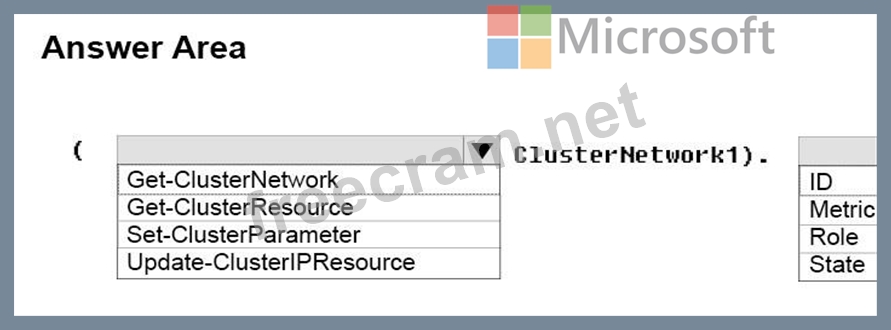
You have a Windows Server 2016 failover cluster that has a cluster network named ClusterNetwork1.
You need to ensure that ClusterNetwork1 is enabled for cluster communication only.
What command should you run? To answer, select the appropriate options in the answer area.
Hot Area:
Correct Answer:
Explanation/Reference:
Explanation:
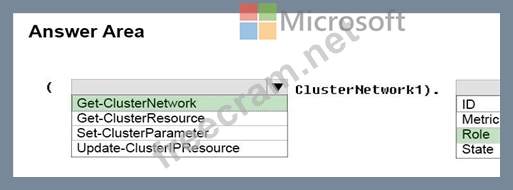
Box 1: Get-ClusterNetwork
Cluster network roles can be changed using PowerShell command, Get-ClusterNetwork.
For example:
(Get-ClusterNetwork "Cluster Network 1"). Role =1
Box 2: Role
Cluster Network Roles:
Cluster networks are automatically created for all logical subnets connected to all nodes in the Cluster.
Each network adapter card connected to a common subnet will be listed in Failover Cluster Manager.
Cluster networks can be configured for different uses.
Three roles:
* Disabled for Cluster Communication (value 0)
* Enabled for Cluster Communication only (value 1)
* Enabled for client and cluster communication (value 3)
References: https://blogs.technet.microsoft.com/askcore/2014/02/19/configuring-windows-failover-cluster- networks/


- Question List (110q)
- Question 1: You have a Hyper-V host named Server1 that runs Windows Serv...
- Question 2: Your network contains an Active Directory domain named conto...
- Question 3: This question is part of a series of questions that present ...
- Question 4: Note: This question is part of a series of questions that us...
- Question 5: HOTSPOT You have a server named Server1 that runs Windows Se...
- Question 6: You have a server named Server1 that runs Windows Server 201...
- Question 7: You have a server named Server1 that runs Windows Server 201...
- Question 8: Note: This question is part of a series of questions that pr...
- Question 9: Note: This question is part of a series of questions that pr...
- Question 10: A company named Contoso, Ltd has five Hyper-V hosts that are...
- Question 11: Note: This question is part of a series of questions that us...
- Question 12: Your network contains an Active Directory forest named conto...
- Question 13: Each question is independent of the other questions in this ...
- Question 14: You create a Nano server image named Nano1.vhdx by using the...
- Question 15: You have a server named Server1 that runs Windows Server 201...
- Question 16: Note: This question is part of a series of questions that us...
- Question 17: You have an IP Address Management (IPAM) deployment that is ...
- Question 18: Your network contains an Active Directory domain named conto...
- Question 19: Your network contains an Active Directory forest named conto...
- Question 20: You have a server named Server1 that runs Windows Server 201...
- Question 21: Your network contains an Active directory forest named conto...
- Question 22: Your network contains three Hyper-V hosts. You add all of th...
- Question 23: Note: This question is part of a series of questions that pr...
- Question 24: You have a server named Server1 that runs Windows Server 201...
- Question 25: Server1 download update from Microsoft update. You have Serv...
- Question 26: You are configuring a Windows Server 2016 failover cluster i...
- Question 27: HOTSPOT You have a server named Server1 that runs Windows Se...
- Question 28: Note: This question is part of a series of questions that pr...
- Question 29: You have a Hyper-V host that runs Windows Server 2016. The h...
- Question 30: You have a failover cluster named Cluster1. A virtual machin...
- Question 31: You have a Hyper-V host named Server1 that runs Windows Serv...
- Question 32: You have a Windows Server 2016 failover cluster named Cluste...
- Question 33: You have a server named Server1 that runs Windows Server 201...
- Question 34: You have a server named Server1 that runs Windows Server 201...
- Question 35: You have two servers named Server1 and Server2. A firewall e...
- Question 36: You have a server named Server1 that runs Windows Server 201...
- Question 37: You have a DHCP server named Server1 that runs Windows Serve...
- Question 38: Note: This question is part of a series of questions that us...
- Question 39: You have a server that runs Windows Server 2016. The server ...
- Question 40: HOTSPOT You have a four-node Hyper-V cluster named Cluster1....
- Question 41: Note: This question is part of a series of questions that pr...
- Question 42: Note: This question is part of a series of questions that us...
- Question 43: Note: This question is part of a series of questions that us...
- Question 44: Note: This question is part of a series of questions that pr...
- Question 45: Note: This question is part of a series of questions that pr...
- Question 46: Note: This question is part of a series of questions that us...
- Question 47: Your network contains an Active Directory domain named conto...
- Question 48: You are deploying a small network that has 30 client compute...
- Question 49: You have a Hyper-V host named Server1 that runs Windows Serv...
- Question 50: Your company has 10 offices. Each office has a local network...
- Question 51: You have a Scale-Out File Server that has a share named Shar...
- Question 52: You are a network administrator for a company named Contoso,...
- Question 53: Note: This question is part of a series of questions that pr...
- Question 54: You have an Active Directory domain named Contoso com. The d...
- Question 55: You have a server named Server1 that runs Windows Server 201...
- Question 56: Active Directory Recycle Bin is enabled. You discover that a...
- Question 57: HOTSPOT You have a server named Server1 that runs Windows Se...
- Question 58: Note: This question is part of a series of questions that us...
- Question 59: You have a server named Server1 that runs Windows Server 201...
- Question 60: HOTSPOT Your network contains an Active Directory domain nam...
- Question 61: Your network contains an Active Directory domain. The domain...
- Question 62: You are implementing a new network. The network contains a D...
- Question 63: HOTSPOT Your network contains an Active Directory forest nam...
- Question 64: Note: This question is part of a series of questions that us...
- Question 65: You have a server named Server1 that runs Windows Server 201...
- Question 66: Note: This question is part of a series of questions that pr...
- Question 67: You have a server named Server1 that runs Windows Server 201...
- Question 68: You have a server named Server1 that runs Windows Server 201...
- Question 69: You have a server named Served that runs Windows Server 2016...
- Question 70: Your network contains three subnets, a production subnet tha...
- Question 71: Note: This question is part of a series of questions that us...
- Question 72: You have a server named Server1. You enable BitLocker Drive ...
- Question 73: DRAG DROP You have a server that runs Windows Server 2016. Y...
- Question 74: You have a Nano Server named Nano1. Which cmdlet should you ...
- Question 75: You need to implement network virtualization. On which objec...
- Question 76: You have an application named App1. App1 is distributed to m...
- Question 77: You have a server named Server1 that runs Windows Server 201...
- Question 78: HOTSPOT You have a Windows Server 2016 failover cluster that...
- Question 79: HOTSPOT You have a server named Server1 that runs Windows Se...
- Question 80: HOTSPOT You have a server that runs Windows Server 2016. You...
- Question 81: You have an Active Directory domain named Contoso.com. The d...
- Question 82: Note: This question is part of a series of questions that pr...
- Question 83: Your network contains an Active Directory forest. The forest...
- Question 84: You are a network administrator for a company named Contoso,...
- Question 85: You have a server named Server1 that runs Windows Server 201...
- Question 86: You deploy two servers that run Windows Server 2016. You ins...
- Question 87: Note: This question is part of a series of questions that us...
- Question 88: Note: This question is part of a series of questions that us...
- Question 89: Note: This question is part of a series of questions that pr...
- Question 90: Your Network contains one Active Directory domain named cont...
- Question 91: You have multiple servers that run Windows Server 2016 and a...
- Question 92: You have a Hyper-V host named Server1 that runs Windows Serv...
- Question 93: You have a server named Server1 that runs Windows Server 201...
- Question 94: You have a server named Server1 that runs Windows Server 201...
- Question 95: You have a Hyper-V host named Server1 that runs Windows Serv...
- Question 96: You implement Software Defined Networking (SDN) by using the...
- Question 97: You plan to install a Nano Server on a physical server named...
- Question 98: You have a container host named Server1 that runs Windows Se...
- Question 99: You have an Active Directory domain named contoso.com. The c...
- Question 100: Note: This question is part of a series of questions that us...
- Question 101: Note: This question is part of a series of questions that us...
- Question 102: You deploy a Hyper-V server named Server1 in an isolated tes...
- Question 103: You have two Hyper-V hosts named Server1 and Server2 that ru...
- Question 104: You have two Hyper-V hosts named Server1 and Server2 that ru...
- Question 105: You have a Hyper-V host named Server1 that runs Windows Serv...
- Question 106: You have two servers named Server1 and Server2 that run Wind...
- Question 107: This question is part of a series of questions that present ...
- Question 108: Your network contains an Active Directory domain named conto...
- Question 109: Note: This question is part of a series of questions that pr...
- Question 110: Your network contains a new Active Directory domain named co...
