Valid 70-680 Dumps shared by EduDump.com for Helping Passing 70-680 Exam! EduDump.com now offer the newest 70-680 exam dumps, the EduDump.com 70-680 exam questions have been updated and answers have been corrected get the newest EduDump.com 70-680 dumps with Test Engine here:
Access 70-680 Dumps Premium Version
(565 Q&As Dumps, 35%OFF Special Discount Code: freecram)
<< Prev Question Next Question >>
Question 369/520
You have two portable computers named Computer1 and Computer2 that run Windows 7.
You configure Computer1 to connect to a wireless network named Network1.
You need to configure Computer2 to connect to Network1 by using the same settings as Computer1.
What should you do on Computer1?
You configure Computer1 to connect to a wireless network named Network1.
You need to configure Computer2 to connect to Network1 by using the same settings as Computer1.
What should you do on Computer1?
Correct Answer: D
Explanation/Reference:
Explanation:
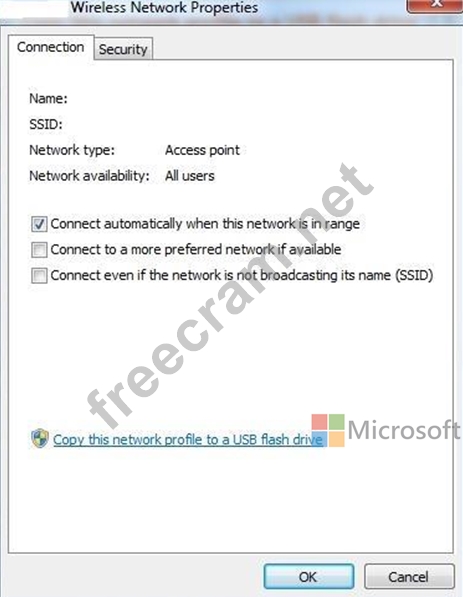
The Copy this network profile to a USB flash drive link launches the Copy Network Settings wizard, which writes the wireless network profile settings to a USB flash drive. You can then use this flash drive to automate the wireless network profile configuration of other computers. To save your wireless network settings to a USB flash drive, insert a USB flash drive into the computer, and then follow these steps:
Click to open Network and Sharing Center.

In the left pane, click Manage wireless networks.
Right-click the network, click Properties, and then click Copy this network profile to a USB flash drive.
Select the USB device, and then click Next.
Follow the instructions in the wizard, and then click Close.
Explanation:
The Copy this network profile to a USB flash drive link launches the Copy Network Settings wizard, which writes the wireless network profile settings to a USB flash drive. You can then use this flash drive to automate the wireless network profile configuration of other computers. To save your wireless network settings to a USB flash drive, insert a USB flash drive into the computer, and then follow these steps:
Click to open Network and Sharing Center.
In the left pane, click Manage wireless networks.
Right-click the network, click Properties, and then click Copy this network profile to a USB flash drive.
Select the USB device, and then click Next.
Follow the instructions in the wizard, and then click Close.


- Question List (520q)
- Question 1: You have a computer that runs Windows 7. You install Interne...
- Question 2: You install the Windows Automated Installation Kit (WAIK) fo...
- Question 3: You have a computer that runs Windows 7. The computer's hard...
- Question 4: Your network contains an Active Directory domain. All server...
- Question 5: DRAG DROP You capture a Windows Image (.wim) file from a ref...
- Question 6: You have a computer that runs Windows 7. The computer is a m...
- Question 7: You use a portable computer that has Windows 7 Enterprise SP...
- Question 8: To establish a Direct Access connection to the network, what...
- Question 9: Your company network includes desktop computers that have Wi...
- Question 10: You have two computers named Computer1 and Computer2 that ru...
- Question 11: You use a portable computer that has Windows 7 SP1 installed...
- Question 12: You are deciding on which storage devices you want to config...
- Question 13: You are preparing to migrate from Windows Vista to Windows 7...
- Question 14: HOTSPOT You support windows 7 client computers used by Marke...
- Question 15: DRAG DROP You are a systems administrator for a company that...
- Question 16: HOTSPOT You use a computer that has Windows 7 and a legacy a...
- Question 17: You work in an international company which is named Wiikigo....
- Question 18: You have a computer that runs Windows 7. You need to identif...
- Question 19: You have a computer that runs Windows 7. IPv6 is disabled on...
- Question 20: You use a computer that has Windows 7 Enterprise installed. ...
- Question 21: Which of the following Windows 7 Editions allows you to join...
- Question 22: You have a computer that runs Windows 7. Multiple users log ...
- Question 23: Your company network includes client computers that have Win...
- Question 24: You perform a clean installation of Windows 7 on a computer....
- Question 25: You have a computer that runs Windows 7. The computer is a m...
- Question 26: You have a stand-alone computer named Computer1 that runs Wi...
- Question 27: You use a desktop computer that has Windows 7 Ultimate SP1. ...
- Question 28: You have a computer named Computer1 that runs Windows 7. You...
- Question 29: Your company network has a single-domain Active Directory fo...
- Question 30: A virtual hard disk (VHD) contains a Windows 7 Enterprise in...
- Question 31: You have two computers named Computer1 and Computer2. Comput...
- Question 32: You work in an international company which is named Wiikigo....
- Question 33: You have a custom image of Windows 7. You plan to deploy the...
- Question 34: You have a computer that runs Windows 7. The computer's hard...
- Question 35: You have a computer that runs Windows 7. The network connect...
- Question 36: You use a portable computer that has Windows 7 installed. Th...
- Question 37: You have a computer that runs Windows 7. You generate a Syst...
- Question 38: You are the administrator of a computer named Computer1 that...
- Question 39: A company has a server running Windows Server2008 R2 with Wi...
- Question 40: You administer a desktop computer that has the following har...
- Question 41: You need to identify the hardware failures have occurred on ...
- Question 42: You have a customized image of Windows 7 Professional. You n...
- Question 43: You have a computer that runs a 32-bit version of Windows 7 ...
- Question 44: You use a computer that has Windows SP1 installed. The compu...
- Question 45: HOTSPOT You are running windows 7 on a portable computer. A ...
- Question 46: A network has a main office and a branch office. The branch ...
- Question 47: HOTSPOT A company has Windows XP, Windows vista, and Windows...
- Question 48: Your organization uses Windows 7 computers. You remotely adm...
- Question 49: You have a wireless access point that is configured to use A...
- Question 50: You have a computer that runs Windows 7. The computer is con...
- Question 51: Kim Akers has an administrator account on a computer running...
- Question 52: You have a computer that runs Windows 7 Professional. You ne...
- Question 53: DRAG DROP You have a computer that runs WindowsXP. The compu...
- Question 54: You use a desktop computer that has Windows 7 Ultimate SP1. ...
- Question 55: Your company has a main office and a branch office. A portab...
- Question 56: You have a computer that runs Windows 7. You install Windows...
- Question 57: You use a computer that has Windows 7 and Internet Explorer ...
- Question 58: You use a computer that has Windows 7 SP1 installed to acces...
- Question 59: You use a portable computer that has Windows 7 installed. Th...
- Question 60: You want to prohibit read, write, and execute access to all ...
- Question 61: HOTSPOT You have upgraded a Windows XP system to Windows 7. ...
- Question 62: You are the system administrator for a large manufacturing c...
- Question 63: A standard user named User1 has a computer that runs Windows...
- Question 64: Your network contains a public computer that runs Windows 7....
- Question 65: An employee has a Windows Vista SP1 32-bit computer that use...
- Question 66: HOTSPOT A manufacturing company has Windows Vista and Window...
- Question 67: A computer that runs Windows XP has on basic disk containing...
- Question 68: Your network contains a Network Policy and Access Services s...
- Question 69: You have a computer that runs windows 7. You log on to the c...
- Question 70: You have a computer that runs Windows 7. You need to configu...
- Question 71: You have a computer that runs Windows 7. The computer has tw...
- Question 72: You administer client computers that have Windows 7 Enterpri...
- Question 73: DRAG DROP Your organization needs to perform a Windows Vista...
- Question 74: You use a portable computer that has Windows 7 SP1 Ultimate ...
- Question 75: You have a computer that runs windows vista. The computer ha...
- Question 76: You use a desktop computer that has Windows 7 SP1 Ultimate i...
- Question 77: You administer client computers that have Windows 7 Professi...
- Question 78: You have a computer that runs Windows 7. You have a system i...
- Question 79: Your company recently upgraded from Windows XP to Windows 7....
- Question 80: HOTSPOT You use a computer that has Windows 7 installed. The...
- Question 81: A network contains computers that run Windows 7 and Windows ...
- Question 82: You use a desktop computer that has Windows 7 SP1 Ultimate i...
- Question 83: You have a computer that runs Windows 7 Home Premium. You ne...
- Question 84: You need to ensure that when you insert a blank DVD into the...
- Question 85: You have a computer that runs Windows Vista. The computer co...
- Question 86: You work in an international company which is named Wiikigo....
- Question 87: DRAG DROP You deploy Windows 7 on client computers by using ...
- Question 88: A company has Windows 7 Enterprise computers that use BitLoc...
- Question 89: You have a computer named Computer1 that runs Windows 7. Com...
- Question 90: A company has client computers that run Windows 7 Enterprise...
- Question 91: You have a workgroup that contains five computers. The compu...
- Question 92: You use a computer that has Windows 7 SP1 installed to acces...
- Question 93: Your company network includes a Windows Server 2008 R2 serve...
- Question 94: You have a computer that runs Windows 7. You open the Disk M...
- Question 95: You work as the desktop support technician. The network cons...
- Question 96: You have two computers on the same subnet. The computers hav...
- Question 97: Your network consists of a single Active Directory forest. Y...
- Question 98: You have a computer that runs Windows 7. You perform regular...
- Question 99: A user reports that he is unable to start his computer. He p...
- Question 100: You have a computer that runs Windows 7. A user installs a t...
- Question 101: You have a computer that runs Windows 7. You add a new hard ...
- Question 102: You are creating an unattend answer file for automatic Windo...
- Question 103: Which of the following operating systems support an offline ...
- Question 104: Your company office network includes a file server that has ...
- Question 105: You are deploying a number of Windows 7 laptops. You create ...
- Question 106: DRAG DROP A company has client computers that run windows vi...
- Question 107: You plan to deploy Windows 7 images. You need to ensure that...
- Question 108: You have a computer that runs a 32-bit version of Windows 7 ...
- Question 109: A user named User1 uses a shared computer that runs Windows ...
- Question 110: You use a computer that has Windows 7 Enterprise installed. ...
- Question 111: A stand-alone computer that runs Windows 7 has only one part...
- Question 112: Your company office network includes a file server that has ...
- Question 113: You have two computers named Computer1 and Computer2 that ru...
- Question 114: You use a portable computer that has Windows 7 Ultimate inst...
- Question 115: You are installing Windows 7 on from the desktop of a Window...
- Question 116: Your company network includes a Windows Server 2008 R2 serve...
- Question 117: You manage a computer that runs Windows 7. You are tasked to...
- Question 118: You have a public computer that runs Windows 7. On the compu...
- Question 119: You have a virtual hard disk (VHD) and a computer that runs ...
- Question 120: You have a computer that runs Windows 7. You discover that a...
- Question 121: You have a computer that runs Windows 7. The IPv6 address of...
- Question 122: You are troubleshooting instability problems on a computer r...
- Question 123: HOTSPOT You need to uninstall a Windows update from a comput...
- Question 124: HOTSPOT All sales employees use portable computers that have...
- Question 125: You have a computer that runs Windows 7. Multiple users shar...
- Question 126: HOTSPOT You are a system administrator for a regional accoun...
- Question 127: You administer desktop computers that have Windows XP profes...
- Question 128: You have a computer that runs Windows 7 and Windows Internet...
- Question 129: HOTSPOT You have a windows 7 computer connected to a local s...
- Question 130: DRAG DROP You use a portable computer that has Windows 7 Hom...
- Question 131: You have two computers named Computer1 and Computer2 that ru...
- Question 132: You need to modify the contents of an image that is containe...
- Question 133: You install an application named app1.exe on a computer Afte...
- Question 134: You administer desktops that have 32-bit and 64-bit versions...
- Question 135: You have a computer that runs a 32-bit version of Windows 7 ...
- Question 136: Your network contains computers that run either Windows Vist...
- Question 137: You have 20 client computers. The computers run Windows XP. ...
- Question 138: Your company has Windows 7 Enterprise computers that do not ...
- Question 139: You have a computer that runs Windows 7 and Windows Internet...
- Question 140: HOTSPOT A company has client computers that run Windows 7. Y...
- Question 141: You need to provide an administrator the ability to view and...
- Question 142: Your network consists of an Active Directory domain and a Di...
- Question 143: Which Windows Setup configuration pass applies settings to W...
- Question 144: You have a computer that runs Windows 7. You need to identif...
- Question 145: You have a computer that runs Windows 7. Multiple users log ...
- Question 146: You have two computers named Computer1 and Computer2 that ru...
- Question 147: You have a computer named Computer1 that runs Windows 7. Com...
- Question 148: You have a computer that runs Windows Vista. You install Win...
- Question 149: You have a computer that runs Windows 7. Your company has a ...
- Question 150: You use a computer that has Windows 7 SP1 installed. The com...
- Question 151: You have a computer that runs Windows 7. The computer's hard...
- Question 152: You have a computer that contains a DVD drive and a single 3...
- Question 153: You plan to deploy a custom Windows 7 image to computers tha...
- Question 154: You have a computer that runs Windows 7. You open Windows In...
- Question 155: You use a portable computer with Windows 7 Enterprise SP1 in...
- Question 156: You have a dual boot PC running both Vista and Windows 7 on ...
- Question 157: You have a computer that runs Windows 7. You need to modify ...
- Question 158: You are investigating instability and boot problems on a com...
- Question 159: You have a computer that runs Windows 7. Windows Backup is c...
- Question 160: You have two computers named Computer1 and Computer2 that ru...
- Question 161: Your company has an Active Directory domain and several bran...
- Question 162: You have a computer that runs Windows 7. You enable Advanced...
- Question 163: You have a computer that runs Windows 7 Professional. A USB ...
- Question 164: A user has a home computer with a cable Internet connection ...
- Question 165: Your company office network includes a file server that has ...
- Question 166: You have a computer that runs Windows 7. Windows Update sett...
- Question 167: A company has a server running Windows Server 2008 R2, with ...
- Question 168: HOTSPOT You install Windows 7 Enterprise from an image file ...
- Question 169: You have an offline virtual hard disk (VHD) that contains a ...
- Question 170: You download a Windows PowerShell snap-in. You need to ensur...
- Question 171: You have a computer that runs windows 7 professional. A remo...
- Question 172: You have a computer that runs Windows 7. The computer is in ...
- Question 173: You have a computer that runs Windows Vista Service Pack 2 (...
- Question 174: You have two computers named Computer1 and Computer2. Comput...
- Question 175: You have a computer that contains the folders shows in the f...
- Question 176: You have a computer that runs Windows 7. You install a third...
- Question 177: A company has a server running Windows Server 2008 R2, with ...
- Question 178: You have a computer that runs a 32-bit version of Windows 7 ...
- Question 179: You have a computer that runs Windows 7. You create an appli...
- Question 180: A company has a deployment of Windows Deployment Services (W...
- Question 181: You are a network administrator for a global company that ha...
- Question 182: You use a client computer named accounting that has Windows ...
- Question 183: Your network has a main office and a branch office. The bran...
- Question 184: You have a computer that runs Windows 7. The computer connec...
- Question 185: You need to back up your Encrypting File System (EFS) certif...
- Question 186: You install Windows 7 on a new computer. Every time you star...
- Question 187: You have a standalone computer that runs Windows 7. Multiple...
- Question 188: Which of the following must you download from Microsoft's We...
- Question 189: Your laptop has a 400 GB drive and currently reserves, by de...
- Question 190: In which of the following scenarios must you perform a migra...
- Question 191: You have a stand-alone computer that runs Windows 7. You ope...
- Question 192: You administer computers that have Windows 7 and Internet Ex...
- Question 193: Your company has a server named Server1 that runs Windows Se...
- Question 194: DRAG DROP You install Windows 7 Enterprise 64-bit on a clien...
- Question 195: You use a desktop computer that has Windows 7 Ultimate SP1. ...
- Question 196: You have a computer named Computer1 that runs Windows 7. You...
- Question 197: DRAG DROP You use a computer that has Windows 7 Enterprise i...
- Question 198: You work in an international company which is named Wiikigo....
- Question 199: You maintain Windows 7 virtual hard disks (VHDs) at Contoso,...
- Question 200: You need to uninstall a Windows update from a computer that ...
- Question 201: You administer a computer that has Windows 7 Enterprise inst...
- Question 202: Your company office network includes a file server that has ...
- Question 203: Your company network includes a Windows Server 2008 R2 serve...
- Question 204: You have a new computer that does not have an operating syst...
- Question 205: Your company has an Active Directory domain. All computers a...
- Question 206: You have a computer that runs Windows 7. A printer is instal...
- Question 207: You use a computer that has Windows 7 SP1 installed. The com...
- Question 208: You have a computer that runs Windows 7. You need to confirm...
- Question 209: Your company office network includes a file server that has ...
- Question 210: HOTSPOT You use a computer that has Windows 7 installed. You...
- Question 211: HOTSPOT A company has client computers that run Windows 7. Y...
- Question 212: You install a local printer on a computer. You share the pri...
- Question 213: Which of the following tools can you use to determine if the...
- Question 214: Which of the following is not a rating for games in Windows ...
- Question 215: Your corporate network contains a Remote Desktop Gateway (RD...
- Question 216: You have a computer named Computer1 that runs Windows 7. You...
- Question 217: You have a computer that has the following configurations: O...
- Question 218: You have a computer that runs Windows 7. The computer is a m...
- Question 219: You have 100 computers that run Windows XP. Each computer ha...
- Question 220: You are deploying a custom Windows 7 system image to a new c...
- Question 221: You work as the desktop support technician at Abc.com. The A...
- Question 222: You have two computers named Computer1 and Computer2 that ru...
- Question 223: You have a computer that runs Windows Vista. The hard disk i...
- Question 224: You work as the desktop support technician at Abc.com. The A...
- Question 225: You have a computer joined to a domain that runs Windows 7. ...
- Question 226: You have a computer that runs windows 7. The windows experie...
- Question 227: DRAG DROP You use a computer that has Windows 7 Enterprise i...
- Question 228: DRAG DROP You administer Windows 7 computers in your company...
- Question 229: You have an answer file named Unattend.xml for a Windows 7 a...
- Question 230: You have a computer named Computer1 that runs Windows 7. The...
- Question 231: You want to create a 20-GB native VHD called Systemvhd in a ...
- Question 232: You have a computer that runs Windows 7. Multiple users log ...
- Question 233: You have a computer that runs Windows 7. The computer contai...
- Question 234: You want to centralize backups by backing up all client comp...
- Question 235: You administer computers that have Windows 7 and Internet Ex...
- Question 236: You use a portable computer that has Windows 7 Enterprise SP...
- Question 237: You plan to install Windows 7 by using a Windows 7 DVD. You ...
- Question 238: You have a computer that runs Windows 7. The computer contai...
- Question 239: A company has client computers that run Windows 7 Enterprise...
- Question 240: DRAG DROP You work for Contoso. Ltd. as part of a Windows 7 ...
- Question 241: Your network has a main office and a branch office. The bran...
- Question 242: You have a computer that runs Windows 7. You create an Encry...
- Question 243: You use a portable computer that has Windows 7 installed. Th...
- Question 244: You are installing a 64bit edition of Windows 7. During the ...
- Question 245: Your company network has a single-domain Active Directory fo...
- Question 246: If you have a router in the network you are connected to and...
- Question 247: You administer an Active Directory domain that includes port...
- Question 248: HOTSPOT You administer a computer that has Windows 7 Enterpr...
- Question 249: Which of the following will cause the Online Compatibility C...
- Question 250: You have a computer that runs Windows 7. You need to configu...
- Question 251: All the games including Titan Chess come with which versions...
- Question 252: Which of the following is not a minimum requirement to insta...
- Question 253: You have a computer that runs Windows 7. You need to configu...
- Question 254: You have a computer joined to a domain that runs Windows 7. ...
- Question 255: You have a computer that runs Windows 7. You need to record ...
- Question 256: You have two computers that run Windows 7. Both computers ar...
- Question 257: DRAG DROP You support desktop computers that have Windows 7 ...
- Question 258: You have a computer that runs Windows 7. Your computer s dis...
- Question 259: Your network consists of an Active Directory domain and 100 ...
- Question 260: DRAG DROP You have a Windows XP computer. You need to migrat...
- Question 261: You administer computers that have Windows 7 and Internet Ex...
- Question 262: You are testing unsigned device drivers on a computer on an ...
- Question 263: You plan to deploy Windows 7 images. You need to ensure that...
- Question 264: You have a computer that runs Windows 7. You need to configu...
- Question 265: You have two computers named Computer1 and Computer2 that ru...
- Question 266: You have a computer that runs windows 7. You have an applica...
- Question 267: You have a computer that runs Windows 7. The computer's hard...
- Question 268: HOTSPOT A company has client computers that run Windows 7. Y...
- Question 269: Your company network includes desktop computers that have Wi...
- Question 270: To which of the following versions and editions of Windows 7...
- Question 271: HOTSPOT A company is upgrading its client computers from Win...
- Question 272: You use a desktop computer that has Windows 7 Ultimate SP1. ...
- Question 273: A user in your company wants to upgrade a Windows Vista Busi...
- Question 274: You have a computer joined to a domain that runs Windows 7. ...
- Question 275: HOTSPOT A company is upgrading its client computers from win...
- Question 276: HOTSPOT A user is attempting to connect to a secure remote M...
- Question 277: Your network contains a wireless access point. You have a co...
- Question 278: You have a computer named Computer1 that runs Windows 7. Com...
- Question 279: You use a computer that has Windows 7 SP1 installed. The com...
- Question 280: Which of the following steps will keep a Microsoft Word shor...
- Question 281: DRAG DROP A company has client computers that run Windows XP...
- Question 282: Your company network includes portable computers that have W...
- Question 283: You have a computer that runs Windows 7. You configure the c...
- Question 284: You have a computer that runs Windows 7. The computer is a m...
- Question 285: A company has a new deployment of Windows Deployment Service...
- Question 286: You have a computer that runs Windows 7. You create a HomeGr...
- Question 287: You have an answer file named Unattend.xml for a Windows 7 a...
- Question 288: You have a computer that runs Windows 7. You plan to create ...
- Question 289: You have a computer that runs Windows 7. You need to identif...
- Question 290: A company has client computers that run Windows 7 Enterprise...
- Question 291: You have a computer that runs Windows 7. You install a secon...
- Question 292: HOTSPOT You work with Windows 7 computers. Your company has ...
- Question 293: You have a netbook computer that runs Windows 7. The compute...
- Question 294: You use a portable computer that has Windows 7 Enterprise SP...
- Question 295: A company has a server running Windows Server2008 R2, with W...
- Question 296: All client computers in your company network have Windows 7 ...
- Question 297: You are performing a native VHD boot from Windows Vista to W...
- Question 298: Your network contains an Intrasite Automatic Tunnel Addressi...
- Question 299: You deploy a custom image to a computer and discover that th...
- Question 300: HOTSPOT You are the network administrator at a scientific re...
- Question 301: You require fault tolerance for your operating system so tha...
- Question 302: Your company has a main office and a branch office. The rele...
- Question 303: You have a computer that runs Windows 7. You need to identif...
- Question 304: Which of the following is not a volume type usable by Window...
- Question 305: You have a portable computer named Computer1 and a desktop c...
- Question 306: You have a computer that runs Windows 7. The Encrypting File...
- Question 307: You have a computer that runs Windows 7. You mark a folder a...
- Question 308: You have a computer that runs Windows 7. Four users share th...
- Question 309: HOTSPOT A company has Windows 7 computers that use Internet ...
- Question 310: You have a computer that runs Windows 7. A user reports that...
- Question 311: You have a computer that runs Windows 7. The computer is con...
- Question 312: You administer client computers that have Windows 7 Enterpri...
- Question 313: You are a network administrator for Southbridge Video, a com...
- Question 314: You administer desktops that have 32-bit and 64-bit versions...
- Question 315: Which of the following is true of Windows 7?...
- Question 316: HOTSPOT A user-installed Windows update for Windows 7 has ca...
- Question 317: HOTSPOT A device driver for a laser printer connected throug...
- Question 318: You have a virtual hard disk (VHD) file. You need to view th...
- Question 319: You have a computer that runs windows 7. You need to configu...
- Question 320: A company has client computers that run Windows 7 Enterprise...
- Question 321: You need to create a VPN connection. What should you do?...
- Question 322: You have a computer that runs Windows 7. You update the driv...
- Question 323: You have a computer that runs Windows 7. You need to ensure ...
- Question 324: A remote user has a computer that runs Windows 7. The user r...
- Question 325: You have a Windows image (WIM) file that contains an image o...
- Question 326: You have an offline virtual hard disk (VHD) that contains an...
- Question 327: You administer a computer that has Windows 7 and Internet Ex...
- Question 328: Federated Search connectors are installed using what method?...
- Question 329: A computer that runs Windows 7 becomes infected with malware...
- Question 330: You work in an international company which is named Wiikigo....
- Question 331: You manage a network device by using a web interface. You pe...
- Question 332: You need to configure a computer to encrypt all inbound conn...
- Question 333: DRAG DROP Your organization has a Windows Server 2008 R2 ser...
- Question 334: DRAG DROP You manage the Windows 7 Professional computers fo...
- Question 335: A company has Windows 7 Enterprise computers that use BitLoc...
- Question 336: A company has client computers that run Windows 7 Enterprise...
- Question 337: You administer computers that have Windows 7 and Internet Ex...
- Question 338: You are preparing a custom Windows 7 image for deployment. Y...
- Question 339: You have a computer that runs Windows 7. You run the Configu...
- Question 340: You have a computer that runs Windows 7. The computer has tw...
- Question 341: Your office contains the wireless networks shown the followi...
- Question 342: A Remote Assistance session is established with a user's com...
- Question 343: DRAG DROP A company has an Active Directory forest which is ...
- Question 344: Which of the following utilities can you use to transfer use...
- Question 345: You have a computer that runs Windows 7. The computer's disk...
- Question 346: You have a portable computer named Computer1 that runs Windo...
- Question 347: You are a desktop administrator for an enterprise organizati...
- Question 348: HOTSPOT You have a computer running Windows 7 Enterprise. Yo...
- Question 349: You have a computer that runs Windows 7. The computer's hard...
- Question 350: A user wants to install the games included with Windows 7 on...
- Question 351: You have a computer that runs Windows 7. The computer's hard...
- Question 352: DRAG DROP Your company network includes a Windows Server 200...
- Question 353: You install Windows 7 on a new computer. Every time you star...
- Question 354: You use a desktop computer that has Windows 7 Ultimate SP1. ...
- Question 355: Your network consists of an Active Directory domain named co...
- Question 356: Your laptop has a 400 GB drive and currently reserves, by de...
- Question 357: A user has a new 3TB External USB hard disk. The user plugs ...
- Question 358: You have a portable computer that runs Windows 7. The comput...
- Question 359: You have a portable computer that runs Windows 7. The comput...
- Question 360: You have a Windows 7 computer in a workgroup. Multiple users...
- Question 361: Your computer running Windows 7 Enterprise has two internal ...
- Question 362: Your network contains 100 computers that run Windows XP. You...
- Question 363: You use a desktop computer that has Windows 7 Ultimate SP1. ...
- Question 364: You administer client computers that have Windows 7 Enterpri...
- Question 365: DRAG DROP You administer portable computers that have Window...
- Question 366: You need to create a virtual hard disk (VHD) file that will ...
- Question 367: Which of the following best describes how the user is alerte...
- Question 368: You have two computers named Computer1 and Computer2. Comput...
- Question 369: You have two portable computers named Computer1 and Computer...
- Question 370: You have a computer that runs Windows 7. The computer's hard...
- Question 371: You administer client computers that have Windows 7 Enterpri...
- Question 372: You have a computer that runs Windows 7. You manually create...
- Question 373: A user named User1 uses a shared computer that runs Windows ...
- Question 374: You work in an international company which is named Wiikigo....
- Question 375: DRAG DROP Your company network includes a Windows Server 200...
- Question 376: You have two computers named Computer1 and Computer2 that ru...
- Question 377: You have a computer that runs Windows Vista. You need to ide...
- Question 378: You plan to install Windows 7 on a new notebook computer. Th...
- Question 379: You start a computer by using Windows Preinstallation Enviro...
- Question 380: Your company has a server that runs Windows Server 2008 R2. ...
- Question 381: HOTSPOT You are performing an audit of the installed updates...
- Question 382: HOTSPOT A company's security policy prohibits employees from...
- Question 383: HOTSPOT A company has client computers that run Windows 7. Y...
- Question 384: You install the Windows Automated Installation Kit (WAIK) fo...
- Question 385: You are a network administrator for a global company that ha...
- Question 386: You have a computer that runs Windows 7. You need to prevent...
- Question 387: You have two portable computers that run Windows 7. The comp...
- Question 388: You have a computer that runs Windows XP. The computer has o...
- Question 389: You have a computer that runs Windows XP Service Pack 2 (SP2...
- Question 390: You have a computer named Computer1 that runs Windows 7. You...
- Question 391: A user telephones your help desk. She has just accidentally ...
- Question 392: You have a computer that runs Windows 7. You need to prevent...
- Question 393: You have a computer that runs Windows 7. Your network has a ...
- Question 394: Which of the following is not a Windows PE tool?...
- Question 395: You have a computer that runs Windows 7. The computer is a m...
- Question 396: DRAG DROP You use a computer that has Windows 7 Professional...
- Question 397: A company has client computers that run Windows 7 Enterprise...
- Question 398: You are configuring static IPv4 addresses for two computers,...
- Question 399: You have a computer that runs Windows 7. You need to provide...
- Question 400: You have a computer that runs Windows 7. You need to copy fi...
- Question 401: HOTSPOT A company has client computers that run Windows 7. Y...
- Question 402: You administer 80 computers that run Windows 7. The computer...
- Question 403: You plan to capture a Windows 7 image by using the Windows P...
- Question 404: You work in an international company which is named Wiikigo....
- Question 405: A company has a server running Windows Server2008 R2 with Wi...
- Question 406: You have a custom image of Windows 7. You discover that the ...
- Question 407: DRAG DROP You use a computer that has Windows 7 Enterprise i...
- Question 408: You administer computers that have Windows 7 and Internet Ex...
- Question 409: You use a portable computer that has Windows 7 installed. Th...
- Question 410: You have three computers that run Windows 7. You use Windows...
- Question 411: You have a computer that runs windows 7. The computer has co...
- Question 412: You attach a mobile device that runs Windows Mobile Professi...
- Question 413: You have 15 computers that run Windows 7. You need to implem...
- Question 414: You use a portable computer that has Windows 7 Enterprise SP...
- Question 415: HOTSPOT You administer portable computers in your company ne...
- Question 416: You have a computer that runs Windows 7. The computer's hard...
- Question 417: You deploy a Windows 7 Enterprise image to a computer on the...
- Question 418: Your network consists of one Active Directory domain. You ha...
- Question 419: You have a portable computer that runs Windows 7. You config...
- Question 420: You administer a computer that has Windows 7 and Internet Ex...
- Question 421: Your company Research department includes client computers t...
- Question 422: You plan to deploy Windows 7 by using a virtual hard disk (V...
- Question 423: You have a computer named Computer1 that runs Windows 7. You...
- Question 424: You have a computer that runs Windows 7. You attempt to add ...
- Question 425: You have a computer running Windows 7. You create a VHD and ...
- Question 426: You are a network administrator for a law firm that has Wind...
- Question 427: You have a reference computer that runs Windows 7. You plan ...
- Question 428: You have a computer that runs Windows 7. You need to connect...
- Question 429: You have a computer that runs Windows 7. Your company has a ...
- Question 430: A company has client computers that run Windows 7 Enterprise...
- Question 431: Your company has an internal Web site that requires HTTPS. T...
- Question 432: You have a computer that runs Windows 7. You need to prevent...
- Question 433: You plan to install Windows 7 on a new portable computer. Th...
- Question 434: You have a computer that has the following hardware configur...
- Question 435: You use a portable computer that has Windows 7 installed. Th...
- Question 436: You need to identify the hardware failures that have occurre...
- Question 437: A company has client computers that run Windows 7 Enterprise...
- Question 438: Your network consists of a single Active Directory domain na...
- Question 439: You have a computer that runs Windows 7. You view the proper...
- Question 440: DRAG DROP A computer that runs Windows XP has one partition....
- Question 441: You have two computers named Computer1 and Computer2. You mi...
- Question 442: You attach a mobile device that runs Windows Mobile Professi...
- Question 443: You have a computer that runs Windows 7. You run Ipconfig as...
- Question 444: You have a computer that runs Windows 7. You need to capture...
- Question 445: A company has client computers that run Windows 7 Enterprise...
- Question 446: You administer a desktop computer that has the following har...
- Question 447: You have a computer that runs windows 7. The computer is con...
- Question 448: What command-line utility can you use in Windows 7 to edit b...
- Question 449: A user named User1 uses a shared computer that runs Windows ...
- Question 450: You have two computers named Computer1 and Computer2 that ru...
- Question 451: You manage Windows 7 computers in your company. The company ...
- Question 452: HOTSPOT A law firm's wireless network does not use IPv6 and ...
- Question 453: You have a computer that runs Windows 7. You perform an imag...
- Question 454: You have a computer that runs Windows 7. The computer contai...
- Question 455: The Aero Shake feature will work if which of the following c...
- Question 456: You have a standalone computer that runs Windows 7. You need...
- Question 457: You have a computer that runs Windows 7. You need to prevent...
- Question 458: Your company network has a single-domain Active Directory fo...
- Question 459: You administer computers that have Windows 7 and Internet Ex...
- Question 460: A company has a deployment of Windows Deployment Services (W...
- Question 461: You have a computer that runs Windows 7. The network contain...
- Question 462: You manage several client computers in an organization. You ...
- Question 463: You have a computer that runs a 32-bit version of Windows 7 ...
- Question 464: An employee who works from home telephones your help desk. A...
- Question 465: You plan to deploy Windows 7 to 100 computers on your corpor...
- Question 466: You have a computer that runs Windows 7. Your network contai...
- Question 467: You have a computer that runs Windows 7 Enterprise. The oper...
- Question 468: You have a Windows 7 Professional computer that is a member ...
- Question 469: HOTSPOT You are running windows 7 on a portable computer. A ...
- Question 470: You have a Windows 7 Windows image (WIM) that is mounted. Yo...
- Question 471: You need to reduce the amount of space currently being used ...
- Question 472: You have a computer that runs Windows 7. The computer is a m...
- Question 473: You administer client computers that have Windows 7 Professi...
- Question 474: HOTSPOT A manufacturing company has Windows Vista and Window...
- Question 475: You administer computers that have Windows 7 and Internet Ex...
- Question 476: Your company uses Windows Deployment Services (WDS) to deplo...
- Question 477: HOTSPOT You use a client computer that has Windows 7 Enterpr...
- Question 478: You have a computer that runs Windows 7. The computer has Sy...
- Question 479: You have two computers named Workstation1 and Workstation2 t...
- Question 480: You have a computer that runs Windows 7. Your company has th...
- Question 481: DRAG DROP You administer Windows 7 Enterprise computers in y...
- Question 482: You have a computer that runs Windows 7. You run Run as and ...
- Question 483: You have a computer that runs Windows 7 and Windows Internet...
- Question 484: You use a computer that has Windows 7 SP1 installed and has ...
- Question 485: A user on your company network creates a new file and works ...
- Question 486: Your company's chief accountant consults you with a question...
- Question 487: You have a computer that runs Windows 7. The computer is joi...
- Question 488: You have a computer that runs Windows XP and a USB drive tha...
- Question 489: You have an answer file for a Windows 7 installation. You ne...
- Question 490: You have a computer named Computer1 that runs Windows 7 and ...
- Question 491: DRAG DROP Twenty client computers run Windows XP. The comput...
- Question 492: HOTSPOT A company has client computers that run Windows 7. Y...
- Question 493: You work as a desktop support technician at Abc.com. The Abc...
- Question 494: You manage several computers that run Windows 7. A user want...
- Question 495: You create a new virtual hard disk (VHD) on a Windows 7 Ente...
- Question 496: You have a computer that runs Windows 7. You have a system i...
- Question 497: You have a computer that runs Windows 7. Windows XP Mode and...
- Question 498: You administer a desktop computer that has the following har...
- Question 499: DRAG DROP You capture a Windows Image (.wim) file from a ref...
- Question 500: In Windows 7 you can control when users such as kids can log...
- Question 501: Your company has an Active Directory domain and several bran...
- Question 502: Your network has a main office and a branch office. The bran...
- Question 503: You need to prevent a custom application from connecting to ...
- Question 504: You have a Windows 7 computer that is a member of a workgrou...
- Question 505: You plan to deploy Windows 7 images. You need ensure that yo...
- Question 506: You have a reference computer that runs Windows 7. You plan ...
- Question 507: Which of the following Windows 7 utilities was used to creat...
- Question 508: You use a portable computer that has Windows 7 installed. Th...
- Question 509: You have a computer that runs windows 7. You have a third-pa...
- Question 510: Your company network has a single-domain Active Directory fo...
- Question 511: You have a portable computer that runs Windows 7. Windows Ba...
- Question 512: You need to identify the hardware failures have occurred on ...
- Question 513: Your company network includes client computers that have Win...
- Question 514: Your network has a main office and a branch office. The bran...
- Question 515: Which of the following can be used to increase the physical ...
- Question 516: You have a computer that is certified for Windows 7. You nee...
- Question 517: Which of the following is used to control when the security ...
- Question 518: You have a computer that runs Windows 7. You need to identif...
- Question 519: You have a computer that runs Windows 7. The computer has a ...
- Question 520: You have a Virtual Hard Disk (VHD) and a computer that runs ...
