- Home
- Microsoft
- Implementing Microsoft Azure Infrastructure Solutions
- Microsoft.70-533.v2018-04-15.q200
- Question 165
Valid 70-533 Dumps shared by ExamDiscuss.com for Helping Passing 70-533 Exam! ExamDiscuss.com now offer the newest 70-533 exam dumps, the ExamDiscuss.com 70-533 exam questions have been updated and answers have been corrected get the newest ExamDiscuss.com 70-533 dumps with Test Engine here:
Access 70-533 Dumps Premium Version
(412 Q&As Dumps, 35%OFF Special Discount Code: freecram)
<< Prev Question Next Question >>
Question 165/200
HOTSPOT
A company uses Azure to host virtual machines (VMs) and web apps.
Storage Analytics data for the web apps must be kept as long as possible. The solution must not result in additional costs.
You need to configure a storage policy for the analytics data.
How should you configure the policy? To answer, select the appropriate options in the answer area.
NOTE: Each correct selection is worth one point.
Hot Area:
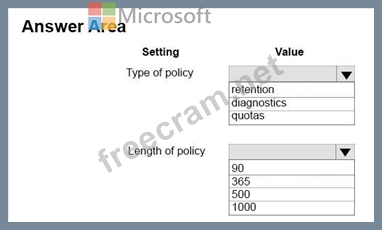
A company uses Azure to host virtual machines (VMs) and web apps.
Storage Analytics data for the web apps must be kept as long as possible. The solution must not result in additional costs.
You need to configure a storage policy for the analytics data.
How should you configure the policy? To answer, select the appropriate options in the answer area.
NOTE: Each correct selection is worth one point.
Hot Area:
Correct Answer:
Explanation/Reference:
Explanation:
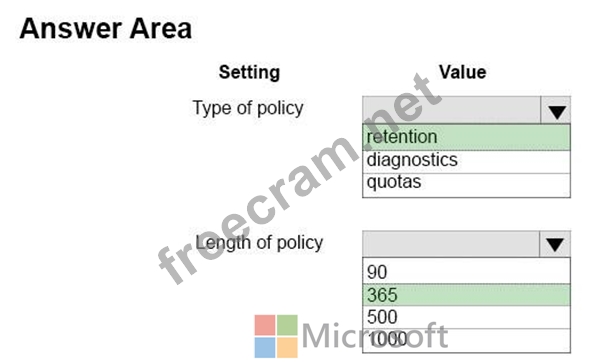
Box 1: retention
There are two ways to delete Storage Analytics data: by manually making deletion requests or by setting a data retention policy. Manual requests to delete Storage Analytics data are billable, but delete requests resulting from a retention policy are not billable.
To avoid unnecessary charges, set a retention policy for logging and metrics.
Note: By default, Storage Analytics will not delete any logging or metrics data. Blobs and table entities will continue to be written until the shared 20TB limit is reached. Once the 20TB limit is reached, Storage Analytics will stop writing new data and will not resume until free space is available.
Box 2: 365
You can configure two data retention policies: one for logging and one for metrics. When enabled for both, Storage Analytics will delete logs and table entries older than the specified number of days. The maximum retention period is 365 days (1 year).
References: https://docs.microsoft.com/en-us/rest/api/storageservices/Setting-a-Storage-Analytics-Data- Retention-Policy


- Question List (200q)
- Question 1: HOTSPOT You deploy an ASP.NET application to an Azure Cloud ...
- Question 2: DRAG DROP You manage an application hosted on cloud services...
- Question 3: DRAG DROP Your company has a main office and several branch ...
- Question 4: HOTSPOT You manage an Azure environment that has 12 virtual ...
- Question 5: HOTSPOT You administer an Azure Active Directory (Azure AD) ...
- Question 6: For development purposes, you deploy several virtual machine...
- Question 7: You are the architect for a software company that provides a...
- Question 8: You manage an on-premises monitoring platform. You plan to d...
- Question 9: DRAG DROP You have an Azure Virtual Network named fabVNet wi...
- Question 10: DRAG DROP You have a runbook in Azure that evaluates the vir...
- Question 11: You manage Azure Web Apps for a company. You migrate an on-p...
- Question 12: HOTSPOT You plan to implement Azure Backup with virtual mach...
- Question 13: You manage a cloud service that supports features hosted by ...
- Question 14: An application uses Windows Azure Table storage. The applica...
- Question 15: You are the administrator for your company's virtual environ...
- Question 16: You create an Azure Recovery Services vault and download the...
- Question 17: You have an Azure subscription that has five virtual machine...
- Question 18: HOTSPOT You are an Azure subscription administrator for your...
- Question 19: You administer an Azure Active Directory (Azure AD) tenant t...
- Question 20: Note: This question is part of a series of questions that pr...
- Question 21: HOTSPOT Your company network has two branch offices. Some em...
- Question 22: You manage an application running on Azure web apps in a Sta...
- Question 23: A company uses Azure to host virtual machines (VMs) and web ...
- Question 24: You manage an application deployed to virtual machines (VMs)...
- Question 25: You purchase an Azure subscription. You plan to deploy an ap...
- Question 26: You are developing a REST API service that provides data abo...
- Question 27: HOTSPOT You have an Azure Web App that uses the URL contoso....
- Question 28: HOTSPOT You plan to deploy an Azure SQL Database instance. A...
- Question 29: DRAG DROP You manage a solution deployed in two Azure subscr...
- Question 30: You manage a collection of large video files that is stored ...
- Question 31: A company is developing a new on-premises desktop applicatio...
- Question 32: DRAG DROP You manage virtual machines (VMs) that have been d...
- Question 33: Note: This question is part of a series of questions that pr...
- Question 34: Your company has a subscription to Azure. You plan to deploy...
- Question 35: HOTSPOT You plan to deploy Ubuntu Linux virtual machines (VM...
- Question 36: DRAG DROP You plan to create an Azure virtual machine (VM) t...
- Question 37: You are designing a Windows Azure application. The applicati...
- Question 38: Note: This question is part of a series of questions that pr...
- Question 39: You manage the on-premises and cloud network for a company. ...
- Question 40: Note: This question is part of a series of questions that pr...
- Question 41: Your company has a subscription to Azure. You configure your...
- Question 42: DRAG DROP Your company network includes a single forest with...
- Question 43: You administer an Azure Storage account named contosostorage...
- Question 44: You manage a cloud service that is running in two small inst...
- Question 45: You manage an Azure subscription with virtual machines (VMs)...
- Question 46: DRAG DROP Your development team has created a new solution t...
- Question 47: You administer an Azure subscription for your company. You h...
- Question 48: DRAG DROP You have a virtual network and virtual machines th...
- Question 49: You manage an Azure web app in standard service tier at the ...
- Question 50: Your network includes a legacy application named LegacyApp1....
- Question 51: DRAG DROP Fourth Coffee has an on-premises, multiple-forest ...
- Question 52: You deploy several virtual machines (VMs) to Azure by using ...
- Question 53: You are evaluating a Windows Azure application. The applicat...
- Question 54: Note: This question is part of a series of questions that pr...
- Question 55: A Windows Azure application stores data in a SQL Azure datab...
- Question 56: Your company has two cloud services named CS01 and CS02. You...
- Question 57: HOTSPOT You create a virtual network named fabVNet01. You de...
- Question 58: Your company has recently signed up for Azure. You plan to r...
- Question 59: HOTSPOT You manage two websites for your company. The sites ...
- Question 60: HOTSPOT You have an Azure subscription that contains two Azu...
- Question 61: You have an Azure subscription. You create an Azure Active D...
- Question 62: HOTSPOT You manage an Azure Web Site for a consumer-product ...
- Question 63: HOTSPOT You federate your on-premises Active Directory with ...
- Question 64: You deploy an Azure Web App named ContosoApp. ContosoApp run...
- Question 65: You are designing a Windows Azure application that will use ...
- Question 66: You manage a large datacenter that has limited physical spac...
- Question 67: You administer an Azure subscription with an existing cloud ...
- Question 68: You administer an Azure Web Site named contosoweb that is us...
- Question 69: DRAG DROP You manage a web application that currently uses a...
- Question 70: You administer a solution deployed to a virtual machine (VM)...
- Question 71: You have an Azure subscription that contains a backup vault ...
- Question 72: You manage a web application published to Azure Cloud Servic...
- Question 73: A company uses Azure to host virtual machines (VMs) and web ...
- Question 74: You deploy an Azure web app named contosoApp. ContosoApp is ...
- Question 75: You manage a cloud service that utilizes an Azure Service Bu...
- Question 76: HOTSPOT You manage an Azure Web Site named contosoweb. Some ...
- Question 77: Your company plans to migrate from On-Premises Exchange to O...
- Question 78: HOTSPOT You plan to use Azure Resource Manager (ARM) templat...
- Question 79: You are the administrator for three Azure subscriptions name...
- Question 80: DRAG DROP You plan to deploy a cloud service named contosoap...
- Question 81: DRAG DROP An organization has several web applications and u...
- Question 82: HOTSPOT You are the administrator for your company's Azure e...
- Question 83: HOTSPOT You are developing an Azure App Service. You must im...
- Question 84: Note: This question is part of a series of questions that pr...
- Question 85: DRAG DROP You have a solution deployed into a virtual networ...
- Question 86: DRAG DROP You have an application that uses an Azure SQL Dat...
- Question 87: HOTSPOT You manage an Internet Information Services (IIS) 6 ...
- Question 88: DRAG DROP You administer an Azure Web Site named WebProd tha...
- Question 89: DRAG DROP Your company manages several Azure Web Apps that a...
- Question 90: You manage a cloud service that has a web role named fabWeb....
- Question 91: DRAG DROP You manage an Azure Web Site named salessite1. You...
- Question 92: Your company has an Azure subscription. You plan to deploy 1...
- Question 93: HOTSPOT You manage a public-facing web application which all...
- Question 94: DRAG DROP Your company is implementing an Intrusion Detectio...
- Question 95: DRAG DROP You administer an Azure Virtual Machine (VM) named...
- Question 96: Your company network has two physical locations configured i...
- Question 97: DRAG DROP You have an Azure Subscription. You have an on-pre...
- Question 98: HOTSPOT A company is using Azure to host virtual machines (V...
- Question 99: DRAG DROP You are managing an Azure SQL Database. You need t...
- Question 100: DRAG DROP You manage two solutions in separate Azure subscri...
- Question 101: Note: This question is part of a series of questions that pr...
- Question 102: DRAG DROP You plan to deploy a cloud service named contosoap...
- Question 103: You are migrating a local virtual machine (VM) to an Azure V...
- Question 104: Your network environment includes remote employees. You need...
- Question 105: You have an Azure subscription. You create an Azure Active D...
- Question 106: You manage a cloud service that hosts a customer-facing appl...
- Question 107: You are designing a Windows Azure application that will use ...
- Question 108: DRAG DROP You manage an Azure Web Site in Standard mode at t...
- Question 109: You are the global administrator for a company's Azure subsc...
- Question 110: You manage a software-as-a-service application named SaasApp...
- Question 111: You are an administrator of the Azure subscription for your ...
- Question 112: A company uses Azure to host virtual machines (VMs) and web ...
- Question 113: You plan to use Azure Monitor with AutoScale Services. You c...
- Question 114: You are an administrator of an Azure subscription for your c...
- Question 115: You are developing a Windows Azure application in which a we...
- Question 116: You manage an Azure Web Site named contosoweb. Logging is en...
- Question 117: You are designing a Windows Azure application that will stor...
- Question 118: DRAG DROP You are administrator for your company's Azure sub...
- Question 119: You develop a Windows Store application that has a web servi...
- Question 120: DRAG DROP You manage an Azure virtual machine (VM) named App...
- Question 121: DRAG DROP You administer a virtual machine (VM) that is depl...
- Question 122: You are designing a Windows Azure web application. The appli...
- Question 123: You administer an Azure virtual network named fabrikamVNet. ...
- Question 124: You administer an Azure SQL Database that runs in the S0 ser...
- Question 125: You are designing an application that will use Windows Azure...
- Question 126: You manage a set of virtual machines (VMs) deployed to the c...
- Question 127: A company has an existing on-premises Active Directory envir...
- Question 128: DRAG DROP You are the administrator for your company's virtu...
- Question 129: HOTSPOT A company uses Azure to host virtual machines (VMs) ...
- Question 130: HOTSPOT You have a virtual machine (VM) that must be secured...
- Question 131: DRAG DROP You are the server administrator for several on-pr...
- Question 132: You have an Azure subscription. In Azure, you create two vir...
- Question 133: You administer an Azure solution that uses a virtual network...
- Question 134: You manage an Azure virtual network that hosts 15 virtual ma...
- Question 135: You plan to use Password Sync on your DirSync Server with Az...
- Question 136: You manage a cloud service named fabrikamReports that is dep...
- Question 137: You manage an Azure virtual network that hosts 15 virtual ma...
- Question 138: You administer an Azure Active Directory (Azure AD) tenant t...
- Question 139: You have an Azure subscription. You create an Azure Active D...
- Question 140: HOTSPOT You plan to deploy Azure SQL Database instances name...
- Question 141: You are the Azure administrator for your company. The compan...
- Question 142: You host an application on an Azure virtual machine (VM) tha...
- Question 143: A company deploys Microsoft SQL Server on an Azure Standard_...
- Question 144: Your company has two physical locations configured in a geo-...
- Question 145: You have an Azure subscription that has a virtual machine na...
- Question 146: DRAG DROP You manage an Azure Web App named contososite. You...
- Question 147: HOTSPOT You manage two cloud services named Service1 and Ser...
- Question 148: Note: This question is part of a series of questions that pr...
- Question 149: You have an Azure subscription. In Azure, you create two vir...
- Question 150: Your company plans to migrate from On-Premises Exchange to E...
- Question 151: DRAG DROP You create a Push Notification service by using an...
- Question 152: You manage Azure Web Apps for a company. You migrate an on-p...
- Question 153: HOTSPOT You manage a public-facing web application which all...
- Question 154: HOTSPOT You manage a web application named Contoso that is a...
- Question 155: DRAG DROP You publish a multi-tenant application named MyApp...
- Question 156: You have an Azure subscription that contains a storage accou...
- Question 157: DRAG DROP You plan to deploy a new public-facing website on ...
- Question 158: You manage a virtual Windows Server 2012 web server that is ...
- Question 159: DRAG DROP You create a virtual machine (VM) in Azure. The VM...
- Question 160: You administer a Windows Server virtual machine (VM). You up...
- Question 161: You administer an Azure virtual network named fabrikamVNet. ...
- Question 162: DRAG DROP You manage an Azure Web App. You need to move the ...
- Question 163: You administer a DirSync server configured with Azure Active...
- Question 164: You manage an Azure Active Directory (AD) tenant You plan to...
- Question 165: HOTSPOT A company uses Azure to host virtual machines (VMs) ...
- Question 166: DRAG DROP You have an Azure Virtual Network named fabVNet wi...
- Question 167: DRAG DROP You manage an Azure virtual network environment fo...
- Question 168: Your company network includes an On-Premises Windows Active ...
- Question 169: HOTSPOT You have an Azure SQL Database named Contosodb. Cont...
- Question 170: Note: This question is part of a series of questions that pr...
- Question 171: HOTSPOT You have two on-premises networks. You need to conne...
- Question 172: You manage a cloud service that has a web application named ...
- Question 173: A Windows Azure application retrieves data from SQL Azure. Y...
- Question 174: You deploy a web application to an Azure Cloud Service. The ...
- Question 175: You administer an Azure Web Site named contoso. The developm...
- Question 176: HOTSPOT You manage an Azure subscription. You develop a stor...
- Question 177: You manage a cloud service that utilizes data encryption. Yo...
- Question 178: You administer a set of virtual machine (VM) guests hosted i...
- Question 179: You manage two datacenters in different geographic regions a...
- Question 180: HOTSPOT You are the Azure administrator for Contoso Ltd. You...
- Question 181: HOTSPOT You have an application that uses three separate dat...
- Question 182: HOTSPOT You are configuring auto-scaling for a virtual machi...
- Question 183: You publish an application named MyApp to Azure Active Direc...
- Question 184: Note: This question is part of a series of questions that pr...
- Question 185: DRAG DROP You administer an Azure Web Site named contosoweb ...
- Question 186: A company has an Azure subscription with four virtual machin...
- Question 187: DRAG DROP You administer two virtual machines (VMs) that are...
- Question 188: You administer a virtual machine (VM) that is deployed to Az...
- Question 189: DRAG DROP You manage an Azure Web App named contososite. You...
- Question 190: You are the administrator for your company's Azure subscript...
- Question 191: You administer an Azure Active Directory (Azure AD) tenant w...
- Question 192: You have an application that needs to use single sign-on (SS...
- Question 193: You administer a Microsoft Azure SQL Database data base in t...
- Question 194: You are deploying an ASP.NET application to an Azure virtual...
- Question 195: DRAG DROP You have a virtual machine (VM) that runs in Azure...
- Question 196: HOTSPOT You deploy a Web App to Azure. The Web App uses seve...
- Question 197: You have an application that uses SQL Server in an Azure vir...
- Question 198: Your company network includes two branch offices. Users at t...
- Question 199: DRAG DROP You administer an Azure Virtual Machine (VM) named...
- Question 200: DRAG DROP You plan to deploy an application by using three A...
