- Home
- Microsoft
- Developing ASP.NET MVC 4 Web Applications
- Microsoft.70-486.v2018-07-09.q108
- Question 12
Valid 70-486 Dumps shared by EduDump.com for Helping Passing 70-486 Exam! EduDump.com now offer the newest 70-486 exam dumps, the EduDump.com 70-486 exam questions have been updated and answers have been corrected get the newest EduDump.com 70-486 dumps with Test Engine here:
Access 70-486 Dumps Premium Version
(230 Q&As Dumps, 35%OFF Special Discount Code: freecram)
<< Prev Question Next Question >>
Question 12/108
HOTSPOT
You develop an ASP.NET MVC application. The application includes a feature that allows users to reset their passwords. The feature is enabled by a ForgotPassword controller method and a corresponding Razor view.
You need to prevent Cross-Site Request Forgery (CSRF) attacks.
How should you complete the relevant code? To answer, select the appropriate code segment from each list in the answer area.
Hot Area:
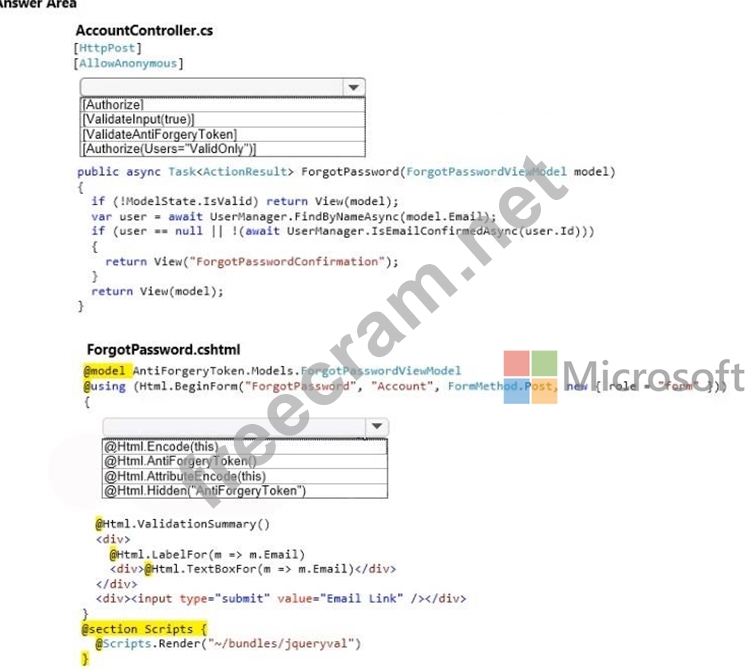
You develop an ASP.NET MVC application. The application includes a feature that allows users to reset their passwords. The feature is enabled by a ForgotPassword controller method and a corresponding Razor view.
You need to prevent Cross-Site Request Forgery (CSRF) attacks.
How should you complete the relevant code? To answer, select the appropriate code segment from each list in the answer area.
Hot Area:
Correct Answer:
Explanation/Reference:
Explanation:
Example:
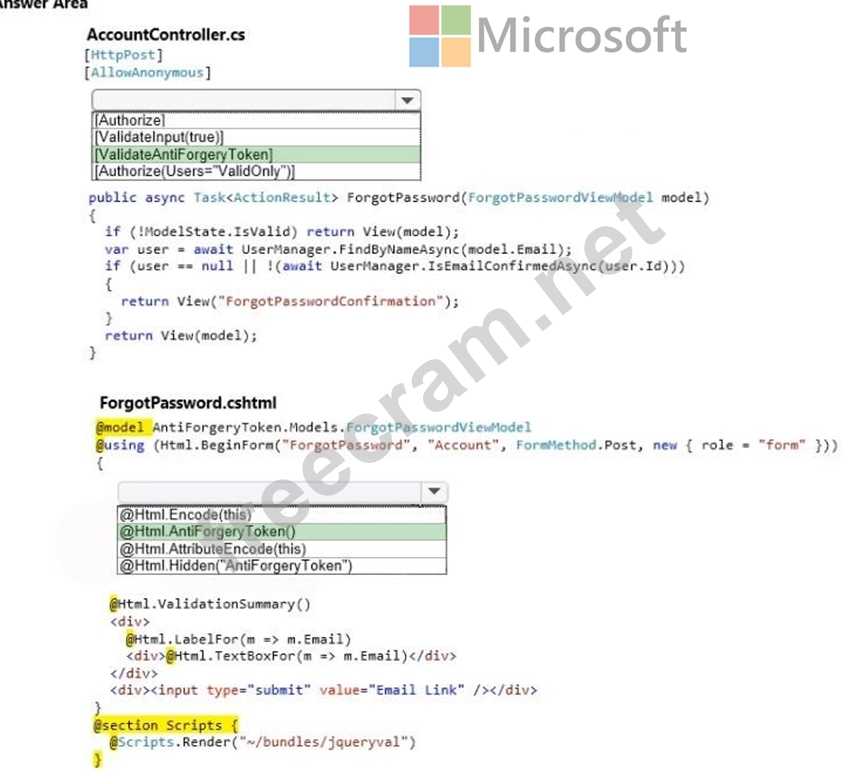
* At the top of the action that we createdto handle the posted form, the one with the [HttpPost] attribute added, we'll add another attribute named [ValidateAntiForgeryToken]. This makes the start of our action now look like the following:
[HttpPost]
[ValidateAntiForgeryToken]
public ActionResult ChangeEmail(ChangeEmailModel model)
{
string username = WebSecurity.CurrentUserName;
*rest of function omitted*
* we must add the unique token to the form to change the user's email when we display it. Update the form in the ChangeEmail.aspx view under /Account/ChangeForm:
<% using(Html.BeginForm()) { %>
<%: Html.AntiForgeryToken() %>
<%: Html.TextBoxFor(t=>t.NewEmail) %>
<input type="submit" value="Change Email" />
<% } %>


- Question List (108q)
- Question 1: You are developing an ASP.NET MVC web application for viewin...
- 1 commentQuestion 2: Note: This question is part of a series of questions that pr...
- Question 3: HOTSPOT You are building an ASP.NET MVC web application. The...
- Question 4: You are developing an ASP.NET MVC application that enables y...
- Question 5: DRAG DROP You are developing an ASP.NET MVC application in V...
- Question 6: You are developing an ASP.NET MVC application that uses form...
- Question 7: You are developing an application that uses many small image...
- Question 8: You are developing an ASP.NET MVC application that uses form...
- Question 9: You are developing an ASP.NET MVC application that delivers ...
- Question 10: You are maintaining an ASP.NET MVC application that runs on ...
- Question 11: DRAG DROP You are developing an ASP.NET web application that...
- Question 12: HOTSPOT You develop an ASP.NET MVC application. The applicat...
- Question 13: You are developing an ASP.NET MVC application. The applicati...
- Question 14: You are developing an ASP.NET MVC application to be used on ...
- Question 15: You are developing an ASP.NET MVC application that provides ...
- Question 16: You are developing an ASP.NET MVC application that uses form...
- Question 17: You are developing an Azure worker role. You enable crash du...
- Question 18: You are designing an MVC web application. The view must be a...
- Question 19: DRAG DROP You need to ensure that URLs for log manipulation ...
- Question 20: You are implementing a website redesign of an existing websi...
- Question 21: HOTSPOT You are preparing to test an ASP.NET application. Th...
- Question 22: You are designing a localized ASP.NET MVC online shopping ap...
- Question 23: HOTSPOT You are developing an ASP.NET MVC application to dis...
- Question 24: HOTSPOT You are developing an ASP.NET MVC 4 application that...
- Question 25: You develop an ASP.NET MVC application. The application has ...
- Question 26: You are developing an ASP.NET MVC application that uses form...
- Question 27: You are developing an ASP.NET MVC application. Devices that ...
- Question 28: DRAG DROP You are developing an ASP.NET MVC application. You...
- Question 29: Note: This question is part of a series of questions that pr...
- Question 30: You define a startup task in the ServiceDefinition.csdef fil...
- Question 31: You deploy an ASP.NET MVC Web application to Internet Inform...
- Question 32: DRAG DROP You are developing an ASP.NET MVC application that...
- Question 33: You are developing an ASP.NET application that runs on Windo...
- Question 34: HOTSPOT You are developing an ASP.NET MVC application. The a...
- Question 35: Note: This question is part of a series of questions that pr...
- Question 36: You are developing an application that uses many small image...
- Question 37: You are designing an enterprise-level Windows Communication ...
- Question 38: DRAG DROP You are developing an ASP.NET MVC application. The...
- Question 39: DRAG DROP You are designed a hybrid application that runs ac...
- Question 40: HOTSPOT You are developing an ASP.NET Core MVC web applicati...
- Question 41: You are developing an ASP.NET MVC application in Visual Stud...
- Question 42: DRAG DROP You deploy an ASP.NET MVC e-commerce application t...
- Question 43: You are designing an HTML5 website. You need to design the i...
- Question 44: You are developing an ASP.NET MVC application that will run ...
- Question 45: DRAG DROP You are developing an ASP.NET MVC application that...
- Question 46: You are developing an application that supports multiple cul...
- Question 47: You are designing a distributed application. The application...
- Question 48: You are developing an ASP.NET MVC application. The applicati...
- Question 49: DRAG DROP You are building an ASP.NET application for a purc...
- Question 50: You are designing a distributed banking application that han...
- Question 51: Note: This question is part of a series of questions that pr...
- Question 52: HOTSPOT You are developing an ASP.NET MVC application. The l...
- Question 53: HOTSPOT You are developing an ASP.NET MVC 4 application. You...
- Question 54: HOTSPOT You are developing an ASP.NET MVC application that w...
- Question 55: You are developing an ASP.NET MVC application that uses form...
- Question 56: You are developing an ASP.NET MVC application by using Visua...
- Question 57: HOTSPOT You develop an ASP.NET MVC application that includes...
- Question 58: You are preparing for the deployment of an ASP.NET MVC appli...
- Question 59: HOTSPOT You are developing an ASP.NET MVC application. You n...
- Question 60: You are designing a distributed application. The application...
- Question 61: The application includes the following method. (Line numbers...
- Question 62: You are developing an ASP.NET MVC application that uses form...
- Question 63: You are developing an ASP.NET MVC application. The applicati...
- Question 64: DRAG DROP You are developing an ASP.NET MVC application in a...
- Question 65: HOTSPOT You are developing an ASP.NET MVC application. You n...
- Question 66: You are designing a localized ASP.NET application to support...
- Question 67: DRAG DROP You are developing an ASP.NET MVC application in V...
- Question 68: You are developing an ASP.NET application. You need to minim...
- Question 69: You are developing an ASP.NET MVC application. The applicati...
- Question 70: You create an ASP.NET MVC application. You host the applicat...
- Question 71: HOTSPOT You are developing an ASP.NET MVC application. Befor...
- Question 72: You need to enable client-side validation for an ASP.NET MVC...
- Question 73: You are designing a distributed application. The application...
- Question 74: DRAG DROP You are developing an ASP.NET MVC application. You...
- Question 75: Note: This question is part of a series of questions that pr...
- Question 76: You are implementing a website redesign of an existing websi...
- Question 77: DRAG DROP You are developing an ASP.NET MVC web application....
- Question 78: DRAG DROP You are developing an ASP.NET MVC web application ...
- Question 79: DRAG DROP You need to ensure that the transcode.exe utility ...
- Question 80: DRAG DROP You are developing an ASP.NET MVC application in V...
- Question 81: Note: This question is part of a series of questions that pr...
- Question 82: You are building an ASP.NET web application. You must test t...
- Question 83: You are developing an ASP.NET MVC application that will be d...
- Question 84: You develop an ASP.NET MVC application. The application is c...
- Question 85: You are designing an enterprise-level Windows Communication ...
- Question 86: DRAG DROP You are developing an ASP.NET MVC application in V...
- Question 87: DRAG DROP You are developing an ASP.NET MVC application. You...
- Question 88: You are developing an ASP.NET MVC web application that inclu...
- Question 89: You are developing an ASP.NET MVC application that will be d...
- Question 90: You are developing an ASP.NET MVC application to be used on ...
- Question 91: You are developing a controller for an ASP.NET MVC applicati...
- Question 92: You are developing an ASP.NET MVC application. You need to a...
- 1 commentQuestion 93: DRAG DROP You develop an ASP.NET MVC application. You plan t...
- Question 94: Customers download videos by using HTTP clients that support...
- Question 95: HOTSPOT You are building an ASP.NET application. You develop...
- Question 96: You are developing an ASP.NET Core MVC web application that ...
- Question 97: HOTSPOT You are developing an ASP.NET MVC web application th...
- Question 98: HOTSPOT You maintain an ASP.NET MVC application. Errors are ...
- Question 99: You are developing an ASP.NET MVC application that will be d...
- Question 100: HOTSPOT You are using the features of the IIS SEO Toolkit to...
- Question 101: You are designing a data-oriented application that features ...
- Question 102: You are developing a controller for an ASP.NET MVC applicati...
- Question 103: You develop an ASP.NET MVC application. The application has ...
- Question 104: DRAG DROP You are developing an ASP.NET MVC application in a...
- Question 105: You are developing an ASP.NET MVC application that will run ...
- Question 106: DRAG DROP You plan a new ASP. NET MVC application. The appli...
- Question 107: You develop an ASP.NET MVC application. The application incl...
- Question 108: You are developing an ASP.NET MVC application. The applicati...
