- Home
- Microsoft
- Configuring Advanced Windows Server 2012 Services
- Microsoft.70-412.v2019-06-04.q270
- Question 5
Valid 70-412 Dumps shared by EduDump.com for Helping Passing 70-412 Exam! EduDump.com now offer the newest 70-412 exam dumps, the EduDump.com 70-412 exam questions have been updated and answers have been corrected get the newest EduDump.com 70-412 dumps with Test Engine here:
Access 70-412 Dumps Premium Version
(455 Q&As Dumps, 35%OFF Special Discount Code: freecram)
<< Prev Question Next Question >>
Question 5/270
You have a server named Server1 that runs Windows Server 2012 R2. Server1 is located in the perimeter network and has the DNS Server server role installed.
Server1 has a zone named contoso.com.
You App1y a security template to Server1.
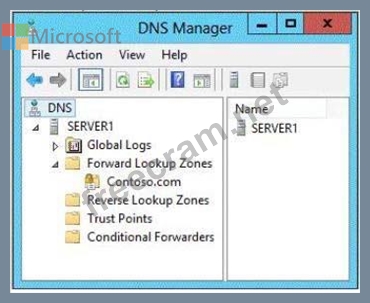
After you App1y the template, users report that they can no longer resolve names from contoso.com. On Server1, you open DNS Manager as shown in the DNS exhibit. (Click the Exhibit button.)
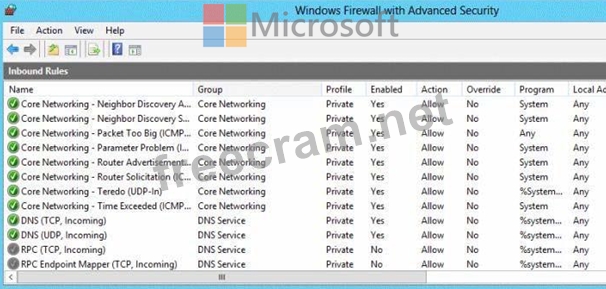
On Server1, you open Windows Firewall with Advanced Security as shown in the Firewall exhibit.
(Click the Exhibit button.)
You need to ensure that users can resolve contoso.com names.
What should you do?
Server1 has a zone named contoso.com.
You App1y a security template to Server1.
After you App1y the template, users report that they can no longer resolve names from contoso.com. On Server1, you open DNS Manager as shown in the DNS exhibit. (Click the Exhibit button.)
On Server1, you open Windows Firewall with Advanced Security as shown in the Firewall exhibit.
(Click the Exhibit button.)
You need to ensure that users can resolve contoso.com names.
What should you do?
Correct Answer: E
Explanation/Reference:
Explanation:
To configure Windows Firewall on a managed DNS server
On the Server Manager menu, click Tools and then click Windows Firewall with Advanced Security.

Right-click Inbound Rules, and then click New Rule. The New Inbound Rule Wizard will launch.
In Rule Type, select Predefined, choose DNS Service from the list, and then click Next.
In Predefined Rules, under Rules, select the checkboxes next to the following rules:
- RPC (TCP, Incoming)
- DNS (UDP, Incoming)
- DNS (TCP, Incoming)
- RPC Endpoint Mapper (TCP, Incoming)
Click Next, choose Allow the connection, and then click Finish.
Right-click Inbound Rules, and then click New Rule. The New Inbound Rule Wizard will launch.
etc.
Reference: Manually Configure DNS Access Settings
Explanation:
To configure Windows Firewall on a managed DNS server
On the Server Manager menu, click Tools and then click Windows Firewall with Advanced Security.
Right-click Inbound Rules, and then click New Rule. The New Inbound Rule Wizard will launch.
In Rule Type, select Predefined, choose DNS Service from the list, and then click Next.
In Predefined Rules, under Rules, select the checkboxes next to the following rules:
- RPC (TCP, Incoming)
- DNS (UDP, Incoming)
- DNS (TCP, Incoming)
- RPC Endpoint Mapper (TCP, Incoming)
Click Next, choose Allow the connection, and then click Finish.
Right-click Inbound Rules, and then click New Rule. The New Inbound Rule Wizard will launch.
etc.
Reference: Manually Configure DNS Access Settings


- Question List (270q)
- Question 1: Your network contains an Active Directory domain named conto...
- Question 2: You are employed as a network administrator at ABC.com. ABC....
- Question 3: Your network contains an Active Directory forest. The forest...
- Question 4: You have a server named Server 1 that runs Windows Server 20...
- Question 5: You have a server named Server1 that runs Windows Server 201...
- Question 6: Note: This question is part of series of questions that use ...
- Question 7: Your network contains an Active Directory forest named conto...
- Question 8: Your network contains one Active Directory forest named adat...
- Question 9: Your network contains an Active Directory domain named conto...
- Question 10: Your network contains an Active Directory domain named conto...
- Question 11: You have a server named Server1 that runs Windows Server 201...
- Question 12: Your network contains an Active Directory domain named conto...
- Question 13: Your network contains an Active Directory domain named conto...
- Question 14: You have a server named Server1. A Microsoft Azure Backup of...
- Question 15: Your network contains one Active Directory domain. The domai...
- Question 16: You have a server named DC2 that runs Windows Server 2012 R2...
- Question 17: Which of the following services would you restart on a domai...
- Question 18: You have a server named Server1 that runs Windows Server 201...
- Question 19: Your network contains an Active Directory forest named conto...
- Question 20: You have a server named Server1 that runs Windows Server 201...
- Question 21: You have a server named Server1 that runs Windows Server 201...
- Question 22: Your network contains an Active Directory domain named conto...
- Question 23: You have a server named Server1 that runs Windows Server 201...
- Question 24: Your network contains two servers named Server1 and Server2 ...
- Question 25: Your network contains an Active Directory domain named conto...
- Question 26: Your network contains an active directory domain named Conto...
- Question 27: Your network contains an Active Directory domain named conto...
- Question 28: Your network contains an Active Directory domain named conto...
- Question 29: Your network contains an Active Directory domain named conto...
- Question 30: Your network contains two Active Directory forests named con...
- Question 31: Your network contains an Active Directory domain named conto...
- Question 32: Your network contains one Active Directory domain named cont...
- Question 33: You have two Hyper-V hosts named Host1 and Host2 that run Wi...
- Question 34: Your network contains two servers named Server1 and Server2 ...
- Question 35: Your network contains an Active Directory forest. The forest...
- Question 36: Your network contains one Active Directory domain named cont...
- Question 37: Your network contains a perimeter network and an internal ne...
- Question 38: There are 42 domains in the tailspintoys.com forest. Users i...
- Question 39: Your network contains an Active Directory domain. The domain...
- Question 40: You need to verify whether a DNS response from a DNS server ...
- Question 41: Your network contains 20 iSCSI storage appliances that will ...
- Question 42: Your network contains an Active Directory domain named conto...
- Question 43: You are employed as a network administrator at contoso.com. ...
- Question 44: You have an enterprise certification authority (CA) named CA...
- Question 45: Your network contains one Active Directory domain named cont...
- Question 46: Your network contains an Active Directory domain named conto...
- Question 47: You have a server named Server1 that runs Windows Server 201...
- Question 48: Your network contains two Web servers named Server1 and Serv...
- Question 49: Your network contains an Active Directory forest named adatu...
- Question 50: Your network contains an Active Directory domain named conto...
- Question 51: You have a server named Server1 that runs Windows Server 201...
- Question 52: Your network contains an Active Directory domain named conto...
- Question 53: Your network contains two Active Directory forests named con...
- Question 54: You network contains one Active Directory domain named adatu...
- Question 55: Your network contains an Active Directory domain named conto...
- Question 56: Your network contains an Active Directory domain named conto...
- Question 57: You are employed as a network administrator at contoso.com. ...
- Question 58: Your network contains an Active Directory forest named conto...
- Question 59: Which permission should you assign on a CA to a group of use...
- Question 60: You have a server named Server1 that runs Windows Server 201...
- Question 61: Your network contains an Active Directory forest. The forest...
- Question 62: Your network contains an Active Directory domain named conto...
- Question 63: You have a server named Server1 that runs Windows Server 201...
- Question 64: You are employed as a senior network administrator at contos...
- Question 65: Your network contains two Hyper-V clusters named Cluster1 an...
- Question 66: Your network contains a perimeter network and an internal ne...
- Question 67: You have a server named Server1 that runs Windows Server 201...
- Question 68: Your network contains an Active Directory domain named conto...
- Question 69: You have a server named Server1 that runs Windows Server 201...
- Question 70: You have a DNS server that runs Windows Server 2012 R2. The ...
- Question 71: You have a server named Server1 that runs Windows Server 201...
- Question 72: You have a file server named FS1 that runs Windows Server 8....
- Question 73: Your network contains an Active Directory domain named conto...
- Question 74: Your network contains an Active Directory domain named conto...
- Question 75: Your network contains an Active Directory domain named conto...
- Question 76: You work as an administrator at contoso.com. Contoso.com net...
- Question 77: You configure the nodes to use the port rule shown in the ex...
- Question 78: Your network contains an Active Directory domain named conto...
- Question 79: Your network contains two DNS servers named DNS1 and DNS2 th...
- Question 80: Your network contains an Active Directory domain named conto...
- Question 81: You have a server named Server1 that runs Windows Server 201...
- Question 82: Your network contains an Active Directory forest named conto...
- Question 83: Your network contains three servers named HV1, HV2, and Serv...
- Question 84: Your network contains an Active Directory domain named conto...
- Question 85: You create a new virtual disk in a storage pool by using the...
- Question 86: You have a server named Server1 that has the Active Director...
- Question 87: Your network contains an Active Directory domain named conto...
- Question 88: Your network contains an Active Directory domain named conto...
- Question 89: You have a datacenter that contains six servers. Each server...
- Question 90: Your network contains an Active Directory forest named conto...
- Question 91: Your network contains an Active Directory domain named conto...
- Question 92: Your network contains an Active Directory domain named conto...
- Question 93: You are employed as a senior network administrator at ABC.co...
- Question 94: You have a server named DNS1 that runs Windows Server 2012 R...
- Question 95: You have a server named Server1 that runs Windows Server 201...
- Question 96: Note: This question is part of series of questions that use ...
- Question 97: Your network contains an Active Directory domain named adatu...
- Question 98: Note: This question is part of series of questions that use ...
- Question 99: You have a server named Server1 that runs Windows Server 201...
- Question 100: Your network contains an Active Directory domain named conto...
- Question 101: Your network contains one Active Directory domain named cont...
- Question 102: You have two Windows Server Update Services (WSUS) servers n...
- Question 103: You have a DHCP server named Server1. Server1 has an IP addr...
- Question 104: Your network contains two Active Directory forests named con...
- Question 105: Your network contains an Active Directory forest named conto...
- Question 106: Which of the following must you back up or have a copy of to...
- Question 107: Your network contains two servers named Server1 and Server2 ...
- Question 108: Your network contains one Active Directory domain named cont...
- Question 109: Your network contains two servers named Server1 and Server2....
- Question 110: You are considering adding a child domain to the dandenong.m...
- Question 111: You manage an environment that has many servers. The servers...
- Question 112: Your network contains one Active Directory forest named cont...
- Question 113: You deploy an Active Directory Federation Services (AD FS) i...
- Question 114: Your network contains an Active Directory domain named conto...
- Question 115: Your network contains an Active Directory domain named conto...
- Question 116: Your network contains an Active Directory forest. The forest...
- Question 117: You are employed as a network administrator at ABC.com. ABC....
- Question 118: You have a server named Server1 that runs Windows Server 201...
- Question 119: Your network contains an Active Directory domain named conto...
- Question 120: Your network contains an Active Directory forest. The forest...
- Question 121: Your network contains an Active Directory domain named adatu...
- Question 122: You have two servers named Server1 and server2 that run Wind...
- Question 123: You have a cluster named Cluster1 that contains two nodes. B...
- Question 124: At present, the subnet 192.168.15.0/24 is associated with th...
- Question 125: You have a server named LON-DC1 that runs Windows Server 201...
- Question 126: Your network contains a Hyper-V host named Server1 that host...
- Question 127: You are employed as a network administrator at consoto.com. ...
- Question 128: Your network contains three servers named Server1, Server2, ...
- Question 129: Your network contains an Active Directory domain named conto...
- Question 130: Your company has offices in Montreal, New York, and Amsterda...
- Question 131: You have a DNS server named Server1 that runs Windows Server...
- Question 132: Your network contains an Active Directory domain named conto...
- Question 133: Your network contains an Active Directory domain named conto...
- Question 134: Your network contains an Active Directory domain named conto...
- Question 135: Which of the following is the minimum domain functional leve...
- Question 136: Your network contains an Active Directory forest named adatu...
- Question 137: Your company has a main office and a remote office. The remo...
- Question 138: Your network contains an Active Directory domain named conto...
- Question 139: Your network contains an Active Directory forest. The forest...
- Question 140: You have a file server named Server1 that runs a Server Core...
- Question 141: Your network contains two servers named Server1 and Server 2...
- Question 142: You have 30 servers that run Windows Server 2012 R2. All of ...
- Question 143: Your network contains an Active Directory domain named conto...
- Question 144: You are employed as a network administrator at ABC.com. ABC....
- Question 145: The Wingtip Toys forest hosts a web application that users i...
- Question 146: Your company recently deployed a new Active Directory forest...
- Question 147: Your network contains an Active Directory domain named conto...
- Question 148: You have an enterprise certification authority (CA) named CA...
- Question 149: Your network contains two Active Directory forests named con...
- Question 150: You are employed as a senior network administrator at ABC.co...
- Question 151: You are about to promote a server running the Windows Server...
- Question 152: Your network contains an Active Directory forest named conto...
- Question 153: Your network contains one Active Directory forest named cont...
- Question 154: You want to configure a security relationship by which users...
- Question 155: Your network contains an Active Directory domain named conto...
- Question 156: Your network contains an Active Directory domain named conto...
- Question 157: Your network contains an Active Directory forest. The forest...
- Question 158: You are configuring AD FS. Which server should you deploy on...
- Question 159: Your network contains two servers named Server1 and Server2 ...
- Question 160: You have an Active Directory Rights Management Services (AD ...
- Question 161: You want to enable key archiving on a CA. You need to issue ...
- Question 162: Your network contains an Active Directory domain named conto...
- Question 163: Your network contains an Active Directory domain named adatu...
- Question 164: You have two servers named Server1 and Server2 that run Wind...
- Question 165: Your network contains two Active Directory forests named con...
- Question 166: You have a Hyper-V failover cluster named Cluster1. On Clust...
- Question 167: Your network contains a server named Server1 that runs Windo...
- Question 168: Your network contains an Active Directory domain named conto...
- Question 169: You have a file server named Server1 that runs Windows Serve...
- Question 170: Your network contains an Active Directory domain named conto...
- Question 171: You have a server named File1 that runs Windows Server 2012 ...
- Question 172: Your network contains two servers named HV1 and HV2. Both se...
- Question 173: Your network contains an Active Directory domain named conto...
- Question 174: Your network contains an Active Directory domain named conto...
- Question 175: You have configured a forest trust relationship between the ...
- Question 176: Your network contains an Active Directory domain named conto...
- Question 177: You have a file server named Server1 that runs a Server Core...
- Question 178: You have a server named File1 that runs Windows Server 2012 ...
- Question 179: Your network contains two Active Directory forests named con...
- Question 180: Your network contains an Active Directory domain named conto...
- Question 181: Your network contains an Active Directory domain named conto...
- Question 182: Your network contains one Active Directory forest named cont...
- Question 183: You are employed as a senior network administrator at ABC.co...
- Question 184: The root domain of the Adatum forest is Adatum.local. The co...
- Question 185: You have moved several domain controllers out of your organi...
- Question 186: Your network contains an Active Directory domain named adatu...
- Question 187: Your network contains an Active Directory domain named adatu...
- Question 188: You have a server named Server1 that runs Windows Server 201...
- Question 189: Your network contains an Active Directory forest named adatu...
- Question 190: Your network contains one Active Directory domain named cont...
- Question 191: Your network contains an Active Directory domain named conto...
- Question 192: You have a cluster named Cluster1 that contains two nodes. B...
- Question 193: You have a server named Server1 that runs Windows Server 201...
- Question 194: Your network contains an Active Directory domain named conto...
- Question 195: Your network contains an Active Directory domain named conto...
- Question 196: Which group policy item should you configure to enable autom...
- Question 197: Your network contains an Active Directory domain named conto...
- Question 198: Your network contains an Active Directory domain named conto...
- Question 199: Your network contains an Active Directory domain named conto...
- Question 200: Your company has two offices. The offices are located in Sea...
- Question 201: Your network contains an Active Directory domain named conto...
- Question 202: Note: This question is part of series of questions that use ...
- Question 203: Your network contains an Active Directory domain named conto...
- Question 204: Your network contains an Active Directory domain named conto...
- Question 205: You have a server named FS1 that runs Windows Server 2012 R2...
- Question 206: You are employed as a network administrator at ABC.com. ABC....
- Question 207: Your network contains an Active Directory domain named conto...
- Question 208: Note: This question is part of series of questions that use ...
- Question 209: Your network contains an Active Directory domain. The domain...
- Question 210: Your network contains an Active Directory domain named adatu...
- Question 211: Your network contains an Active Directory domain named conto...
- Question 212: Note: This question is part of series of questions that use ...
- Question 213: Your network contains an Active Directory domain named conto...
- Question 214: Your network contains an Active Directory forest named adatu...
- Question 215: You have a server named Server1 that runs Windows Server 201...
- Question 216: You need to ensure that clients will check at least every 30...
- Question 217: Your network contains an Active Directory domain named conto...
- Question 218: Your network contains two servers named Server1 and Server2 ...
- Question 219: Your network contains an Active Directory domain named adatu...
- Question 220: You have a server named Server1 that runs Windows Server 201...
- Question 221: You are employee as a network administrator at abc.com. ABC....
- Question 222: Your network contains an Active Directory domain named conto...
- Question 223: Your network contains an Active Directory domain named conto...
- Question 224: Your network contains an Active Directory domain named conto...
- Question 225: A user named User1 is a member of the local Administrators g...
- Question 226: Which security groups must a user account be a member of to ...
- Question 227: Note: This question is part of series of questions that use ...
- Question 228: You have a Hyper-V host named Server1 that runs Windows Serv...
- Question 229: Your company recently deployed a new Active Directory forest...
- Question 230: You perform a full installation of Windows Server 2012 R2 on...
- Question 231: You have a server named Server1 that runs Windows Server 201...
- Question 232: You have a server named Server1 that runs Windows Server 201...
- Question 233: Your organization is deploying a second Active Directory for...
- Question 234: Your network contains an Active Directory domain named adatu...
- Question 235: Your network contains two Active Directory forests named con...
- Question 236: You have a server named Server1 that runs a Server Core Inst...
- Question 237: You have two Hyper -V hosts named Server1 and Server2 that r...
- Question 238: You have DHCP server named Server1 that runs Windows Server ...
- Question 239: Your network contains an Active Directory domain named conto...
- Question 240: Which of the following authentication types must you enable ...
- Question 241: You have a server named Server1 that runs Windows Server 201...
- Question 242: You are employed as a network administrator at ABC.com. ABC....
- Question 243: Your network contains an Active Directory domain named conto...
- Question 244: You have a group Managed Service Account named Service01. Th...
- Question 245: Your network contains an Active directory forest named conto...
- Question 246: Which of the following CA types must be deployed on domain-j...
- Question 247: Your company has a main office and a branch office. The main...
- Question 248: Your network contains an Active Directory domain named conto...
- Question 249: Your network contains an Active Directory domain named adatu...
- Question 250: Your network contains an Active Directory forest named conto...
- Question 251: Your network contains an Active Directory domain named conto...
- Question 252: Your network contains an Active Directory domain named conto...
- Question 253: Your network contains two Active Directory forests named con...
- Question 254: Your network contains two Active Directory forests named con...
- Question 255: You are employed as a network administrator ABC.com. ABC.com...
- Question 256: You are employed as a senior network administrator at contos...
- Question 257: Your network contains an Active Directory domain named conto...
- Question 258: You have a server named Server1 that runs Windows Server 201...
- Question 259: You have a virtual machine named VM1 that runs on a host nam...
- Question 260: You are configuring secondary links for the connections betw...
- Question 261: Your network contains an Active Directory domain named conto...
- Question 262: Note: This question is part of series of questions that use ...
- Question 263: Your network contains an Active Directory domain named conto...
- Question 264: Your network contains one Active Directory domain named cont...
- Question 265: Your network contains two servers that run Windows Server 20...
- Question 266: Your network contains one Active Directory domain named cont...
- Question 267: Your network contains an Active Directory domain named adatu...
- Question 268: Your network contains an Active Directory domain named conto...
- Question 269: Your network contains an Active Directory forest named conto...
- Question 270: Your network contains an Active Directory domain named conto...
