Valid 70-411 Dumps shared by EduDump.com for Helping Passing 70-411 Exam! EduDump.com now offer the newest 70-411 exam dumps, the EduDump.com 70-411 exam questions have been updated and answers have been corrected get the newest EduDump.com 70-411 dumps with Test Engine here:
Access 70-411 Dumps Premium Version
(295 Q&As Dumps, 35%OFF Special Discount Code: freecram)
<< Prev Question Next Question >>
Question 59/170
Your network contains an Active Directory domain named contoso.com. All domain controllers run Windows Server 2012 R2.
An organizational unit (OU) named OU1 contains 200 client computers that run Windows 8 Enterprise. A Group Policy object (GPO) named GPO1 is linked to OU1.
You make a change to GPO1.
You need to force all of the computers in OU1 to refresh their Group Policy settings immediately. The solution must minimize administrative effort.
Which tool should you use?
An organizational unit (OU) named OU1 contains 200 client computers that run Windows 8 Enterprise. A Group Policy object (GPO) named GPO1 is linked to OU1.
You make a change to GPO1.
You need to force all of the computers in OU1 to refresh their Group Policy settings immediately. The solution must minimize administrative effort.
Which tool should you use?
Correct Answer: B
Explanation/Reference:
Explanation:
In the previous versions of Windows, this was accomplished by having the user run GPUpdate.exe on their computer.
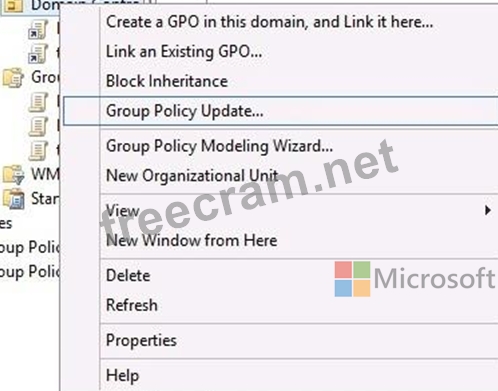
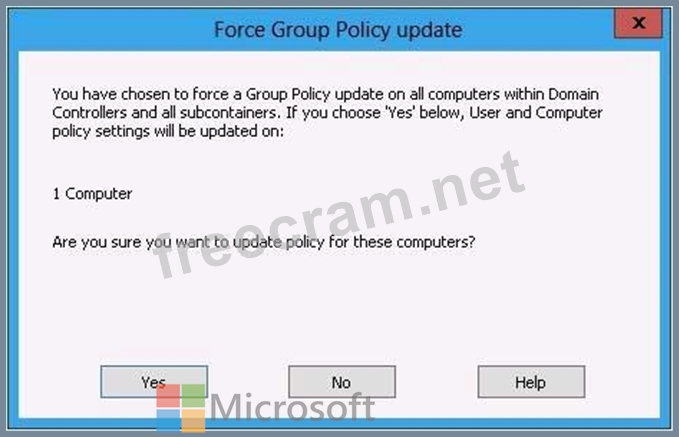
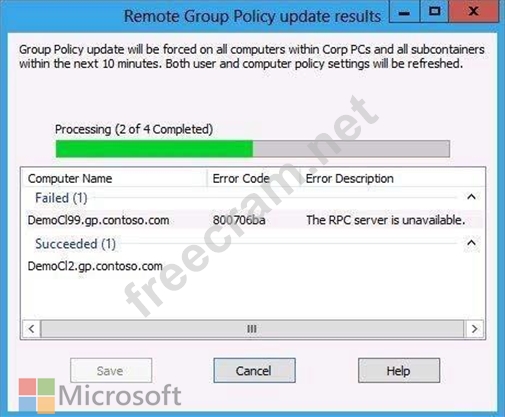
Starting with Windows Server® 2012 and Windows® 8, you can now remotely refresh Group Policy settings for all computers in an OU from one central location through the Group Policy Management Console (GPMC). Or you can use the Invoke-GPUpdate cmdlet to refresh Group Policy for a set of computers, not limited to the OU structure, for example, if the computers are located in the default computers container.
References:
http://technet.microsoft.com/en-us//library/jj134201.aspx
http://blogs.technet.com/b/grouppolicy/archive/2012/11/27/group-policy-in-windows-server-2012-using- remote-gpupdate.aspx
Explanation:
In the previous versions of Windows, this was accomplished by having the user run GPUpdate.exe on their computer.
Starting with Windows Server® 2012 and Windows® 8, you can now remotely refresh Group Policy settings for all computers in an OU from one central location through the Group Policy Management Console (GPMC). Or you can use the Invoke-GPUpdate cmdlet to refresh Group Policy for a set of computers, not limited to the OU structure, for example, if the computers are located in the default computers container.
References:
http://technet.microsoft.com/en-us//library/jj134201.aspx
http://blogs.technet.com/b/grouppolicy/archive/2012/11/27/group-policy-in-windows-server-2012-using- remote-gpupdate.aspx


- Question List (170q)
- Question 1: Your network contains an Active Directory domain named conto...
- Question 2: You have a server named WSUS1 that runs Windows Server 2012 ...
- Question 3: Your network contains two servers named Served and Server 2....
- Question 4: You have a server named Server1 that runs Windows Server 201...
- Question 5: Your company has a main office and a branch office. The main...
- Question 6: Your network contains an Active Directory domain named conto...
- Question 7: You have a DNS server named Served that has a Server Core In...
- Question 8: Your network contains an Active Directory domain named conto...
- Question 9: Your network contains an Active Directory domain named conto...
- Question 10: Your network contains an Active Directory domain named conto...
- Question 11: Your network contains two Active Directory domains named con...
- Question 12: Your network contains a domain controller named DC1 that run...
- Question 13: Your network contains an Active Directory domain named conto...
- Question 14: Your network contains a single Active Directory domain named...
- Question 15: You manage a server that runs Windows Server 2012 R2. The se...
- Question 16: Your network contains an Active Directory domain named conto...
- Question 17: Your network contains an Active Directory domain named conto...
- Question 18: Your network contains an Active Directory domain named conto...
- Question 19: Your network contains an Active Directory domain named adatu...
- Question 20: Your network contains an Active Directory domain named conto...
- Question 21: Your network contains an Active Directory domain named conto...
- Question 22: You have a server named Server1 that runs Windows Server 201...
- Question 23: Your network contains an Active Directory domain named conto...
- Question 24: A technician installs a new server that runs Windows Server ...
- Question 25: Your network contains an Active Directory domain named conto...
- Question 26: Your network contains an Active Directory domain named conto...
- Question 27: Your network contains two servers named Server1 and Server2 ...
- Question 28: Your network contains an Active Directory domain named conto...
- Question 29: Your network contains an Active Directory domain named conto...
- Question 30: Note: This question is part of a series of questions that us...
- Question 31: Your network contains an Active Directory domain named conto...
- Question 32: Your network contains an Active Directory domain named conto...
- Question 33: Your network contains two Active Directory forests named con...
- Question 34: Your network contains an Active Directory domain named conto...
- Question 35: Note: This question is part of a series of questions that us...
- Question 36: Your network contains an Active Directory domain named conto...
- Question 37: Your network contains an Active Directory domain named conto...
- Question 38: Your network contains one Active Directory domain named cont...
- Question 39: Your network contains an Active Directory domain named conto...
- Question 40: Your network contains one Active Directory domain named cont...
- Question 41: Your network contains an Active Directory domain named conto...
- Question 42: Your network contains an Active Directory domain named conto...
- Question 43: Your network contains an Active Directory domain named conto...
- Question 44: Your company has a main office and two branch offices. The m...
- Question 45: Your network contains an Active Directory domain named conto...
- Question 46: You have a failover cluster that contains five nodes. All of...
- Question 47: Your network contains an Active Directory forest. The forest...
- Question 48: Note: This question is part of a series of questions that us...
- Question 49: Your network contains an Active Directory domain named conto...
- Question 50: You deploy a Windows Server Update Services (WSUS) server na...
- Question 51: You have a server named Server1 that runs Windows Server 201...
- Question 52: Your network contains an Active Directory domain named adatu...
- Question 53: You have a DNS server that runs Windows Server 2012 R2. The ...
- Question 54: Your network contains an Active Directory domain named conto...
- Question 55: You have a server named Server1 that runs Windows Server 201...
- Question 56: Note: This question is part of a series of questions that us...
- Question 57: Your network contains an Active Directory domain named conto...
- Question 58: Your network contains an Active Directory domain named conto...
- Question 59: Your network contains an Active Directory domain named conto...
- Question 60: Your network contains an Active Directory domain named adatu...
- Question 61: Your network contains an Active Directory domain named conto...
- Question 62: Your network contains an Active Directory domain named conto...
- Question 63: Note: This question is part of a series of questions that us...
- Question 64: Your network contains an Active Directory domain named conto...
- Question 65: You have a cluster named Cluster1 that contains two nodes. B...
- Question 66: Your network contains an Active Directory domain named conto...
- Question 67: Your network contains one Active Directory forest named cont...
- Question 68: You have a server named Server1 that runs Windows Server 201...
- Question 69: Your network contains two DNS servers named Server1 and Serv...
- Question 70: Your network contains an Active Directory domain named conto...
- Question 71: Your network contains an Active Directory domain named conto...
- Question 72: You have a server named Server1 that runs Windows Server 201...
- Question 73: Your network contains an Active Directory domain named conto...
- Question 74: Your network contains an Active Directory domain named conto...
- Question 75: Your network contains an Active Directory domain named conto...
- Question 76: Your network contains an Active Directory domain named conto...
- Question 77: Your network contains an Active Directory domain named conto...
- Question 78: You have a server named Server1 that runs Windows Server 201...
- Question 79: Your network contains an Active Directory domain named conto...
- Question 80: Note: This question is part of a series of questions that us...
- Question 81: Your network contains an Active Directory domain named conto...
- Question 82: Your network contains a Hyper-V host named Server1 that host...
- Question 83: You have two Windows Server Update Services (WSUS) servers n...
- Question 84: Your network contains a server named Server1 that has the Ne...
- Question 85: Your company deploys a new Active Directory forest named con...
- Question 86: Note: This question is part of a series of questions that us...
- Question 87: You have the following Windows PowerShell Output. (Exhibit) ...
- Question 88: Your company has a main office and a branch office. The main...
- Question 89: Your network contains an Active Directory domain named adatu...
- Question 90: Your network contains an Active Directory forest named conto...
- Question 91: Note: This question is part of a series of questions that us...
- Question 92: Your network contains an Active Directory forest named conto...
- Question 93: Your network contains two Active Directory forests named ada...
- Question 94: Your network contains a single Active Directory domain named...
- Question 95: You have a server named Server1 that runs Windows Server 201...
- Question 96: You have a server named Server 1. You enable BitLocker Drive...
- Question 97: Your network contains an Active Directory domain named conto...
- Question 98: Your network contains an Active Directory forest named conto...
- Question 99: Your network contains an Active Directory forest named conto...
- Question 100: Your network contains an Active Directory domain named conto...
- Question 101: Your network contains an Active Directory domain named conto...
- Question 102: You have a group Managed Service Account named Service01. Th...
- Question 103: Your network contains an Active Directory domain named conto...
- Question 104: Your network contains an Active Directory domain named conto...
- Question 105: Your network contains an Active Directory domain named conto...
- Question 106: You have a server named Server1 that runs Windows Server 201...
- Question 107: You have a server named Server1 that runs Windows Server 201...
- Question 108: Your network contains a single Active Directory domain named...
- Question 109: Note: This question is part of a series of questions that us...
- Question 110: Your network contains an Active Directory domain named conto...
- Question 111: Your network contains an Active Directory domain named conto...
- Question 112: You deploy a Windows Server Update Services (WSUS) server na...
- Question 113: Your network is configured as shown in the exhibit. (Click t...
- Question 114: Your network contains an Active Directory domain named conto...
- Question 115: Your network contains an Active Directory domain named conto...
- Question 116: Your network contains an Active Directory domain named conto...
- Question 117: Your network has a router named Router1 that provides access...
- Question 118: Your network contains an Active Directory domain named conto...
- Question 119: Your network contains an Active Directory domain named conto...
- Question 120: Your network contains an Active Directory domain named adatu...
- Question 121: Your network contains an Active Directory forest. The forest...
- Question 122: You have a server that runs Windows Server 2012 R2. You have...
- Question 123: Your network contains an Active Directory domain named conto...
- Question 124: Your network contains one Active Directory domain named cont...
- Question 125: You have Windows Server 2012 R2 installation media that cont...
- Question 126: Your network contains an Active Directory domain named conto...
- Question 127: You have a file server named Server1 that runs Windows Serve...
- Question 128: Your network contains two Active Directory forests named con...
- Question 129: You have a server named Server1 that runs Windows Server 201...
- Question 130: Your network contains an Active Directory domain named conto...
- Question 131: Your network contains two servers named Server1 and Server2....
- Question 132: Your network contains an Active Directory domain named conto...
- Question 133: Your network contains an Active Directory domain named conto...
- Question 134: Your company is testing DirectAccess on Windows Server 2012 ...
- Question 135: Your network contains multiple Active Directory sites. You h...
- Question 136: You have a file server that has the File Server Resource Man...
- Question 137: Your network contains an Active Directory domain named adatu...
- Question 138: You have a DNS server named Server1. Server1 has a primary z...
- Question 139: Your network contains an Active Directory domain named conto...
- Question 140: Your network contains an Active Directory domain named conto...
- Question 141: Your network contains an Active Directory domain named conto...
- Question 142: Note: This question is part of a series of questions that us...
- Question 143: Your company has a main office and a branch office. The netw...
- Question 144: Your network contains an Active Directory forest named conto...
- Question 145: Your network contains an Active Directory domain named conto...
- Question 146: Your network contains an Active Directory domain named conto...
- Question 147: Your network contains one Active Directory domain named cont...
- Question 148: Your network contains three Network Policy Server (NPS) serv...
- Question 149: You have a DNS server named Server1 that runs Windows Server...
- Question 150: You have a server named Server1 that runs Windows Server 201...
- Question 151: Your network contains an Active Directory domain named conto...
- Question 152: Your network contains an Active Directory domain named conto...
- Question 153: Your network contains an Active Directory domain named conto...
- Question 154: Your network contains an Active Directory domain named adatu...
- Question 155: Your network contains an Active Directory domain named conto...
- Question 156: Your network contains an Active Directory domain named adatu...
- Question 157: Your network contains a Network Policy Server (NPS) server n...
- Question 158: Your network contains an Active Directory domain named conto...
- Question 159: Your network contains an Active Directory domain named conto...
- Question 160: You have a DNS server named DN51 that runs Windows Server 20...
- Question 161: Your network contains two servers named Server1 and Server2....
- Question 162: Your network contains an Active Directory domain named conto...
- Question 163: Your network contains an Active Directory domain named conto...
- Question 164: Your network contains an Active Directory domain named conto...
- Question 165: Your network contains an Active Directory forest named conto...
- Question 166: Your network contains an Active Directory domain named conto...
- Question 167: Your network contains an Active Directory domain named conto...
- Question 168: Your network contains an Active Directory domain named conto...
- Question 169: Your network contains an Active Directory domain named conto...
- Question 170: You have a Windows Server Update Services (WSUS) server name...
