Valid 70-347 Dumps shared by ExamDiscuss.com for Helping Passing 70-347 Exam! ExamDiscuss.com now offer the newest 70-347 exam dumps, the ExamDiscuss.com 70-347 exam questions have been updated and answers have been corrected get the newest ExamDiscuss.com 70-347 dumps with Test Engine here:
Access 70-347 Dumps Premium Version
(315 Q&As Dumps, 35%OFF Special Discount Code: freecram)
<< Prev Question Next Question >>
Question 71/174
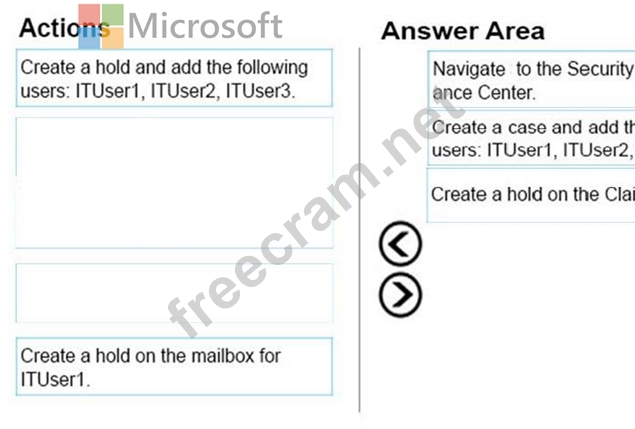
You need to create the eDiscovery case.
Which three actions should you perform in sequence? To answer, move the appropriate actions from the list of actions to the answer area and arrange them in the correct order.
Select and Place:
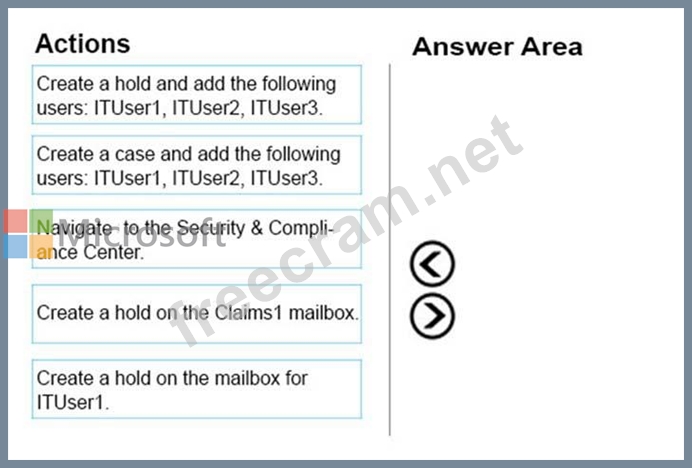
Which three actions should you perform in sequence? To answer, move the appropriate actions from the list of actions to the answer area and arrange them in the correct order.
Select and Place:
Correct Answer:
Explanation/Reference:
eDiscovery cases can be used in the Office 365 Security & Compliance Center to control who can create, access, and manage eDiscovery cases in your organization.
To set up and use eDiscovery cases in the Security & Compliance Center and Advanced eDiscovery, you can use the options below:
Step 1: Assign eDiscovery permissions to potential case members
Step 2: Create a new case
Step 3: Add members to a case
Step 4: Place content locations on hold
Step 5: Create and run a Content Search associated with a case
Step 6: Export the results of a Content Search associated with a case
Step 7: Prepare search results for Advanced eDiscovery
Step 8: Go to the case in Advanced eDiscovery
(Optional) Step 9: Close a case
(Optional) Step 10: Re-open a closed case
References: https://support.office.com/en-us/article/Manage-eDiscovery-cases-in-the-Office-365-Security- Compliance-Center-9a00b9ea-33fd-4772-8ea6-9d3c65e829e6


- Question List (174q)
- Question 1: Note: This question is part of a series of questions that pr...
- Question 2: You are the Office 365 administrator for your company. All u...
- Question 3: Your company plans to use Office 365 and Microsoft SharePoin...
- Question 4: You are the Office 365 administrator for a company. You must...
- Question 5: Note: This question is part of a series of questions that pr...
- Question 6: You manage an Office 365 tenant with an Enterprise E3 subscr...
- Question 7: Your company is planning to migrate to Microsoft Exchange On...
- Question 8: Your company has an Office 365 Small Business subscription. ...
- Question 9: You are the Office 365 administrator for your company. The c...
- Question 10: You manage a Microsoft SharePoint Online deployment. You cre...
- Question 11: Note: This question is part of a series of questions that us...
- Question 12: You are the Office 365 administrator for your company. Any c...
- Question 13: You are the Office 365 administrator for your company. The c...
- Question 14: You are the Office 365 administrator for your company. The c...
- Question 15: You are the Office 365 administrator for your company. The c...
- Question 16: Note: This question is part of a series of questions that pr...
- Question 17: Note: This question is part of a series of questions that pr...
- Question 18: You need to configure the software that is available through...
- Question 19: You are an Office 365 administrator for Contoso, Ltd. Contos...
- Question 20: Your company has an Office 365 Enterprise E1 subscription. T...
- Question 21: You are the desktop administrator for a company. All desktop...
- Question 22: You are deploying an Office 365 tenant that uses an Enterpri...
- Question 23: Note: This question is part of a series of questions that pr...
- Question 24: You are the Office 365 administrator for a company. You need...
- Question 25: You administer the Office 365 tenant for an organization. Yo...
- Question 26: You are the Office 365 administrator for your company. Many ...
- Question 27: Your company is planning to migrate to Microsoft Exchange On...
- Question 28: You are the Office 365 administrator for your company. The c...
- Question 29: Note: This question is part of a series of questions that pr...
- Question 30: Note: This question is part of a series of questions that pr...
- Question 31: Note: This question is part of a series of questions that pr...
- Question 32: You are the Office 365 administrator for a company. All empl...
- Question 33: Note: This question is part of a series of questions that pr...
- Question 34: You are the Office 365 administrator for your company. You n...
- Question 35: You are the Office 365 administrator for a financial service...
- Question 36: Note: This question is part of a series of questions that us...
- Question 37: Your company has an Exchange Server 2010 Service Pack (SP1) ...
- Question 38: You are the Office 365 administrator for your company. The c...
- Question 39: You are the Office 365 administrator for your company. The c...
- Question 40: You are a desktop administrator for a company. All desktops ...
- Question 41: Note: This question is part of a series of questions that pr...
- Question 42: You are the Office 365 administrator for your company. The c...
- Question 43: Your company has a Microsoft Exchange Server 2010 Service Pa...
- Question 44: Note: This question is part of a series of questions that pr...
- Question 45: Note: This question is part of a series of questions that pr...
- Question 46: Note: This question is part of a series of questions that pr...
- Question 47: You are the SharePoint administrator for a company's SharePo...
- Question 48: A user named User1 has a Windows Phone device. You use the O...
- Question 49: You are the Office 365 Administrator for your company. You p...
- Question 50: A company uses Office 365 ProPlus. The company has a main of...
- Question 51: A company is upgrading its 3,000 client computers to Office ...
- Question 52: Your company has a hybrid deployment of Office 365. You need...
- Question 53: Note: This question is part of a series of questions that pr...
- Question 54: A company uses Skype for Business Online. You need to ensure...
- Question 55: Note: This question is part of a series of questions that pr...
- Question 56: You manage an Office 365 tenant that uses an Enterprise E1 s...
- Question 57: Note: This question is part of a series of questions that pr...
- Question 58: A company is upgrading from Office 2010 to Office 365 ProPlu...
- Question 59: Note: This question is part of a series of questions that us...
- Question 60: HOTSPOT You enable sharing for all users in the organization...
- Question 61: You are the Office 365 administrator for a company. You must...
- Question 62: HOTSPOT Note: This question is part of a series of questions...
- Question 63: You have an on-premises Exchange 2010 organization. All clie...
- Question 64: You subscribe to Office 365. You plan to implement single si...
- Question 65: Your company has a hybrid deployment of Office 365. You need...
- Question 66: DRAG DROP Note: This question is part of a series of questio...
- Question 67: Note: This question is part of a series of questions that pr...
- Question 68: Your company uses Microsoft Exchange Online. Employees frequ...
- Question 69: You are the Office 365 administrator for your company. The c...
- Question 70: A company uses Office 365 ProPlus. The company has a main of...
- Question 71: You need to create the eDiscovery case. Which three actions ...
- Question 72: Note: This question is part of a series of questions that pr...
- Question 73: You need to ensure that the documents from the sales departm...
- Question 74: You are the Office 365 administrator for your company. The c...
- Question 75: Note: This question is part of a series of questions that us...
- Question 76: You are the Office 365 administrator for your company. The c...
- Question 77: You are the Office 365 administrator for a company. You need...
- Question 78: Your company uses Microsoft Exchange Online. Employees frequ...
- Question 79: You administer an Office 365 deployment. You need to ensure ...
- Question 80: Note: This question is part of a series of questions that pr...
- Question 81: You are the Office 365 administrator for a company. All acco...
- Question 82: You are the Office 365 administrator for your company. The c...
- Question 83: You open the settings for the site collection and discover t...
- Question 84: You are the Office 365 administrator for your company. Execu...
- Question 85: You are the Office 365 administrator for your company. The c...
- Question 86: Your company uses Office 365 and has an Enterprise E3 licens...
- Question 87: Which two statements accurately describe the migration of th...
- Question 88: Note: This question is part of a series of questions that pr...
- Question 89: You deploy Office 365. All the members of a team named Sales...
- Question 90: Your company has a hybrid deployment of Office 365. All mail...
- Question 91: An organization has an Office 365 tenant and uses an Enterpr...
- Question 92: You manage a Microsoft SharePoint Online tenant that has coa...
- Question 93: An organization has an on-premises Exchange 2010 organizatio...
- Question 94: Your company has a hybrid deployment of Office 365. You disc...
- Question 95: Note: This question is part of a series of questions that pr...
- Question 96: You are the Office 365 ProPlus administrator for your compan...
- Question 97: You administer Microsoft Exchange Online for Fabrikam, Inc. ...
- Question 98: You are an Office 365 administrator. You need to share a doc...
- Question 99: You need to ensure that the sales department can perform the...
- Question 100: Note: This question is part of a series of questions that pr...
- Question 101: Your company decides to migrate all users to Office 365. As ...
- Question 102: Your company has an Office 365 subscription. You need to add...
- Question 103: You manage a Microsoft SharePoint Online deployment. You nee...
- Question 104: You are the Office 365 administrator for a company. You plan...
- Question 105: Note: This question is part of a series of questions that us...
- Question 106: You have an Office 365 subscription. A new compliance policy...
- Question 107: Note: This question is part of a series of questions that us...
- Question 108: Note: This question is part of a series of questions that us...
- Question 109: NOTE: This question is part of a series of questions that pr...
- Question 110: You need to migrate a Microsoft Exchange Server 2007 organiz...
- Question 111: Your company purchases an Office 365 subscription. You creat...
- Question 112: You are the Office 365 administrator for your company. The c...
- Question 113: DRAG DROP You need to configure Office 365 to comply with th...
- Question 114: You administer the Office 365 tenant for an organization. Yo...
- Question 115: Note: This question is part of a series of questions that pr...
- Question 116: You are the Office 365 administrator for a company. You must...
- Question 117: You need to configure the Office 365 environment to enforce ...
- Question 118: You are the administrator for Contoso, Ltd. You have an Offi...
- Question 119: Note: This question is part of a series of questions that pr...
- Question 120: You manage client computing devices for a company. Office 36...
- Question 121: HOTSPOT You need to configure Exchange Online to meet the te...
- Question 122: You are the Office 365 administrator for your company. You n...
- Question 123: Note: This question is part of a series of questions that us...
- Question 124: You are the Microsoft Skype for Business administrator for a...
- Question 125: You manage a Microsoft SharePoint Online deployment. You nee...
- Question 126: Note: This question is part of a series of questions that us...
- Question 127: Your company hires a new human resources consultant. Corpora...
- Question 128: Note: This question is part of a series of questions that pr...
- Question 129: Note: This question is part of a series of questions that pr...
- Question 130: You are the Office 365 Administrator for your company. You m...
- Question 131: NOTE: This question is part of a series of questions that pr...
- Question 132: Note: This question is part of a series of questions that us...
- Question 133: Your company is planning to migrate to Microsoft Exchange On...
- Question 134: You are the Office 365 administrator for Contoso, Ltd. Some ...
- Question 135: You have an Office 365 subscription. Users have either an Of...
- Question 136: Note: This question is part of a series of questions that pr...
- Question 137: You need to deploy Office 365 ProPlus to the sales departmen...
- Question 138: Your company uses Microsoft Exchange Online and Microsoft Sk...
- Question 139: Your company deploys Microsoft Skype for Business Online. Yo...
- Question 140: You manage a Microsoft SharePoint Online tenant that has coa...
- Question 141: NOTE: This question is part of a series of questions that pr...
- Question 142: Note: This question is part of a series of questions that us...
- Question 143: You are the Office 365 administrator for your company. The c...
- Question 144: Your company uses Microsoft SharePoint Online for collaborat...
- Question 145: Note: This question is part of a series of questions that pr...
- Question 146: Contoso, Ltd. has an Office 365 Enterprise E3 plan. Contoso ...
- Question 147: You are deploying an Office 365 tenant that uses an Enterpri...
- Question 148: Note: This question is part of a series of questions that pr...
- Question 149: Your company uses Office 365 and has an Enterprise E3 plan. ...
- Question 150: You plan to implement a collaboration platform for a company...
- Question 151: Contoso, Ltd. has a SharePoint Online tenant and uses an Off...
- Question 152: You manage a Microsoft Exchange server that is on an isolate...
- Question 153: All employees at a company have Exchange Online mailboxes. Y...
- Question 154: HOTSPOT You need to configure the site collection for the ac...
- Question 155: You are the Office 365 administrator for your company. The c...
- Question 156: You manage an Office 365 tenant that uses an Enterprise E1 s...
- Question 157: Note: This question is part of a series of questions that pr...
- Question 158: You manage an Office 365 tenant that uses an Enterprise E1 s...
- Question 159: You are responsible for managing Office 365 for your custome...
- Question 160: Your company subscribes to the Office 365 Enterprise E1 plan...
- Question 161: You manage an Office 365 tenant that uses SharePoint Online....
- Question 162: You administer 100 client devices that run Windows 10. Users...
- Question 163: You are the Office 365 administrator for your company. Emplo...
- Question 164: Note: This question is part of a series of questions that us...
- Question 165: Note: This question is part of a series of questions that pr...
- Question 166: HOTSPOT You need to configure the Office application deploym...
- Question 167: You implement Skype for Business Online. You deploy the foll...
- Question 168: You are the Office 365 administrator for a company. Users fr...
- Question 169: Note: This question is part of a series of questions that pr...
- Question 170: Note: This question is part of a series of questions that pr...
- Question 171: Your company has an Office 365 subscription. A user named Te...
- Question 172: Your company has a hybrid deployment of Office 365 that uses...
- Question 173: You need to implement the email attachment requirements. Wha...
- Question 174: You administer Office 365 tenant for an organization. You as...
