- Home
- Microsoft
- Designing and Deploying Microsoft Exchange Server 2016
- Microsoft.70-345.v2018-09-26.q91
- Question 30
Valid 70-345 Dumps shared by ExamDiscuss.com for Helping Passing 70-345 Exam! ExamDiscuss.com now offer the newest 70-345 exam dumps, the ExamDiscuss.com 70-345 exam questions have been updated and answers have been corrected get the newest ExamDiscuss.com 70-345 dumps with Test Engine here:
Access 70-345 Dumps Premium Version
(168 Q&As Dumps, 35%OFF Special Discount Code: freecram)
<< Prev Question Next Question >>
Question 30/91
DRAG DROP
You have two standalone Exchange Server 2016 servers.
You perform daily full backups of the Exchange server databases.
A user accidentally deletes some critical items.
You need to restore the critical items.
Which three actions should you perform in sequence? To answer, move the appropriate actions from the list of actions to the answer area and arrange them in the correct order.
Select and Place:
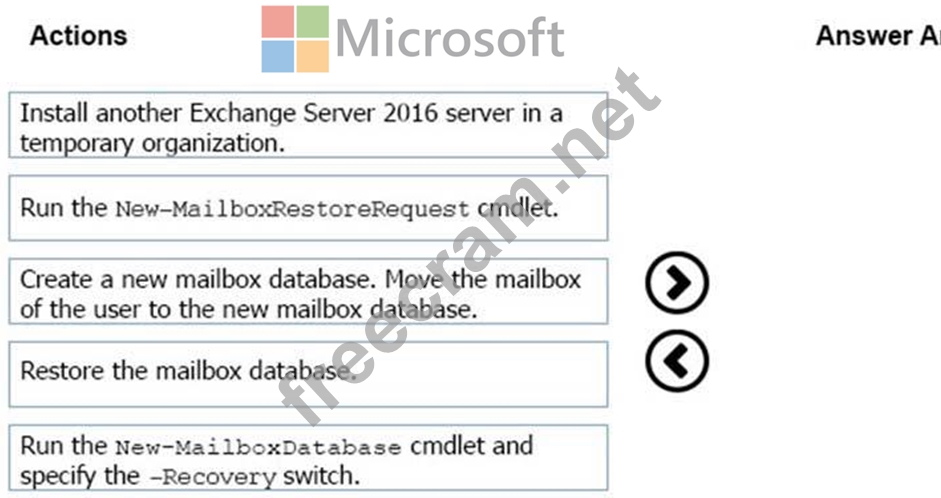
You have two standalone Exchange Server 2016 servers.
You perform daily full backups of the Exchange server databases.
A user accidentally deletes some critical items.
You need to restore the critical items.
Which three actions should you perform in sequence? To answer, move the appropriate actions from the list of actions to the answer area and arrange them in the correct order.
Select and Place:
Correct Answer:
Explanation/Reference:
Explanation:
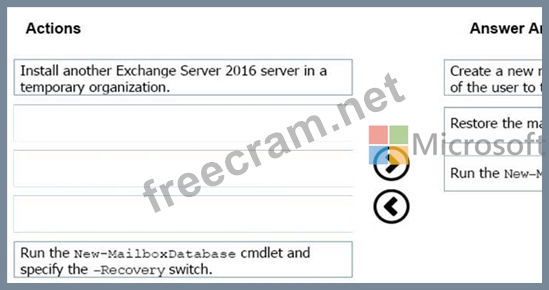
Box 1: Create a recovery database.
A recovery database (RDB) is a special kind of mailbox database that allows you to mount and extract data from a restored mailbox database as part of a recovery operation. RDBs allow you to recover data from a backup or copy of a database without disrupting user access to current data.
Box 2: Restore the mailbox database.
After you create an RDB, you can restore a mailbox database into the RDB by using a backup application or by copying a database and its log files into the RDB folder structure.
Box 3: New-MailboxRestoreRequest with -Recovery
Use the New-MailboxRestoreRequest cmdlet to restore a mailbox or items from the recovery database to a production mailbox.
Note: A recovery database (RDB) is a special kind of mailbox database that allows you to mount and extract data from a restored mailbox database as part of a recovery operation. RDBs allow you to recover data from a backup or copy of a database without disrupting user access to current data.
After you create an RDB, you can restore a mailbox database into the RDB by using a backup application or by copying a database and its log files into the RDB folder structure. Then you can use the New- MailboxRestoreRequest cmdlet to extract data from the recovered database. Once extracted, the data can then be exported to a folder or merged into an existing mailbox.
References: https://technet.microsoft.com/en-us/library/ee332351(v=exchg.160).aspx#Use the Exchange Management Shell to recover data using a recovery database


- Question List (91q)
- Question 1: Your network contains a single Active Directory forest. The ...
- Question 2: Your company has an Exchange Server 2016 organization and a ...
- Question 3: You have an Exchange Server 2016 organization. You plan to e...
- Question 4: Note: This question is part of a series of questions that pr...
- Question 5: You have an Exchange Server 2016 organization. You allow mob...
- Question 6: Your company has an Exchange Server 2016 organization. The o...
- Question 7: You have an Exchange Server 2016 organization that contains ...
- Question 8: A customer has a mailbox database named DB1. The database an...
- Question 9: Your company has three offices. The offices are located in N...
- Question 10: DRAG DROP You have two Mailbox servers named EX1 and EX2 tha...
- Question 11: HOTSPOT A company named Contoso, Ltd. has an Exchange Server...
- Question 12: DRAG DROP Your company has an Exchange Server 2016 organizat...
- Question 13: DRAG DROP You have an Exchange Server 2016 organization. Thr...
- Question 14: Note: This question is part of a series of questions that pr...
- Question 15: DRAG DROP Your company has an Exchange Server 2016 Organizat...
- Question 16: HOTSPOT You have two servers named EX1 and EX2. You plan to ...
- Question 17: HOTSPOT You have an Exchange Server 2010 organization. You p...
- Question 18: HOTSPOT You are deploying a new Exchange Server 2016 organiz...
- Question 19: Your company has an Exchange Server 2016 organization. The o...
- Question 20: You have an Exchange Server 2016 organization. The organizat...
- Question 21: You are planning an Exchange Server 2016 organization. The o...
- Question 22: You have an Exchange Server 2016 organization. Users store s...
- Question 23: HOTSPOT You have an Exchange Server 2016 organization. You p...
- Question 24: Your network contains a single domain named contoso.local. Y...
- Question 25: Your company has two offices. The offices are located in San...
- Question 26: Note: This question is part of a series of questions that pr...
- Question 27: You have an Exchange Server 2016 organization. Some users co...
- Question 28: You have an Exchange Server organization. The organization c...
- Question 29: Your company has an Exchange Server 2016 organization named ...
- Question 30: DRAG DROP You have two standalone Exchange Server 2016 serve...
- Question 31: Your company has an Exchange Server 2016 organization. All u...
- Question 32: You have an Exchange Server 2016 organization and Microsoft ...
- Question 33: You plan to deploy Exchange Server 2016 to a new server. The...
- Question 34: You have an Exchange Server 2010 organization that uses a na...
- Question 35: You have an Exchange Server 2016 organization. The organizat...
- Question 36: You have an Exchange Server 2016 organization. The organizat...
- Question 37: DRAG DROP Your company recently deployed Exchange Server 201...
- Question 38: You have a server named EX01 that runs Exchange Server 2016....
- Question 39: HOTSPOT You deploy a new Exchange Server 2016 organization. ...
- Question 40: You have an Exchange Server 2016 organization. The organizat...
- Question 41: You need to add a DNS record to provide Autodiscoverfor each...
- Question 42: You have an Exchange Server 2016 organization. Users connect...
- Question 43: HOTSPOT You run Get-Service | where displayname -like "trans...
- Question 44: HOTSPOT A company named Contoso, Ltd. deploys Exchange Serve...
- Question 45: You deploy an Exchange Server 2016 organization. You create ...
- Question 46: Your company has one Exchange Server 2016 database availabil...
- Question 47: You remove the namespaces for the branch offices. The branch...
- Question 48: You are planning an Exchange Server 2016 organization. The o...
- Question 49: DRAG DROP You plan to deploy a database availability group (...
- Question 50: You have an Exchange Server 2016 organization. The organizat...
- Question 51: Your network contains the servers configured as shown in the...
- Question 52: Your company has three offices. The offices are located in N...
- Question 53: You have an exchange server 2016 organization. The organizat...
- Question 54: You have an Exchange Server 2016 organization. You need to e...
- Question 55: Your network contains an Active Directory forest that has th...
- Question 56: HOTSPOT You have an Exchange Server 2016 organization. The o...
- Question 57: A new company has the following: Two offices that connect to...
- Question 58: You have an Exchange Server 2016 organization. The organizat...
- Question 59: HOTSPOT You have an Active Directory forest named contoso.co...
- Question 60: You have an Exchange Server 2016 organization. You need to c...
- Question 61: You have an Exchange Server 2016 organization. You plan to c...
- Question 62: HOTSPOT You are upgrading your Exchange Server 2010 organiza...
- Question 63: You have an Exchange Server 2016 organization. The organizat...
- Question 64: You have an Exchange Server 2016 organization. Users report ...
- Question 65: You have an Exchange Server 2016 organization. The organizat...
- Question 66: You have an Exchange Server 2016 organization. Some users ac...
- Question 67: Note: This question is part of a series of questions that pr...
- Question 68: You have a hybrid Exchange Server 2016 organization. Some of...
- Question 69: You have an Exchange Server 2016 on-premises organization an...
- Question 70: You have three Hyper-V hosts that each have 20 processor cor...
- Question 71: You have an exchange Server 2016 organization that uses an S...
- Question 72: Note: This question is part of a series of questions that pr...
- Question 73: You manage an Exchange Server 2016 organization that spans t...
- Question 74: You have an Exchange Server 2016 organization. All users wor...
- Question 75: You are planning an Exchange Server 2016 organization. The o...
- Question 76: You have an Exchange Server 2016 organization. You plan to m...
- Question 77: You have an Exchange Server 2016 organization. The organizat...
- Question 78: You have an Exchange Server 2016 organization. You have a us...
- Question 79: Your company has a data center. The data center contains a s...
- Question 80: You have an Exchange Server 2016 organization. You configure...
- Question 81: You work for a company named Litware, Inc. that hosts all em...
- Question 82: Note: This question is part of a series of questions that pr...
- Question 83: HOTSPOT You have an Exchange Server 2016 organization. You a...
- Question 84: You have an Exchange Server 2016 organization. The organizat...
- Question 85: Your company has a main office and a branch office. An Activ...
- Question 86: You manage an Exchange Server 2016 organization in an Active...
- Question 87: How is the IBM Content Template Catalog delivered for instal...
- Question 88: Your network contains an Active Directory forest. The forest...
- Question 89: You have an Exchange Server 2016 organization. The organizat...
- Question 90: You have an Exchange Server 2016 organization. The organizat...
- Question 91: You need to configure the virtual directories for the Exchan...
