- Home
- Microsoft
- Designing and Deploying Microsoft Exchange Server 2016
- Microsoft.70-345.v2018-09-19.q93
- Question 72
Valid 70-345 Dumps shared by ExamDiscuss.com for Helping Passing 70-345 Exam! ExamDiscuss.com now offer the newest 70-345 exam dumps, the ExamDiscuss.com 70-345 exam questions have been updated and answers have been corrected get the newest ExamDiscuss.com 70-345 dumps with Test Engine here:
Access 70-345 Dumps Premium Version
(168 Q&As Dumps, 35%OFF Special Discount Code: freecram)
<< Prev Question Next Question >>
Question 72/93
HOTSPOT
You have an Exchange Server organization. The organization contains four servers. The servers configured as shown in the following table.
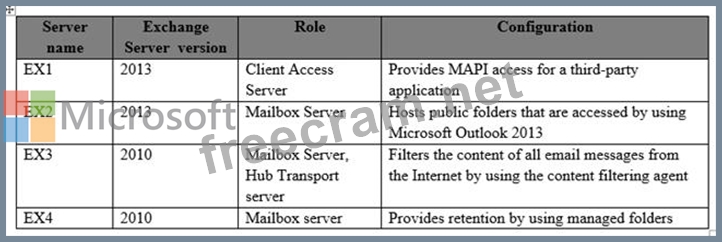
You plan to upgrade the organization to Exchange Server 2016.
You need to identify which functionalities from the current environment can be implemented in Exchange Server 2016.
What should you identify? To answer, select the appropriate options in the answer area.
Hot Area:
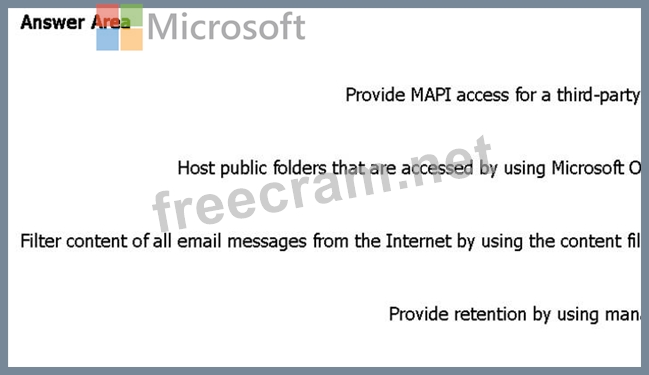
You have an Exchange Server organization. The organization contains four servers. The servers configured as shown in the following table.
You plan to upgrade the organization to Exchange Server 2016.
You need to identify which functionalities from the current environment can be implemented in Exchange Server 2016.
What should you identify? To answer, select the appropriate options in the answer area.
Hot Area:
Correct Answer:
Explanation/Reference:
Explanation:
Box 1: No
Discontinued features from Exchange 2013 to Exchange 2016 include:
The MAPI/CDO library has been replaced by Exchange Web Services (EWS), Exchange ActiveSync (EAS), and Representational State Transfer (REST)* APIs. If an application uses the MAPI/CDO library, it needs to move to EWS, EAS, or the REST APIs to communicate with Exchange 2016.
Box 2: Yes
Public folders are available in the following Outlook clients: Outlook on the web for Exchange 2016, Outlook 2007 or later, and Outlook for Mac.
Box 3: Yes
Content filtering evaluates inbound email messages by assessing the probability that the messages are legitimate or spam. Unlike other filtering technologies, the content filtering uses characteristics from a statistically significant sample of legitimate messages and spam to make its determination. Content filtering in Exchange Server 2016 is provided by the Content Filter agent, and is basically unchanged from Exchange Server 2010.
Box 4: No
In Exchange 2010, you use managed folders for messaging retention management (MRM). In Exchange
2016, managed folders aren't supported. You must use retention policies for MRM.
References:
https://technet.microsoft.com/en-us/library/jj619283(v=exchg.160).aspx
https://technet.microsoft.com/en-us/library/mt577271(v=exchg.160).aspx
https://technet.microsoft.com/en-us/library/bb124739(v=exchg.160).aspx


- Question List (93q)
- Question 1: DRAG DROP You have an Exchange Server 2016 organization. The...
- Question 2: You have three Hyper-V hosts that each have 20 processor cor...
- Question 3: You have an Exchange Server 2016 organization. The organizat...
- Question 4: You have an Exchange Server 2016 organization. Some users ac...
- Question 5: You have an exchange server 2016 organization. The organizat...
- Question 6: You have an Exchange Server 2016 organization. The organizat...
- Question 7: HOTSPOT You have an Exchange Server organization. The organi...
- Question 8: Your company has an Exchange Server 2016 organization. All u...
- Question 9: You have an Exchange Server 2016 organization. The organizat...
- Question 10: A customer has a mailbox database named DB1. The database an...
- Question 11: Your company has an Exchange Server 2016 organization named ...
- Question 12: HOTSPOT You have an Active Directory forest named contoso.co...
- Question 13: You have an Exchange Server 2016 organization. The organizat...
- Question 14: You have an Exchange Server 2016 organization. The organizat...
- Question 15: You have an Exchange Server 2016 organization. Some users co...
- Question 16: You have an Exchange Server 2016 organization. The organizat...
- Question 17: HOTSPOT You have an Exchange Server 2016 organization. The o...
- Question 18: Note: This question is part of a series of questions that pr...
- Question 19: Your company has a data center. The data center contains a s...
- Question 20: HOTSPOT You run the Get-DlpPolicy cmdlet and you receive the...
- Question 21: DRAG DROP You have two Mailbox servers named EX1 and EX2 tha...
- Question 22: HOTSPOT You have a hybrid Exchange Server 2016 organization....
- Question 23: Your network contains a single Active Directory forest. The ...
- Question 24: You have an Exchange Server 2016 organization. The organizat...
- Question 25: Your network contains an Active Directory forest. The forest...
- Question 26: Your company has three offices. The offices are located in N...
- Question 27: DRAG DROP Your company recently deployed Exchange Server 201...
- Question 28: Note: This question is part of a series of questions that pr...
- Question 29: You have an Exchange Server 2016 organization. You plan to c...
- Question 30: You have a server named EX01 that runs Exchange Server 2016....
- Question 31: Your network contains the servers configured as shown in the...
- Question 32: HOTSPOT Your company has an Exchange Server 2016 organizatio...
- Question 33: Note: This question is part of a series of questions that pr...
- Question 34: Your company has two offices. The offices are located in San...
- Question 35: DRAG DROP You need to configure the Sender Policy Framework ...
- Question 36: You have an Exchange Server 2016 organization. The organizat...
- Question 37: HOTSPOT You have an Exchange Server 2016 organization and a ...
- Question 38: You have an Exchange Server 2016 organization. Users connect...
- Question 39: DRAG DROP You have an Exchange Server 2010 organization. The...
- Question 40: HOTSPOT You have an Exchange Server 2016 organization. The A...
- Question 41: You have an Exchange Server 2016 organization and Microsoft ...
- Question 42: Your company has a main office and a branch office. An Activ...
- Question 43: You are planning an Exchange Server 2016 organization. The o...
- Question 44: You have an Exchange Server 2016 organization. You plan to e...
- Question 45: DRAG DROP You have an Exchange Server 2016 organization. The...
- Question 46: You have an Exchange Server 2016 on-premises organization an...
- Question 47: You plan to deploy Exchange Server 2016 to a new server. The...
- Question 48: You have an Exchange Server 2016 organization that contains ...
- Question 49: How is the IBM Content Template Catalog delivered for instal...
- Question 50: You have an exchange Server 2016 organization that uses an S...
- Question 51: You have an Exchange Server 2016 organization. The organizat...
- Question 52: You deploy an Exchange Server 2016 organization. You create ...
- Question 53: HOTSPOT You deploy an Exchange Server 2016 organization. The...
- Question 54: HOTSPOT You are planning an Exchange Server 2016 organizatio...
- Question 55: DRAG DROP You have an Exchange Server 2016 organization. You...
- Question 56: You have an Exchange Server 2016 organization. You allow mob...
- Question 57: You have an Exchange Server 2016 organization. All users wor...
- Question 58: You need to configure the virtual directories for the Exchan...
- Question 59: Note: This question is part of a series of questions that pr...
- Question 60: HOTSPOT You have an Exchange Server 2016 organization. All u...
- Question 61: You are planning an Exchange Server 2016 organization. The o...
- Question 62: You have an Exchange Server 2016 organization. Users report ...
- Question 63: DRAG DROP You need to configure a distribution group named C...
- Question 64: Your company has an Exchange Server 2016 organization. The o...
- Question 65: You have an Exchange Server 2016 organization. Users store s...
- Question 66: HOTSPOT A company named Contoso, Ltd. deploys Exchange Serve...
- Question 67: You have an Exchange Server organization. The organization c...
- Question 68: Your company has three offices. The offices are located in N...
- Question 69: You have an Exchange Server 2010 organization that uses a na...
- Question 70: You have a hybrid Exchange Server 2016 organization. Some of...
- Question 71: HOTSPOT You are designing an Exchange Server 2016 organizati...
- Question 72: HOTSPOT You have an Exchange Server organization. The organi...
- Question 73: Your company has an Exchange Server 2016 organization. The o...
- Question 74: HOTSPOT You have an Exchange Server 2016 organization. The o...
- Question 75: HOTSPOT You have an Exchange Server 2016 organization. You h...
- Question 76: DRAG DROP You have an Exchange Server 2016 organization. The...
- Question 77: DRAG DROP Your company has an Exchange Server 2016 organizat...
- Question 78: Note: This question is part of a series of questions that pr...
- 2 commentQuestion 79: You have an Exchange Server 2016 organization. You configure...
- Question 80: You have an Exchange Server 2016 organization. You plan to m...
- Question 81: HOTSPOT You have an Exchange Server 2016 organization named ...
- Question 82: HOTSPOT Your company has an Exchange Server 2016 organizatio...
- Question 83: Your company has an Exchange Server 2016 organization and a ...
- Question 84: You are planning an Exchange Server 2016 organization. The o...
- Question 85: HOTSPOT You have an Exchange Server 2016 organization. The o...
- Question 86: HOTSPOT You have an Exchange Server 2010 organization. You p...
- Question 87: You have an Exchange Server 2016 organization. You need to e...
- Question 88: You have an Exchange Server 2016 organization. The organizat...
- Question 89: HOTSPOT You have an Exchange Server 2016 organization. The A...
- Question 90: Your network contains an Active Directory forest that has th...
- Question 91: Your network contains a single domain named contoso.local. Y...
- Question 92: HOTSPOT You deploy a server named ex01.contoso.com that has ...
- Question 93: You have an Exchange Server 2016 organization. The organizat...
