- Home
- Linux Foundation
- Certified Kubernetes Administrator (CKA) Program Exam
- LinuxFoundation.CKA.v2023-03-27.q73
- Question 66
Valid CKA Dumps shared by EduDump.com for Helping Passing CKA Exam! EduDump.com now offer the newest CKA exam dumps, the EduDump.com CKA exam questions have been updated and answers have been corrected get the newest EduDump.com CKA dumps with Test Engine here:
Access CKA Dumps Premium Version
(85 Q&As Dumps, 35%OFF Special Discount Code: freecram)
<< Prev Question Next Question >>
Question 66/73
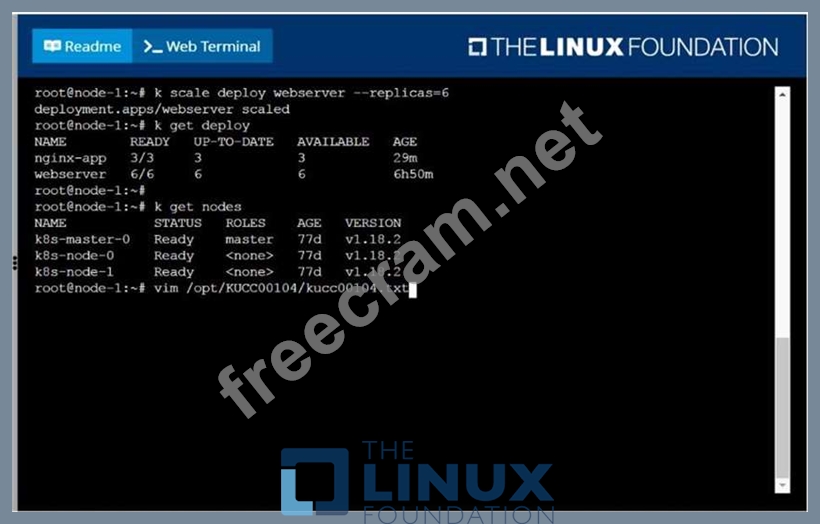
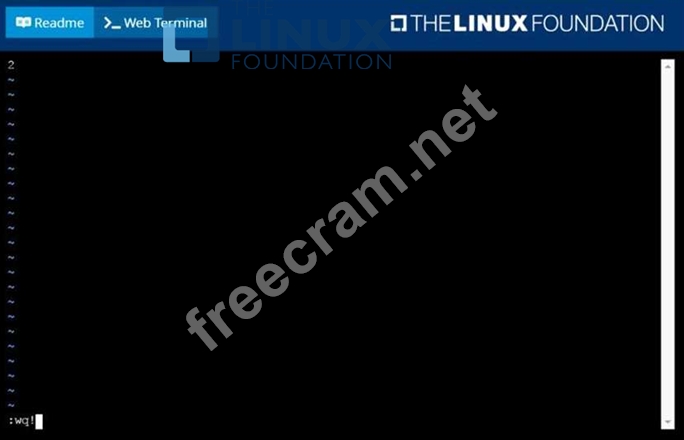
Check to see how many worker nodes are ready (not including nodes tainted NoSchedule) and write the number to /opt/KUCC00104/kucc00104.txt.
Correct Answer:
solution


- Question List (73q)
- Question 1: Score: 4% (Exhibit) Context You have been asked to create a ...
- Question 2: From the pod label name=cpu-utilizer, find pods running high...
- Question 3: List all the pods sorted by created timestamp...
- Question 4: Check to see how many worker nodes are ready (not including ...
- Question 5: Pause the rollout of the deployment...
- Question 6: Score: 5% (Exhibit) Task From the pod label name=cpu-utilize...
- Question 7: Get IP address of the pod - "nginx-dev"...
- Question 8: Delete the pod without any delay (force delete)...
- Question 9: Create a pod that having 3 containers in it? (Multi-Containe...
- Question 10: A bootstrap USB flash drive has been prepared using a Linux ...
- Question 11: Create a pod that echo "hello world" and then exists. Have t...
- Question 12: Create a pod as follows: Name: mongo Using Image: mongo In a...
- Question 13: Create a nginx pod with label env=test in engineering namesp...
- Question 14: Score: 7% (Exhibit) Task Create a new NetworkPolicy named al...
- Question 15: Perform the following tasks: Add an init container to hungry...
- Question 16: Create a pod as follows: Name: non-persistent-redis containe...
- Question 17: Create a file: /opt/KUCC00302/kucc00302.txt that lists all p...
- Question 18: Score: 7% (Exhibit) Task Create a new nginx Ingress resource...
- Question 19: Create a Kubernetes secret as follows: * Name: super-secret ...
- Question 20: Score: 4% (Exhibit) Task Create a persistent volume with nam...
- Question 21: Get the deployment rollout status...
- Question 22: Change the Image version back to 1.17.1 for the pod you just...
- Question 23: Perform the following tasks: * Add an init container tohungr...
- Question 24: Get IP address of the pod - "nginx-dev"...
- Question 25: Ensure a single instance of pod nginx is running on each nod...
- Question 26: Given a partially-functioningKubernetes cluster, identifysym...
- Question 27: List all the pods sorted by created timestamp...
- Question 28: Create an nginx pod with containerPort 80 and it should chec...
- Question 29: Score: 7% (Exhibit) Task Create a new nginx Ingress resource...
- Question 30: Get list of all pods in all namespaces and write it to file ...
- Question 31: Set the node namedek8s-node-1asunavailable and reschedule al...
- Question 32: Task Weight: 4% (Exhibit) Task Scale the deployment webserve...
- Question 33: Create a deployment as follows: Name: nginx-app Using contai...
- Question 34: List all service account and create a service account called...
- Question 35: Check the Image version of nginx-dev pod using jsonpath...
- Question 36: Get the number of schedulable nodes and write to a file /opt...
- Question 37: Create a persistent volume with name app-data, of capacity 2...
- Question 38: List all configmap and secrets in the cluster in all namespa...
- Question 39: Undo the deployment with the previous version and verify eve...
- Question 40: Ensure a single instance of pod nginx is running on each nod...
- 1 commentQuestion 41: Create the service as type NodePort with the port 32767 for ...
- Question 42: Create a job named "hello-job" with the image busybox which ...
- Question 43: List all persistent volumes sorted by capacity, saving the f...
- Question 44: Monitor the logs of pod foo and: Extract log lines correspon...
- Question 45: What is the maximum number of samples that can be submitted ...
- Question 46: Create an nginx pod and list the pod with different levels o...
- Question 47: A Kubernetes worker node, named wk8s-node-0 is in state NotR...
- Question 48: Check the history of deployment...
- Question 49: Score: 7% (Exhibit) Task First, create a snapshot of the exi...
- Question 50: Monitor the logs of pod foo and: Extract log lines correspon...
- 1 commentQuestion 51: Print pod name and start time to "/opt/pod-status" file...
- Question 52: Get list of all the nodes with labels...
- Question 53: Create a file: /opt/KUCC00302/kucc00302.txt that lists all p...
- 1 commentQuestion 54: What are the differences between using a service versus usin...
- Question 55: Ensure a single instance of pod nginx is running on each nod...
- Question 56: Delete the above pod and create again from the same yaml fil...
- Question 57: Score: 13% (Exhibit) Task A Kubernetes worker node, named wk...
- Question 58: Create 2 nginx image pods in which one of them is labelled w...
- Question 59: Create a daemonset named "Prometheus-monitoring" using image...
- Question 60: Get list of all the pods showing name and namespace with a j...
- Question 61: Create a deployment as follows: * Name:nginx-random * Expose...
- Question 62: Create and configure the servicefront-end-serviceso it's acc...
- Question 63: Score: 5% (Exhibit) Task Monitor the logs of pod bar and: * ...
- Question 64: Deploy a pod with image=redis on a node with label disktype=...
- 1 commentQuestion 65: On the NGFW, how can you generate and block a private key fr...
- Question 66: Check to see how many worker nodes are ready (not including ...
- Question 67: Set the node named ek8s-node-1 as unavailable and reschedule...
- Question 68: A Kubernetes worker node, named wk8s-node-0 is in state NotR...
- Question 69: Task Weight: 4% (Exhibit) Task Schedule a Pod as follows: * ...
- Question 70: List all the pods showing name and namespace with a json pat...
- Question 71: List "nginx-dev" and "nginx-prod" pod and delete those pods...
- Question 72: Schedule a pod as follows: * Name: nginx-kusc00101 * Image: ...
- Question 73: Score: 4% (Exhibit) Task Schedule a pod as follows: * Name: ...
