- Home
- Fortinet
- FCSS - Network Security 7.4 Support Engineer
- Fortinet.FCSS_NST_SE-7.4.v2025-11-24.q47
- Question 11
Valid FCSS_NST_SE-7.4 Dumps shared by EduDump.com for Helping Passing FCSS_NST_SE-7.4 Exam! EduDump.com now offer the newest FCSS_NST_SE-7.4 exam dumps, the EduDump.com FCSS_NST_SE-7.4 exam questions have been updated and answers have been corrected get the newest EduDump.com FCSS_NST_SE-7.4 dumps with Test Engine here:
Access FCSS_NST_SE-7.4 Dumps Premium Version
(104 Q&As Dumps, 35%OFF Special Discount Code: freecram)
<< Prev Question Next Question >>
Question 11/47
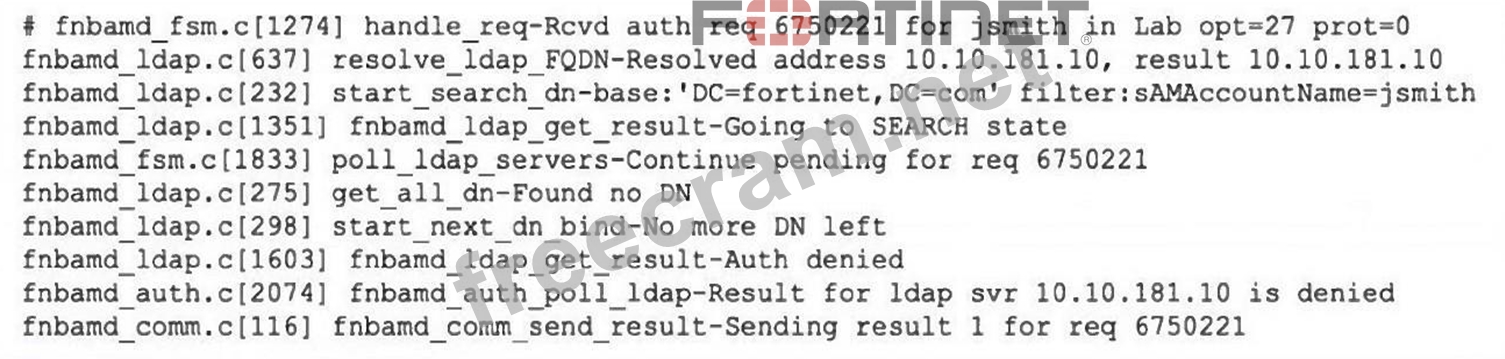
Refer to the exhibit, which shows a partial output of the real-time LDAP debug.
What two actions can the administrator take to resolve this issue? (Choose two.)
What two actions can the administrator take to resolve this issue? (Choose two.)
Correct Answer: C,D
When FortiGate's LDAP authentication can't find any matching DN it reports "get all dn - found no DN," which usually means the user either isn't in the group(s) you've told FortiGate to check or the account isn't currently active.
Ensure the user is a member of at least one AD group.
If you've configured FortiGate to restrict logins to specific groups, any user not in one of those groups will simply never be found by the LDAP search.
Ensure the account is active.
FortiGate's default search filter excludes disabled or locked accounts, so a disabled user object will likewise never show up in the DN search.
Ensure the user is a member of at least one AD group.
If you've configured FortiGate to restrict logins to specific groups, any user not in one of those groups will simply never be found by the LDAP search.
Ensure the account is active.
FortiGate's default search filter excludes disabled or locked accounts, so a disabled user object will likewise never show up in the DN search.


- Question List (47q)
- Question 1: Refer to the exhibit, which shows the output of a debug comm...
- Question 2: For IKEv2, which combination of payloads can INFORMATIONAL e...
- Question 3: Refer to the exhibit, which shows partial outputs from two r...
- Question 4: Refer to the exhibit, which a network topology and a partial...
- Question 5: The local OSPF router is unable to establish adjacency with ...
- Question 6: Refer to the exhibit, which contains a screenshot of some ph...
- Question 7: Refer to the exhibit, which shows a partial output from the ...
- Question 8: In IKEv2, which exchange establishes the first CHILD_SA?...
- Question 9: Refer to the exhibit, which contains partial output from an ...
- Question 10: Refer to the exhibit, which contains the output of the comma...
- Question 11: Refer to the exhibit, which shows a partial output of the re...
- Question 12: Refer to the exhibit, which shows the output of the command ...
- Question 13: What are two reasons you might see iprope_in_check() check f...
- Question 14: Refer to the exhibit, which shows a partial output of a real...
- Question 15: Refer to the exhibit, which contains the partial configurati...
- Question 16: Which authentication option can you not configure under conf...
- Question 17: Which two statements about an auxiliary session ate true? (C...
- Question 18: Which three steps does FortiGate execute using the pull meth...
- Question 19: Which two statements are true regarding heartbeat messages s...
- Question 20: Refer to the exhibit, which shows the output of a policy rou...
- Question 21: Refer to the exhibit, which shows the output of get system h...
- Question 22: Which exchanges are the first two exchanges in IKEv2 negotia...
- Question 23: Refer to the exhibit, which shows a FortiGate configuration....
- Question 24: Which statement about protocol options is true?...
- Question 25: Refer to the exhibit, which shows a partial web filter profi...
- Question 26: Refer to the exhibit, which shows a session table entry. (Ex...
- Question 27: Refer to the exhibit. Which three pieces of information does...
- Question 28: When investigating FortiGuard connectivity issues, which act...
- Question 29: Refer to the exhibit, which displays the output of a real-ti...
- Question 30: Refer to the exhibits. An administrator is attempting to adv...
- Question 31: Refer to the exhibit, which shows a truncated output of a re...
- Question 32: Refer to the exhibit, which shows the partial output of a re...
- Question 33: In an FSSO environment, a user is listed as active on FortiG...
- Question 34: An administrator wants to capture encrypted phase 2 traffic ...
- Question 35: Refer to the exhibit, which shows the output of diagnose aut...
- Question 36: Refer to the exhibits, which show the configuration on Forti...
- Question 37: Which two statements about conserve mode are true? (Choose t...
- Question 38: Refer to the exhibit. FortiGate is showing continuous high C...
- Question 39: Refer to the exhibit, which shows one way communication of t...
- Question 40: Refer to the exhibit, which contains the partial output of t...
- Question 41: Refer to the exhibit, which contains a screenshot of some ph...
- Question 42: Refer to the exhibit. FortiGate is in conserve mode as shown...
- Question 43: Refer to the exhibit. The exhibit shows the output from usin...
- Question 44: Refer to the exhibit, which shows the output of a BGP debug ...
- Question 45: View the exhibit: (Exhibit) Given the output showing a real-...
- Question 46: Refer to the exhibit, which shows the modified output of the...
- Question 47: Refer to the exhibit, which shows the output of a BGP debug ...

[×]
Download PDF File
Enter your email address to download Fortinet.FCSS_NST_SE-7.4.v2025-11-24.q47.pdf