Valid SY0-601 Dumps shared by ExamDiscuss.com for Helping Passing SY0-601 Exam! ExamDiscuss.com now offer the newest SY0-601 exam dumps, the ExamDiscuss.com SY0-601 exam questions have been updated and answers have been corrected get the newest ExamDiscuss.com SY0-601 dumps with Test Engine here:
Access SY0-601 Dumps Premium Version
(1061 Q&As Dumps, 35%OFF Special Discount Code: freecram)
<< Prev Question Next Question >>
Question 52/240
SIMULATION
A company recently added a DR site and is redesigning the network. Users at the DR site are having issues browsing websites.
INSTRUCTIONS
Click on each firewall to do the following:
1. Deny cleartext web traffic.
2. Ensure secure management protocols are used.
3. Resolve issues at the DR site.
The ruleset order cannot be modified due to outside constraints.
If at any time you would like to bring back the initial state of the simulation, please click the Reset All button.
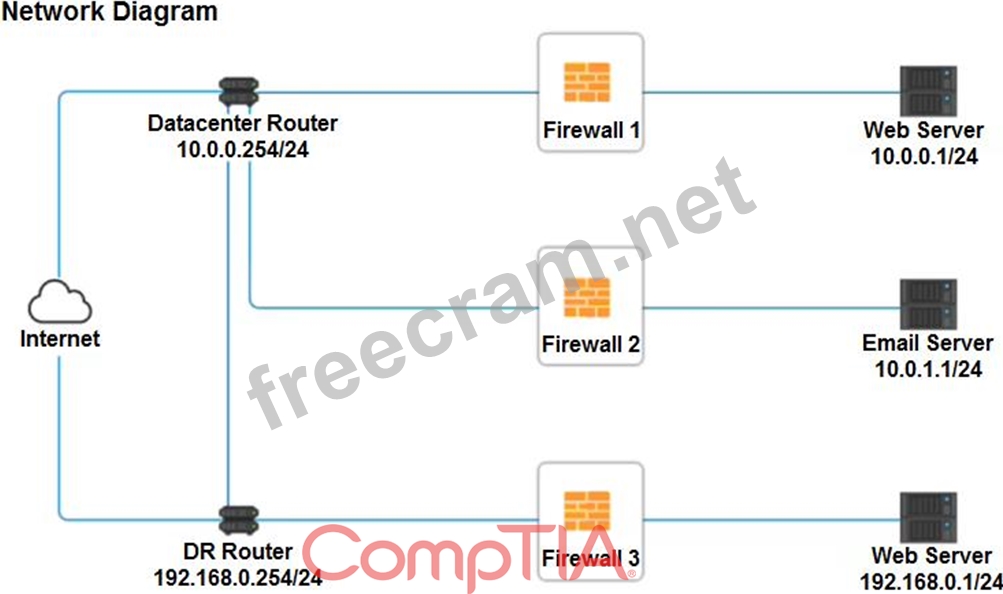
A company recently added a DR site and is redesigning the network. Users at the DR site are having issues browsing websites.
INSTRUCTIONS
Click on each firewall to do the following:
1. Deny cleartext web traffic.
2. Ensure secure management protocols are used.
3. Resolve issues at the DR site.
The ruleset order cannot be modified due to outside constraints.
If at any time you would like to bring back the initial state of the simulation, please click the Reset All button.
Correct Answer:
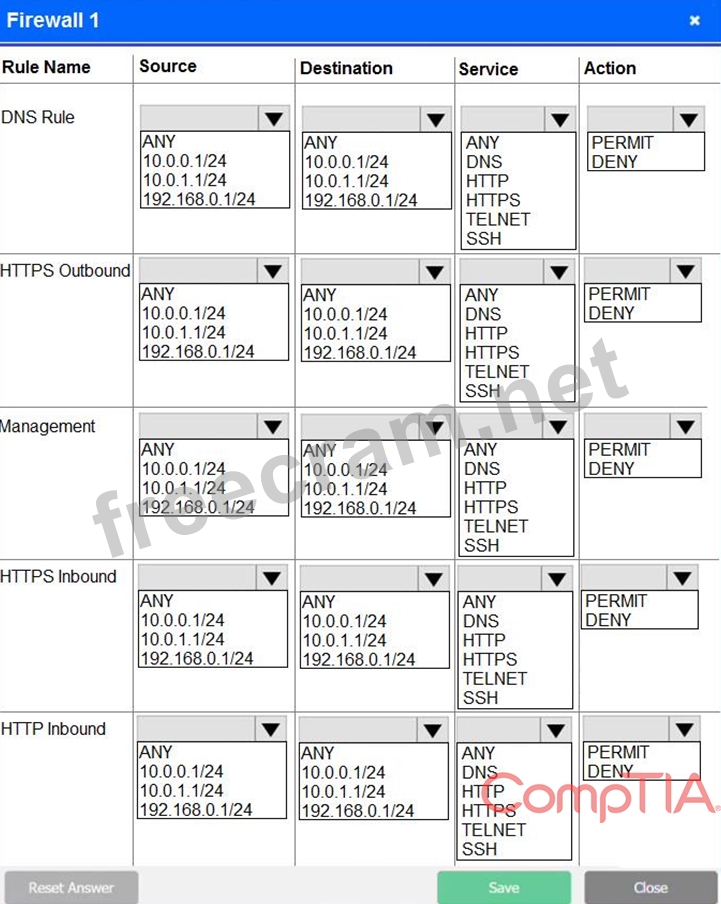
Firewall 1:
DNS Rule - ANY ANY DNS PERMIT
HTTPS Outbound - 10.0.0.1/24 ANY HTTPS PERMIT
Management - ANY ANY SSH PERMIT
HTTPS Inbound - ANY ANY HTTPS PERMIT
HTTP Inbound - ANY ANY HTTP DENY
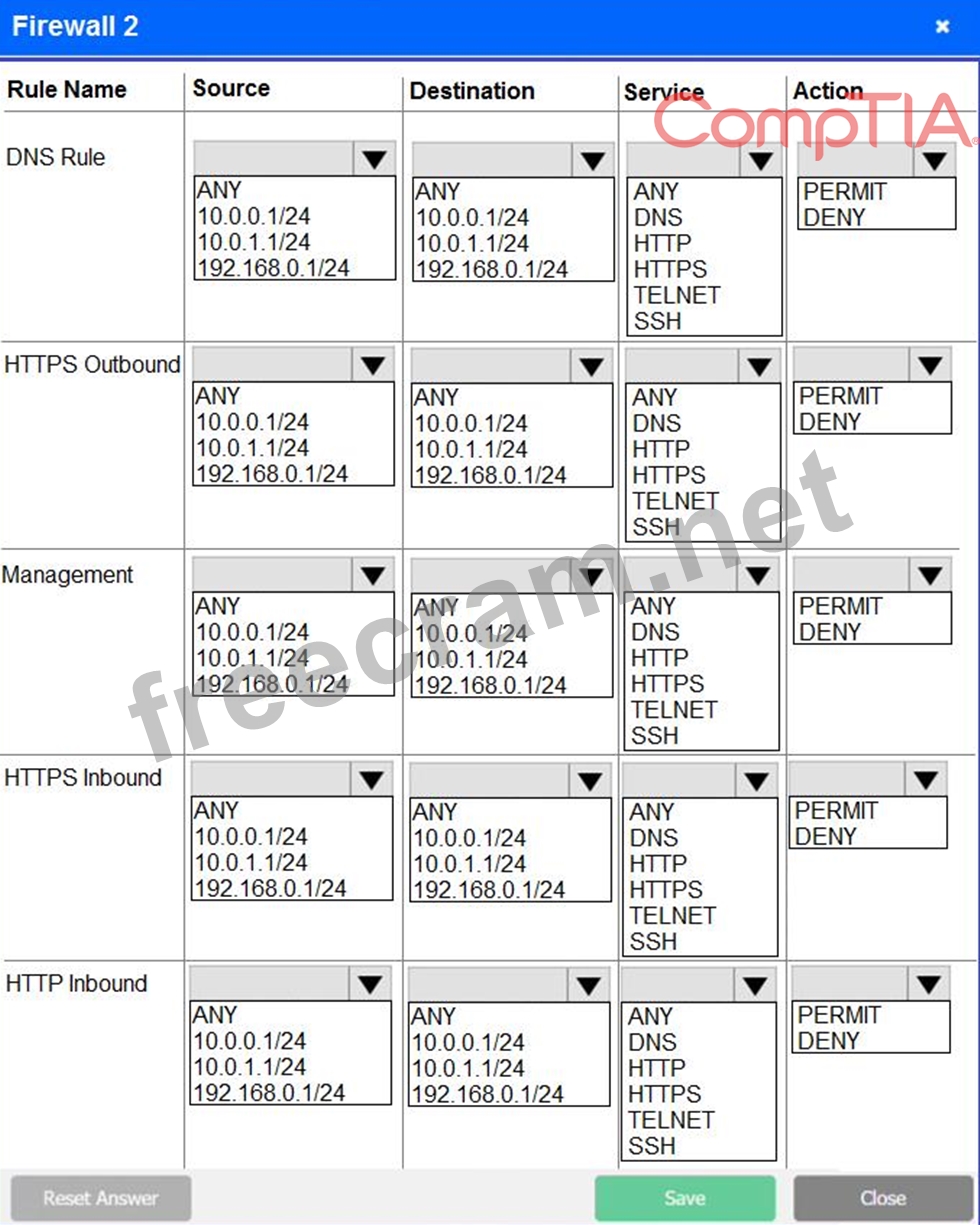
Firewall 2: No changes should be made to this firewall
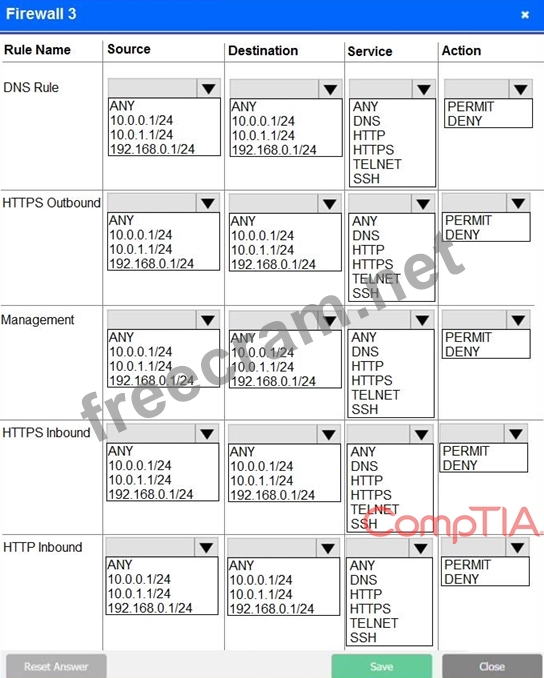
Firewall 3:
DNS Rule - ANY ANY DNS PERMIT
HTTPS Outbound - 192.168.0.1/24 ANY HTTPS PERMIT
Management - ANY ANY SSH PERMIT
HTTPS Inbound - ANY ANY HTTPS PERMIT
HTTP Inbound - ANY ANY HTTP DENY
DNS Rule - ANY ANY DNS PERMIT
HTTPS Outbound - 10.0.0.1/24 ANY HTTPS PERMIT
Management - ANY ANY SSH PERMIT
HTTPS Inbound - ANY ANY HTTPS PERMIT
HTTP Inbound - ANY ANY HTTP DENY
Firewall 2: No changes should be made to this firewall
Firewall 3:
DNS Rule - ANY ANY DNS PERMIT
HTTPS Outbound - 192.168.0.1/24 ANY HTTPS PERMIT
Management - ANY ANY SSH PERMIT
HTTPS Inbound - ANY ANY HTTPS PERMIT
HTTP Inbound - ANY ANY HTTP DENY


- Question List (240q)
- Question 1: A Chief Executive Officer (CEO) is dissatisfied with the lev...
- Question 2: A network administrator would like to configure a site-to-si...
- Question 3: A security administrator suspects an employee has been email...
- Question 4: Leveraging the information supplied below, complete the CSR ...
- Question 5: A company recently experienced a data breach and the source ...
- Question 6: A security analyst is looking for a solution to help communi...
- Question 7: A security analyst is reviewing the following command-line o...
- Question 8: A SOC is implementing an in sider-threat-detection program. ...
- Question 9: An enterprise needs to keep cryptographic keys in a safe man...
- Question 10: A recent malware outbreak across a subnet included successfu...
- Question 11: A security audit has revealed that a process control termina...
- Question 12: A cyberthreat intelligence analyst is gathering data about a...
- Question 13: A SOC is implementing an in sider-threat-detection program. ...
- Question 14: An organization is concerned that its hosted web servers are...
- Question 15: A security analyst discovers that a company's username and p...
- Question 16: A security analyst needs to make a recommendation for restri...
- Question 17: An organization has been experiencing outages during holiday...
- Question 18: A major clothing company recently lost a large amount of pro...
- Question 19: A consultant is configuring a vulnerability scanner for a la...
- Question 20: An organization has implemented a policy requiring the use o...
- Question 21: Several employees have noticed other bystanders can clearly ...
- Question 22: Following a prolonged datacenter outage that affected web-ba...
- Question 23: A researcher has been analyzing large data sets for the last...
- Question 24: A security analyst needs to determine how an attacker was ab...
- Question 25: A security analyst has been asked to investigate a situation...
- Question 26: A nuclear plant was the victim of a recent attack, and all t...
- Question 27: An attacker has successfully exfiltrated several non-salted ...
- Question 28: An auditor is performing an assessment of a security applian...
- Question 29: A security engineer is setting up passwordless authenticatio...
- Question 30: Which of the following describes the ability of code to targ...
- Question 31: Which of the following job roles would sponsor data quality ...
- Question 32: A security analyst is reviewing logs on a server and observe...
- Question 33: Which of the following is the correct order of volatility fr...
- Question 34: A company is required to continue using legacy software to s...
- Question 35: A security administrator checks the table of a network switc...
- Question 36: A user downloaded an extension for a browser, and the uses d...
- Question 37: A forensics investigator is examining a number of unauthoriz...
- Question 38: Local guidelines require that all information systems meet a...
- Question 39: An organization has decided to host its web application and ...
- Question 40: A company uses specially configured workstations tor any wor...
- Question 41: A network administrator needs to build out a new datacenter,...
- Question 42: Which of the following describes a maintenance metric that m...
- Question 43: A security researcher has alerted an organization that its s...
- Question 44: A privileged user at a company stole several proprietary doc...
- Question 45: A security analyst needs to generate a server certificate to...
- Question 46: A vulnerability assessment report will include the CVSS scor...
- Question 47: An analyst has determined that a server was not patched and ...
- Question 48: A user's account is constantly being locked out. Upon furthe...
- Question 49: A large enterprise has moved all Hs data to the cloud behind...
- Question 50: A company is experiencing an increasing number of systems th...
- Question 51: Leveraging the information supplied below, complete the CSR ...
- Question 52: SIMULATION A company recently added a DR site and is redesig...
- Question 53: A security engineer has enabled two-factor authentication on...
- Question 54: An analyst visits an internet forum looking for information ...
- Question 55: An attack relies on an end user visiting a website the end u...
- Question 56: During an incident response, a security analyst observes the...
- Question 57: A systems administrator needs to install a new wireless netw...
- Question 58: A security analyst is reviewing the following attack log out...
- Question 59: A security analyst is reviewing a new website that will soon...
- Question 60: A500 is implementing an insider threat detection program, Th...
- Question 61: An organization suffered an outage and a critical system too...
- Question 62: During a routine scan of a wireless segment at a retail comp...
- Question 63: A company uses wireless tor all laptops and keeps a very det...
- Question 64: A security analyst is reviewing a new website that will soon...
- Question 65: Drag and Drop Question A security engineer is setting up pas...
- Question 66: A remote user recently took a two-week vacation abroad and b...
- Question 67: A security analyst has been asked to investigate a situation...
- Question 68: A security analyst is investigation an incident that was fir...
- Question 69: A security analyst sees the following log output while revie...
- Question 70: A user recently attended an exposition and received some dig...
- Question 71: During an incident, an EDR system detects an increase in the...
- Question 72: The following is an administrative control that would be MOS...
- Question 73: An enterprise has hired an outside security firm to conduct ...
- Question 74: Which of the following provides the BEST protection for sens...
- Question 75: A security analyst is reviewing the following attack log out...
- Question 76: A newly purchased corporate WAP needs to be configured in th...
- Question 77: If a current private key is compromised, which of the follow...
- Question 78: A security engineer is setting up passwordless authenticatio...
- Question 79: The security team received a report of copyright infringemen...
- Question 80: A security analyst is investigating a vulnerability in which...
- Question 81: An organization has various applications that contain sensit...
- Question 82: A security administrator currently spends a large amount of ...
- Question 83: A security researching is tracking an adversary by noting it...
- Question 84: The following are the logs of a successful attack. (Exhibit)...
- Question 85: A security analyst wants to verify that a client-server (non...
- Question 86: A security analyst has received an alert about being sent vi...
- Question 87: A company recently experienced an attack during which its ma...
- Question 88: A company recently added a DR site and is redesigning the ne...
- Question 89: A Chief Information Security Officer (CISO) is concerned abo...
- Question 90: A security analyst is reviewing the following command-line o...
- Question 91: A global pandemic is forcing a private organization to close...
- Question 92: A hospital's administration is concerned about a potential l...
- Question 93: An enterprise has hired an outside security firm to conduct ...
- Question 94: Which of the following types of attacks is specific to the i...
- Question 95: Which of the following often operates in a client-server arc...
- Question 96: A researcher has been analyzing large data sets for the last...
- Question 97: An organization's finance department is implementing a polic...
- Question 98: An organization has hired a security analyst to perform a pe...
- Question 99: During an incident response, a security analyst observes the...
- Question 100: The Chief Executive Officer (CEO) of an organization would l...
- Question 101: A security analyst discovers that a company username and pas...
- Question 102: An end user reports a computer has been acting slower than n...
- Question 103: A security engineer is setting up passwordless authenticatio...
- Question 104: A security analyst reviews the datacenter access logs for a ...
- Question 105: A security analyst sees the following log output while revie...
- Question 106: A symmetric encryption algorithm is BEST suited for:...
- Question 107: A company recently implemented a new security system. In the...
- Question 108: A vulnerability assessment report will include the CVSS scor...
- Question 109: A user must introduce a password and a USB key to authentica...
- Question 110: An attacker was easily able to log in to a company's securit...
- Question 111: A security engineer is setting up passwordless authenticatio...
- Question 112: A security engineer is setting up passwordless authenticatio...
- Question 113: During an investigation, a security manager receives notific...
- Question 114: A company recently added a DR site and is redesigning the ne...
- Question 115: A security analyst is reviewing a new website that will soon...
- Question 116: Users have been issued smart cards that provide physical acc...
- Question 117: A malicious actor recently penetrated a company's network an...
- Question 118: A cybersecurity manager has scheduled biannual meetings with...
- Question 119: An organization has implemented a policy requiring the use o...
- Question 120: The website http://companywebsite.com requires users to prov...
- Question 121: An organization is concerned that is hosted web servers are ...
- Question 122: A security analyst is investigating an incident to determine...
- Question 123: Which of the following should be put in place when negotiati...
- Question 124: Joe, a user at a company, clicked an email link led to a web...
- Question 125: A security analyst receives a SIEM alert that someone logged...
- Question 126: A company installed several crosscut shredders as part of in...
- Question 127: A security analyst receives a SIEM alert that someone logged...
- Question 128: Select the appropriate attack and remediation from each drop...
- Question 129: A security analyst is reviewing a new website that will soon...
- Question 130: A security analyst is running a vulnerability scan to check ...
- Question 131: A security engineer is setting up passwordless authenticatio...
- Question 132: An attacker was easily able to log in to a company's securit...
- Question 133: Which of the following will MOST likely cause machine learni...
- Question 134: An organization is concerned that its hosted web servers are...
- Question 135: An organization is building backup sever moms in geographica...
- Question 136: A security analyst is reviewing the following output from a ...
- Question 137: A researcher has been analyzing large data sets for the last...
- Question 138: Which of the following is an example of federated access man...
- Question 139: A security analyst wants to verify that a client-server (non...
- Question 140: A network administrator is concerned about users being expos...
- Question 141: An incident response technician collected a mobile device du...
- Question 142: An organization regularly scans its infrastructure for missi...
- Question 143: To secure an application after a large data breach, an e-com...
- Question 144: Which of the following is MOST likely to contain ranked and ...
- Question 145: A systems analyst is responsible for generating a new digita...
- Question 146: An attacker is exploiting a vulnerability that does not have...
- Question 147: A security engineer obtained the following output from a thr...
- Question 148: An organization wants to implement a third factor to an exis...
- Question 149: An organization has expanded its operations by opening a rem...
- Question 150: A preventive control differs from a compensating control in ...
- Question 151: A security engineer obtained the following output from a thr...
- Question 152: The website http://companywebsite.com requires users to prov...
- Question 153: An end user reports a computer has been acting slower than n...
- Question 154: A cybersecurity department purchased o new PAM solution. The...
- Question 155: A forensics investigator is examining a number of unauthoriz...
- Question 156: The website http://companywebsite.com requires users to prov...
- Question 157: A security analyst needs to determine how an attacker was ab...
- Question 158: When implementing automation with loT devices, which of the ...
- Question 159: A recent security assessment revealed that an actor exploite...
- Question 160: A company has limited storage available and online presence ...
- Question 161: A security analyst receives the configuration of a current V...
- Question 162: A root cause analysis reveals that a web application outage ...
- Question 163: A security engineer is reviewing log files after a third dis...
- Question 164: A network administrator has been alerted that web pages are ...
- Question 165: A company is designing the layout of a new datacenter so it ...
- Question 166: A security analyst was deploying a new website and found a c...
- Question 167: A security analyst is reviewing a new website that will soon...
- Question 168: The security administrator has installed a new firewall whic...
- Question 169: SIMULATION A company recently added a DR site and is redesig...
- Question 170: A security analyst receives a SIEM alert that someone logged...
- Question 171: To secure an application after a large data breach, an e-com...
- Question 172: A network engineer notices the VPN concentrator overloaded a...
- Question 173: A small business just recovered from a ransomware attack aga...
- Question 174: A cybersecurity analyst needs to implement secure authentica...
- Question 175: Which of the following is a risk that is specifically associ...
- Question 176: A nationwide company is experiencing unauthorized logins at ...
- Question 177: Which of the following would be BEST to establish between or...
- Question 178: The SOC is reviewing process and procedures after a recent i...
- Question 179: A commercial cyber-threat intelligence organization observes...
- Question 180: Select the appropriate attack and remediation from each drop...
- Question 181: The cost of 'Cmovable media and the security risks of transp...
- Question 182: After a phishing scam for a user's credentials, the red team...
- Question 183: A security engineer is setting up passwordless authenticatio...
- Question 184: A root cause analysis reveals that a web application outage ...
- Question 185: Users at organization have been installing programs from the...
- Question 186: A security analyst is reviewing a new website that will soon...
- Question 187: A security engineer is setting up passwordless authenticatio...
- Question 188: During a routine scan of a wireless segment at a retail comp...
- Question 189: Users reported several suspicious activities within the last...
- Question 190: A healthcare company is revamping its IT strategy in light o...
- Question 191: While investigating a data leakage incident, a security anal...
- Question 192: A smart retail business has a local store and a newly establ...
- Question 193: The lessons-learned analysis from a recent incident reveals ...
- Question 194: Which of the following should a technician consider when sel...
- Question 195: An analyst visits an internet forum looking for information ...
- Question 196: A grocery store is expressing security and reliability conce...
- Question 197: An attacked is attempting to exploit users by creating a fak...
- Question 198: Which of the following would be BEST to establish between or...
- Question 199: A company recently moved sensitive videos between on-premise...
- Question 200: A security analyst needs to determine how an attacker was ab...
- Question 201: A network technician is installing a guest wireless network ...
- Question 202: An organization wants to host an externally accessible web s...
- Question 203: A security analyst b concerned about traffic initiated to th...
- Question 204: Leveraging the information supplied below, complete the CSR ...
- Question 205: A network administrator has been asked to install an IDS to ...
- Question 206: A security architect at a large, multinational organization ...
- Question 207: A company recently moved sensitive videos between on-premise...
- Question 208: A cybersecurity administrator needs to add disk redundancy f...
- Question 209: A company recently transitioned to a strictly BYOD culture d...
- Question 210: The Chief Security Officer (CSO) at a major hospital wants t...
- Question 211: A company just implemented a new telework policy that allows...
- Question 212: Which of the following would be the BEST resource for a soft...
- Question 213: A cybersecurity administrator is using iptables as an enterp...
- Question 214: To mitigate the impact of a single VM being compromised by a...
- Question 215: A smart retail business has a local store and a newly establ...
- Question 216: A newly purchased corporate WAP needs to be configured in th...
- Question 217: A security engineer is setting up passwordless authenticatio...
- Question 218: A host was infected with malware. During the incident respon...
- Question 219: A security analyst is running a vulnerability scan to check ...
- Question 220: Which of the following scenarios would make a DNS sinkhole e...
- Question 221: After reading a security bulletin, a network security manage...
- Question 222: A public relations team will be taking a group of guest on a...
- Question 223: A security analyst discovers several .jpg photos from a cell...
- Question 224: A malicious actor recently penetration a company's network a...
- Question 225: A security analyst is investigating an incident to determine...
- Question 226: A security modern may have occurred on the desktop PC of an ...
- Question 227: A security administrator checks the table of a network switc...
- Question 228: The SOC is reviewing process and procedures after a recent i...
- Question 229: Users have been issued smart cards that provide physical acc...
- Question 230: A security analyst is preparing a threat for an upcoming int...
- Question 231: A security analyst was deploying a new website and found a c...
- Question 232: A security administrator has noticed unusual activity occurr...
- Question 233: Which of the following is the purpose of a risk register?...
- Question 234: A security analyst receives a SIEM alert that someone logged...
- Question 235: A company is setting up a web server on the Internet that wi...
- Question 236: During an investigation, a security manager receives notific...
- Question 237: A development team employs a practice of bringing all the co...
- Question 238: A document that appears to be malicious has been discovered ...
- Question 239: An organization is concerned that its hosted web servers are...
- Question 240: During a routine scan of a wireless segment at a retail comp...

