- Home
- CompTIA
- CompTIA Advanced Security Practitioner (CASP)
- CompTIA.CAS-003.v2023-03-15.q404
- Question 400
Valid CAS-003 Dumps shared by ExamDiscuss.com for Helping Passing CAS-003 Exam! ExamDiscuss.com now offer the newest CAS-003 exam dumps, the ExamDiscuss.com CAS-003 exam questions have been updated and answers have been corrected get the newest ExamDiscuss.com CAS-003 dumps with Test Engine here:
Access CAS-003 Dumps Premium Version
(683 Q&As Dumps, 35%OFF Special Discount Code: freecram)
<< Prev Question Next Question >>
Question 400/404
Lab Simulation
Compliance with company policy requires a quarterly review of firewall rules. A new administrator is asked to conduct this review on the internal firewall sitting between several Internal networks.
The intent of this firewall is to make traffic more restrictive. Given the following information answer the questions below:
User Subnet: 192.168.1.0/24
Server Subnet: 192.168.2.0/24
Finance Subnet:192.168.3.0/24
Instructions: To perform the necessary tasks, please modify the DST port, Protocol, Action, and/or Rule Order columns. Firewall ACLs are read from the top down Task 1) An administrator added a rule to allow their machine terminal server access to the server subnet. This rule is not working. Identify the rule and correct this issue.
Task 2) All web servers have been changed to communicate solely over SSL. Modify the appropriate rule to allow communications.
Task 3) An administrator added a rule to block access to the SQL server from anywhere on the network. This rule is not working. Identify and correct this issue.
Task 4) Other than allowing all hosts to do network time and SSL, modify a rule to ensure that no other traffic is allowed.
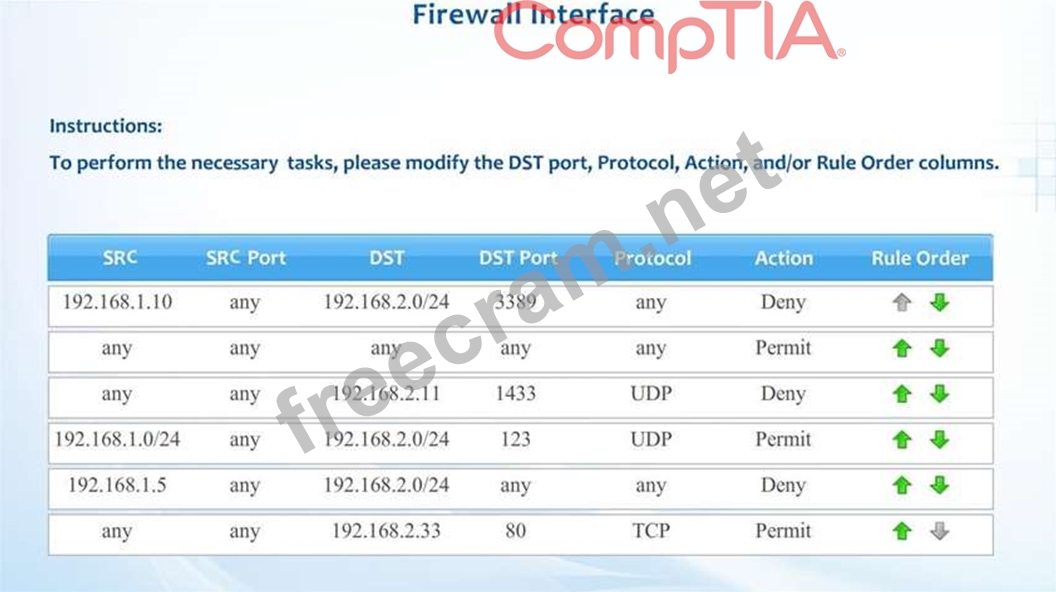
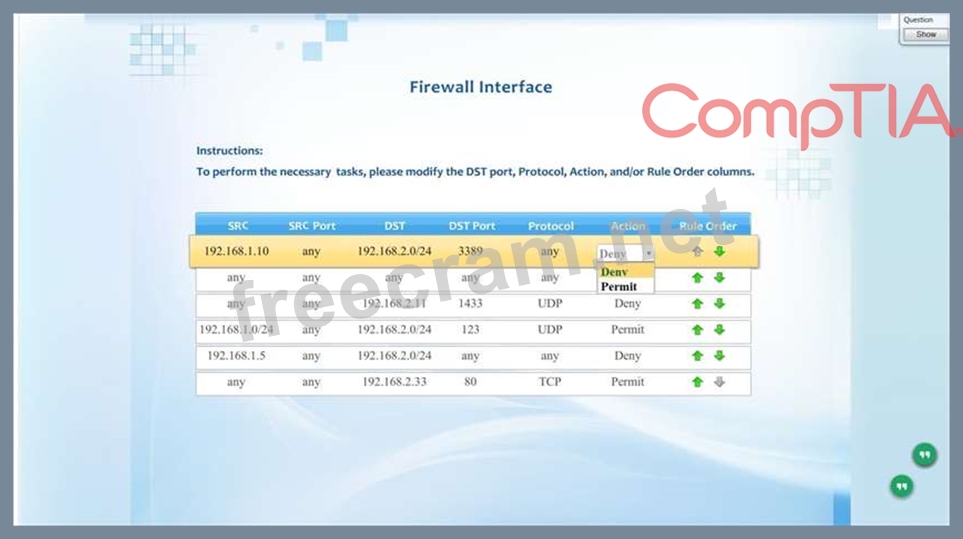
Compliance with company policy requires a quarterly review of firewall rules. A new administrator is asked to conduct this review on the internal firewall sitting between several Internal networks.
The intent of this firewall is to make traffic more restrictive. Given the following information answer the questions below:
User Subnet: 192.168.1.0/24
Server Subnet: 192.168.2.0/24
Finance Subnet:192.168.3.0/24
Instructions: To perform the necessary tasks, please modify the DST port, Protocol, Action, and/or Rule Order columns. Firewall ACLs are read from the top down Task 1) An administrator added a rule to allow their machine terminal server access to the server subnet. This rule is not working. Identify the rule and correct this issue.
Task 2) All web servers have been changed to communicate solely over SSL. Modify the appropriate rule to allow communications.
Task 3) An administrator added a rule to block access to the SQL server from anywhere on the network. This rule is not working. Identify and correct this issue.
Task 4) Other than allowing all hosts to do network time and SSL, modify a rule to ensure that no other traffic is allowed.
Correct Answer:
Firewall rules should be re-arranged to look like this:
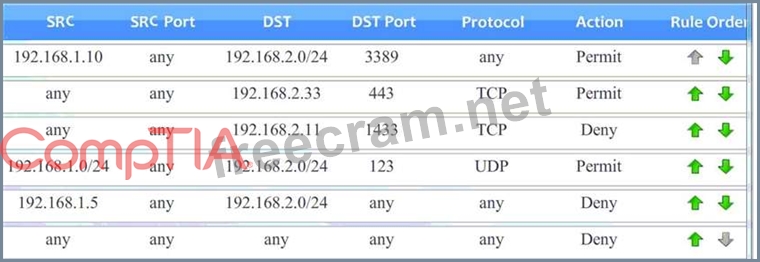
Task 1) An administrator added a rule to allow their machine terminal server access to the server subnet. This rule is not working. Identify the rule and correct this issue. The rule shown in the image below is the rule in question. It is not working because the action is set to Deny. This needs to be set to Permit.

Task 2) All web servers have been changed to communicate solely over SSL. Modify the appropriate rule to allow communications.
The web servers rule is shown in the image below. Port 80 (HTTP) needs to be changed to port
443 for HTTPS (HTTP over SSL).

Task 3) An administrator added a rule to block access to the SQL server from anywhere on the network. This rule is not working. Identify and correct this issue. The SQL Server rule is shown in the image below. It is not working because the protocol is wrong. It should be TCP, not UDP.

Task 4) Other than allowing all hosts to do network time and SSL, modify a rule to ensure that no other traffic is allowed.
The network time rule is shown in the image below.

However, this rule is not being used because the `any' rule shown below allows all traffic and the rule is placed above the network time rule. To block all other traffic, the `any' rule needs to be set to Deny, not Permit and the rule needs to be placed below all the other rules (it needs to be placed at the bottom of the list to the rule is enumerated last).

Task 1) An administrator added a rule to allow their machine terminal server access to the server subnet. This rule is not working. Identify the rule and correct this issue. The rule shown in the image below is the rule in question. It is not working because the action is set to Deny. This needs to be set to Permit.
Task 2) All web servers have been changed to communicate solely over SSL. Modify the appropriate rule to allow communications.
The web servers rule is shown in the image below. Port 80 (HTTP) needs to be changed to port
443 for HTTPS (HTTP over SSL).
Task 3) An administrator added a rule to block access to the SQL server from anywhere on the network. This rule is not working. Identify and correct this issue. The SQL Server rule is shown in the image below. It is not working because the protocol is wrong. It should be TCP, not UDP.
Task 4) Other than allowing all hosts to do network time and SSL, modify a rule to ensure that no other traffic is allowed.
The network time rule is shown in the image below.
However, this rule is not being used because the `any' rule shown below allows all traffic and the rule is placed above the network time rule. To block all other traffic, the `any' rule needs to be set to Deny, not Permit and the rule needs to be placed below all the other rules (it needs to be placed at the bottom of the list to the rule is enumerated last).


- Question List (404q)
- Question 1: An attacker wants to gain information about a company's data...
- Question 2: A security analyst who is concerned about sensitive data exf...
- Question 3: A security administrator wants to allow external organizatio...
- Question 4: A SaaS-based email service provider often receives reports f...
- Question 5: A developer needs to provide feedback on a peer's work durin...
- Question 6: A recent incident revealed a log entry was modified alter it...
- Question 7: A Chief Information Security Officer (CISO) is working with ...
- Question 8: A company has created a policy to allow employees to use the...
- Question 9: An organization has implemented an Agile development process...
- Question 10: A security consultant is considering authentication options ...
- Question 11: You are a security analyst tasked with interpreting an Nmap ...
- Question 12: A security administrator has noticed that an increased numbe...
- Question 13: An organization just merged with an organization in another ...
- Question 14: A networking administrator was recently promoted to security...
- Question 15: Ann, a Physical Security Manager, is ready to replace all 50...
- Question 16: A medical device company is implementing a new COTS antiviru...
- Question 17: A security administrator must configure the database server ...
- Question 18: Ann, a retiring employee, cleaned out her desk. The next day...
- Question 19: An advanced threat emulation engineer is conducting testing ...
- Question 20: An organization is reviewing endpoint security solutions. In...
- Question 21: A company that has been breached multiple times is looking t...
- Question 22: Designing a system in which only information that is essenti...
- Question 23: An infrastructure team within an energy organization is at t...
- Question 24: A security consultant is attempting to discover if the compa...
- Question 25: A security engineer reviews the table below: (Exhibit) The e...
- Question 26: Within the past six months, a company has experienced a seri...
- Question 27: A completely new class of web-based vulnerabilities has been...
- Question 28: A company is the victim of a phishing and spear-phishing cam...
- Question 29: A penetration tester is inspecting traffic on a new mobile b...
- Question 30: A cybersecurity analyst is hired to review the security the ...
- Question 31: A security analyst who is concerned about sensitive data exf...
- Question 32: A Chief Information Security Officer (CISO) of a large finan...
- Question 33: A networking administrator was recently promoted to security...
- Question 34: A technician is reviewing the following log: (Exhibit) Which...
- Question 35: Click on the exhibit buttons to view the four messages. (Exh...
- Question 36: A company sales manager received a memo from the company's f...
- Question 37: A security administrator at Company XYZ is trying to develop...
- Question 38: Given the following code snippet: (Exhibit) Which of the fol...
- Question 39: A security analyst sees some suspicious entries in a log fil...
- Question 40: A web developer has implemented HTML5 optimizations into a l...
- Question 41: Three companies want to allow their employees to seamlessly ...
- Question 42: A user has a laptop configured with multiple operating syste...
- Question 43: A new internal network segmentation solution will be impleme...
- Question 44: Compliance with company policy requires a quarterly review o...
- Question 45: After the departure of a developer under unpleasant circumst...
- Question 46: A critical system audit shows that the payroll system is not...
- Question 47: A company is migrating systems from an on-premises facility ...
- Question 48: A penetration test is being scoped for a set of web services...
- Question 49: As part of an organization's compliance program. administrat...
- Question 50: After the install process, a software application executed a...
- Question 51: An internal penetration tester was assessing a recruiting pa...
- Question 52: Company XYZ has just purchased Company ABC through a new acq...
- Question 53: Click on the exhibit buttons to view the four messages. (Exh...
- Question 54: An information security officer is responsible for one secur...
- Question 55: An organization is concerned that its hosted web servers are...
- Question 56: A security administrator is investigating an incident involv...
- Question 57: IT staff within a company often conduct remote desktop shari...
- Question 58: A company has created a policy to allow employees to use the...
- Question 59: Following the successful response to a data-leakage incident...
- Question 60: A security engineer is investigating a compromise that occur...
- Question 61: In a situation where data is to be recovered from an attacke...
- Question 62: A security technician is incorporating the following require...
- Question 63: Following a security assessment, the Chief Information Secur...
- Question 64: A security engineer must establish a method to assess compli...
- Question 65: A university's help desk is receiving reports that Internet ...
- Question 66: A large enterprise with thousands of users is experiencing a...
- Question 67: A security analyst is attempting to break into a client's se...
- Question 68: A security architect is designing a system to satisfy user d...
- Question 69: A security engineer is assessing the controls that are in pl...
- Question 70: The senior security administrator wants to redesign the comp...
- Question 71: A company's chief cybersecurity architect wants to configure...
- Question 72: A company has gone through a round of phishing attacks. More...
- Question 73: A large organization has recently suffered a massive credit ...
- Question 74: As a security administrator, you are asked to harden a serve...
- Question 75: An organization wants to allow its employees to receive corp...
- Question 76: A Chief information Security Officer (CISO) is developing co...
- Question 77: A security firm is writing a response to an RFP from a custo...
- Question 78: A security analyst is reviewing the corporate MDM settings a...
- Question 79: After being notified of an issue with the online shopping ca...
- Question 80: A network engineer is concerned about hosting web SFTP. and ...
- Question 81: Following a merger, the number of remote sites for a company...
- Question 82: Company A has noticed abnormal behavior targeting their SQL ...
- Question 83: Exhibit: (Exhibit)
- Question 84: After analyzing code, two developers al a company bring thes...
- Question 85: The senior security administrator wants to redesign the comp...
- Question 86: A company is concerned about insider threats and wants to pe...
- Question 87: A security engineer is working on a large software developme...
- Question 88: A security engineer has just been embedded in an agile devel...
- Question 89: A developer has implemented a piece of client-side JavaScrip...
- Question 90: The audit team was only provided the physical and logical ad...
- Question 91: A networking administrator was recently promoted to security...
- Question 92: When implementing a penetration testing program, the Chief I...
- Question 93: An infrastructure team is at the end of a procurement proces...
- Question 94: A software development company lost customers recently becau...
- Question 95: A security engineer has implemented an internal user access ...
- Question 96: An application development company implements object reuse t...
- Question 97: An organization is concerned with potential data loss inthe ...
- Question 98: A security technician is incorporating the following require...
- Question 99: A large bank deployed a DLP solution to detect and block cus...
- Question 100: A consulting firm was hired to conduct assessment for a comp...
- Question 101: Which of the following BEST represents a risk associated wit...
- Question 102: A security engineer is analyzing an application during a sec...
- Question 103: A hospital uses a legacy electronic medical record system th...
- Question 104: As a security administrator, you are asked to harden a serve...
- Question 105: A systems administrator establishes a CIFS share on a UNIX d...
- Question 106: An organization is attempting to harden its web servers and ...
- Question 107: An investigator wants to collect the most volatile data firs...
- Question 108: A Chief Financial Officer (CFO) has raised concerns with the...
- Question 109: While investigating suspicious activity on a server, a secur...
- Question 110: Employees who travel internationally have been issued corpor...
- Question 111: (Exhibit) Compliance with company policy requires a quarterl...
- Question 112: A security administrator adding a NAC requirement for all VP...
- Question 113: During a recent audit of servers, a company discovered that ...
- Question 114: A security administrator at a hospital has implemented a VDI...
- Question 115: A security consultant is considering authentication options ...
- Question 116: An enterprise is trying to secure a specific web-based appli...
- Question 117: An organization has established the following controls matri...
- Question 118: Due to compliance regulations, a company requires a yearly p...
- Question 119: A security engineer is attempting to convey the importance o...
- Question 120: An internal staff member logs into an ERP platform and click...
- Question 121: The government is concerned with remote military missions be...
- Question 122: A security engineer is analyzing an application during a sec...
- Question 123: A security manager recently categorized an information syste...
- Question 124: A security auditor suspects two employees of having devised ...
- Question 125: A user workstation was infected with a new malware variant a...
- Question 126: Immediately following the report of a potential breach, a se...
- Question 127: A request has been approved for a vendor to access a new int...
- Question 128: A security engineer is helping the web developers assess a n...
- Question 129: An enterprise solution requires a central monitoring platfor...
- Question 130: After a security incident, an administrator would like to im...
- Question 131: A company's Chief Operating Officer (COO) is concerned about...
- Question 132: A medical device company is implementing a new COTS antiviru...
- Question 133: A company has adopted and established a continuous-monitorin...
- Question 134: A security administrator must configure the database server ...
- Question 135: A laptop is recovered a few days after it was stolen. Which ...
- Question 136: A company is updating its acceptable use and security polici...
- Question 137: During the decommissioning phase of a hardware project, a se...
- Question 138: An engineer wants to assess the OS security configurations o...
- Question 139: A project manager is working with a team that is tasked to d...
- Question 140: An architect was recently hired by a power utility to increa...
- Question 141: A security engineer has been hired to design a device that w...
- Question 142: A security engineer has implemented an internal user access ...
- Question 143: A security engineer is attempting to inventory all network d...
- Question 144: The Information Security Officer (ISO) believes that the com...
- Question 145: During a routine network scan, a security administrator disc...
- Question 146: A software project manager has been provided with a requirem...
- Question 147: A product owner is reviewing the output of a web-application...
- Question 148: A security administrator wants to stand up a NIPS that is mu...
- Question 149: A security manager recently categorized an information syste...
- Question 150: In a SPML exchange, which of the following BEST describes th...
- Question 151: The risk manager has requested a security solution that is c...
- Question 152: Drag and drop the cloud deployment model to the associated u...
- Question 153: Confidential information related to Application A. Applicati...
- Question 154: A company's chief cybersecurity architect wants to configure...
- Question 155: Click on the exhibit buttons to view the four messages. (Exh...
- Question 156: A user workstation was infected with a new malware variant a...
- Question 157: A vulnerability scan with the latest definitions was perform...
- Question 158: An information security officer reviews a report and notices...
- Question 159: The DLP solution has been showing some unidentified encrypte...
- Question 160: A large organization has recently suffered a massive credit ...
- Question 161: As part of incident response, a technician is taking an imag...
- Question 162: Given the following code snippet: (Exhibit) Of which of the ...
- Question 163: A web developer has implemented HTML5 optimizations into a l...
- Question 164: Which of the following system would be at the GREATEST risk ...
- Question 165: A company is not familiar with the risks associated with IPv...
- Question 166: A company has decided to replace all the T-1 uplinks at each...
- Question 167: During a security assessment, an organization is advised of ...
- Question 168: A company is migrating systems from an on-premises facility ...
- Question 169: A security administrator has been asked to select a cryptogr...
- Question 170: An organization has established the following controls matri...
- Question 171: The Chief Information Security Officer (CISO) at a large org...
- Question 172: Given the following code snippet: (Exhibit) Of which of the ...
- Question 173: Lab Simulation Company A has noticed abnormal behavior targe...
- Question 174: The code snippet below controls all electronic door locks to...
- Question 175: A government contractor was the victim of a malicious attack...
- Question 176: A security administrator is opening connectivity on a firewa...
- Question 177: A security technician is incorporating the following require...
- Question 178: A regional business is expecting a severe winter storm next ...
- Question 179: A security architect has been assigned to a new digital tran...
- Question 180: An agency has implemented a data retention policy that requi...
- Question 181: Given the following output from a local PC: (Exhibit) Which ...
- Question 182: After several industry comnpetitors suffered data loss as a ...
- Question 183: A company suspects a web server may have been infiltrated by...
- Question 184: A managed service provider is designing a log aggregation se...
- Question 185: The latest independent research shows that cyber attacks inv...
- Question 186: A developer emails the following output to a security admini...
- Question 187: An analyst connects to a company web conference hosted on ww...
- Question 188: An organization is in the process of integrating its operati...
- Question 189: An external penetration tester compromised one of the client...
- Question 190: An internal application has been developed to increase the e...
- Question 191: An educational institution would like to make computer labs ...
- Question 192: The senior security administrator wants to redesign the comp...
- Question 193: A hospital uses a legacy electronic medical record system th...
- Question 194: A new security policy states all wireless and wired authenti...
- Question 195: A security engineer is making certain URLs from an internal ...
- Question 196: A company wants to configure its wireless network to require...
- Question 197: Company A has noticed abnormal behavior targeting their SQL ...
- Question 198: The risk subcommittee of a corporate board typically maintai...
- Question 199: Drag and drop the cloud deployment model to the associated u...
- Question 200: A newly hired Chief Information Security Officer (CISO) is r...
- Question 201: An enterprise's Chief Technology Officer (CTO) and Chief Inf...
- Question 202: A company that has been breached multiple times is looking t...
- Question 203: A financial services company wants to migrate its email serv...
- Question 204: Joe an application security engineer is performing an audit ...
- Question 205: Compliance with company policy requires a quarterly review o...
- Question 206: An organization is preparing to develop a business continuit...
- Question 207: A systems administrator at a medical imaging company discove...
- Question 208: A security engineer is working to secure an organization's V...
- Question 209: The Chief information Officer (CIO) wants to establish a non...
- Question 210: A Chief Information Security Officer (CISO) has requested th...
- Question 211: The Chief Executive Officer (CEO) of a fast-growing company ...
- Question 212: Given the following: (Exhibit) Which of the following vulner...
- Question 213: A security administrator is updating a company's SCADA authe...
- Question 214: Which of the following describes a contract that is used to ...
- Question 215: A security engineer has implemented an internal user access ...
- Question 216: A security administrator is performing VDI traffic data coll...
- Question 217: A software development team is conducting functional and use...
- Question 218: The finance department for an online shopping website has di...
- Question 219: A remote user reports the inability to authenticate to the V...
- Question 220: A Chief Information Security Officer (CISO) is reviewing the...
- Question 221: Company.org has requested a black-box security assessment be...
- Question 222: The Chief Executive Officer (CEO) of a company that allows t...
- Question 223: At a meeting, the systems administrator states the security ...
- Question 224: Which of the following would be used in forensic analysis of...
- Question 225: A penetration tester is inspecting traffic on a new mobile b...
- Question 226: Joe, a hacker, has discovered he can specifically craft a we...
- Question 227: A server (10.0.0.2) on the corporate network is experiencing...
- Question 228: A security engineer is analyzing an application during a sec...
- Question 229: A security administrator wants to implement controls to hard...
- Question 230: A security engineer must establish a method to assess compli...
- Question 231: While investigating suspicious activity on a server, a secur...
- Question 232: A security administrator must configure the database server ...
- Question 233: Wireless users are reporting issues with the company's video...
- Question 234: A vulnerability scanner report shows that a client-server ho...
- Question 235: A vulnerability scanner report shows that a client-server ho...
- Question 236: A systems administrator has installed a disk wiping utility ...
- Question 237: A security consultant is considering authentication options ...
- Question 238: A developer is reviewing the following transaction logs from...
- Question 239: An asset manager is struggling with the best way to reduce t...
- Question 240: An administrator wants to install a patch to an application....
- Question 241: A Chief Information Security Officer (CISO) needs to create ...
- Question 242: The Chief Information Officer (CIO) is reviewing the IT cent...
- Question 243: A senior network security engineer has been tasked to decrea...
- Question 244: A completely new class of web-based vulnerabilities has been...
- Question 245: The Chief Information Security Officer (CISO) suspects that ...
- Question 246: The security administrator finds unauthorized tables and rec...
- Question 247: A researcher is working to identify what appears to be a new...
- Question 248: Since the implementation of IPv6 on the company network, the...
- Question 249: Company.org has requested a black-box security assessment be...
- Question 250: A software development company lost customers recently becau...
- Question 251: An insurance company has an online quoting system for insura...
- Question 252: A large hospital has implemented BYOD to allow doctors and s...
- Question 253: Given the following code snippet: (Exhibit) Which of the fol...
- Question 254: A new database application was added to a company's hosted V...
- Question 255: A company's existing forward proxies support software-based ...
- Question 256: An organization just merged with an organization in another ...
- Question 257: A remote user reports the inability to authenticate to the V...
- Question 258: The Universal Research Association has just been acquired by...
- Question 259: The security administrator of a small firm wants to stay cur...
- Question 260: A security architect is implementing security measures in re...
- Question 261: A security engineer is performing an assessment again for a ...
- Question 262: A network engineer wants to deploy user-based authentication...
- Question 263: An IT manager is concerned about the cost of implementing a ...
- Question 264: A company protects privileged accounts by using hardware key...
- Question 265: A security engineer is helping the web developers assess a n...
- Question 266: A security consultant is considering authentication options ...
- Question 267: A security administrator is assessing a new application. The...
- Question 268: A Chief Information Officer (CIO) has mandated that all web-...
- Question 269: A company's IT department currently performs traditional pat...
- Question 270: Following a major security modem that resulted in a signific...
- Question 271: An administrative control that is put in place to ensure one...
- Question 272: Compliance with company policy requires a quarterly review o...
- Question 273: Which of the following activities is commonly deemed "OUT OF...
- Question 274: A hospital uses a legacy electronic medical record system th...
- Question 275: A company wants to analyze internal network traffic for IOCs...
- Question 276: After multiple availability issues a systems administrator i...
- Question 277: A security architect is designing a new infrastructure using...
- Question 278: A company monitors the performance of all web servers using ...
- Question 279: A recent overview of the network's security and storage appl...
- Question 280: An Association is preparing to upgrade their firewalls at fi...
- Question 281: Joe an application security engineer is performing an audit ...
- Question 282: A software development team is conducting functional and use...
- Question 283: A critical system audit shows that the payroll system is not...
- Question 284: IT staff within a company often conduct remote desktop shari...
- Question 285: (Exhibit)
- Question 286: Two new technical SMB security settings have been enforced a...
- Question 287: An organization has established the following controls matri...
- Question 288: Joe, a penetration tester, is assessing the security of an a...
- Question 289: An organization is in the process of integrating its operati...
- Question 290: A security incident responder discovers an attacker has gain...
- Question 291: A penetration tester is given an assignment lo gain physical...
- Question 292: Company policy requires that all company laptops meet the fo...
- Question 293: A senior network security engineer has been tasked to decrea...
- Question 294: Which of the following BEST represents a risk associated wit...
- Question 295: An insurance company has two million customers and is resear...
- Question 296: The Chief Information Security Officer (CISO) at a large org...
- Question 297: A systems administrator at a medical imaging company discove...
- Question 298: A security engineer is working with a software development t...
- Question 299: A company is purchasing an application that will be used to ...
- Question 300: An information security officer reviews a report and notices...
- Question 301: After analyzing code, two developers al a company bring thes...
- Question 302: select id, firstname, lastname from authors User input= firs...
- Question 303: Drag and drop the cloud deployment model to the associated u...
- Question 304: A database administrator is required to adhere to and implem...
- Question 305: A consultant is hired to perform a passive vulnerability ass...
- Question 306: A security auditor needs to review the manner in which an en...
- Question 307: An enterprise with global sites processes and exchanges high...
- Question 308: A security administrator is troubleshooting RADIUS authentic...
- Question 309: During a new desktop refresh, all hosts are hardened at the ...
- Question 310: A security administrator is troubleshooting RADIUS authentic...
- Question 311: A forensic analyst receives a hard drive containing malware ...
- Question 312: Developers are working on anew feature to add to a social me...
- Question 313: A core router was manipulated by a credentialed bypass to se...
- Question 314: News outlets are beginning to report on a number of retail e...
- Question 315: Company ABC is hiring customer service representatives from ...
- Question 316: An administrator is working with management to develop polic...
- Question 317: Which of the following is MOST likely to be included in a se...
- Question 318: Providers at a healthcare system with many geographically di...
- Question 319: A small company is developing a new Internet-facing web appl...
- Question 320: A hospital uses a legacy electronic medical record system th...
- Question 321: A company has completed the implementation of technical and ...
- Question 322: The Chief Executive Officer (CEO) of an Internet service pro...
- Question 323: A security consultant is conducting a penetration test again...
- Question 324: Due to a recent breach, the Chief Executive Officer (CEO) ha...
- Question 325: A user workstation was infected with a new malware variant a...
- Question 326: A government agency considers confidentiality to be of utmos...
- Question 327: A network service on a production system keeps crashing at r...
- Question 328: An enterprise solution requires a central monitoring platfor...
- Question 329: A security administrator wants to deploy a dedicated storage...
- Question 330: A recent overview of the network's security and storage appl...
- Question 331: While conducting a BIA for a proposed acquisition, the IT in...
- Question 332: The source workstation image for new accounting PCs has begu...
- Question 333: Users have been reporting unusual automated phone calls, inc...
- Question 334: A Chief Information Securiy Officer (CISO) is reviewing tech...
- Question 335: An organization is improving its web services to enable bett...
- Question 336: An organization wants to arm its cybersecurity defensive sui...
- Question 337: An organization has employed the services of an auditing fir...
- Question 338: The Chief Information Security Officer (CISO) is asking for ...
- Question 339: Two competing companies experienced similar attacks on their...
- Question 340: After the install process, a software application executed a...
- Question 341: A cybersecurity analyst is conducting packet analysis on the...
- Question 342: Which of the following would be used in forensic analysis of...
- Question 343: The Chief Information Officer (CIO) wants to increase securi...
- Question 344: A user workstation was infected with a new malware variant a...
- Question 345: When reviewing KRIs of the email security appliance with the...
- Question 346: DRAG DROP Drag and drop the cloud deployment model to the as...
- Question 347: A security analyst is investigating a series of suspicious e...
- Question 348: Which of the following BEST represents a risk associated wit...
- Question 349: A company recently experienced a period of rapid growth, and...
- Question 350: SIMULATION (Exhibit) Compliance with company policy requires...
- Question 351: A hospital uses a legacy electronic medical record system th...
- Question 352: An organization is considering the use of a thin client arch...
- Question 353: Which of the following are the MOST likely vectors for the u...
- Question 354: A company recently implemented a new cloud storage solution ...
- Question 355: An engineer is reviewing the security architecture for an en...
- Question 356: A forensics analyst suspects that a breach has occurred. Sec...
- Question 357: After a large organization has completed the acquisition of ...
- Question 358: Which of the following attacks can be mitigated by proper da...
- Question 359: An organization has recently deployed an EDR solution across...
- Question 360: The security administrator of a large enterprise is tasked w...
- Question 361: Which of the following provides the BEST risk calculation me...
- Question 362: An organization has recently deployed an EDR solution across...
- Question 363: After analyzing code, two developers al a company bring thes...
- Question 364: A recent overview of the network's security and storage appl...
- Question 365: The helpdesk is receiving multiple calls about slow and inte...
- Question 366: A protect manager Ts working with a team that is tasked to d...
- Question 367: The administrator is troubleshooting availability issues on ...
- Question 368: A technician uses an old SSL server due to budget constraint...
- Question 369: ABC Corporation uses multiple security zones to protect syst...
- Question 370: A security administrator is concerned about employees connec...
- Question 371: A security administrator was informed that a server unexpect...
- Question 372: The source workstation image for new accounting PCs has begu...
- Question 373: Which of the following technologies prevents an unauthorized...
- Question 374: A Chief Information Security Officer (CISO) has created a su...
- Question 375: A security administrator must configure the database server ...
- Question 376: An engineer is reviewing the security architecture for an en...
- Question 377: A security technician receives a copy of a report that was o...
- Question 378: A Chief Financial Officer (CFO) has raised concerns with the...
- Question 379: A security technician receives a copy of a report that was o...
- Question 380: A security analyst sees some suspicious entries in a log fil...
- Question 381: An organization, which handles large volumes of PII, allows ...
- Question 382: During a recent audit of servers, a company discovered that ...
- Question 383: A company enlists a trusted agent to implement a way to auth...
- Question 384: A core router was manipulated by a credentialed bypass to se...
- Question 385: A systems security engineer is assisting an organization's m...
- Question 386: A request has been approved for a vendor to access a new int...
- Question 387: An attacker attempts to create a DoS event against the VoIP ...
- Question 388: An organization is currently performing a market scan for ma...
- Question 389: A penetration tester is conducting an assessment on Comptia....
- Question 390: Executive management is asking for a new manufacturing contr...
- Question 391: An international e-commerce company has identified attack tr...
- Question 392: Users have been reporting unusual automated phone calls, inc...
- Question 393: A security administrator wants to prevent sensitive data res...
- Question 394: An advanced threat emulation engineer is conducting testing ...
- Question 395: A company is acquiring incident response and forensic assist...
- Question 396: A SaaS provider decides to offer data storage as a service. ...
- Question 397: A security administrator notices the following line in a ser...
- Question 398: A storage as a service company implements both encryption at...
- Question 399: A security administrator wants to deploy a dedicated storage...
- Question 400: Lab Simulation Compliance with company policy requires a qua...
- Question 401: An internal penetration tester was assessing a recruiting pa...
- Question 402: A security consultant is considering authentication options ...
- Question 403: A security manager is looking into the following vendor prop...
- Question 404: An attacker wants to gain information about a company's data...
