- Home
- Citrix
- Citrix NetScaler 10.5 Essentials and Networking
- Citrix.1Y0-351.v2018-03-18.q264
- Question 73
Valid 1Y0-351 Dumps shared by ExamDiscuss.com for Helping Passing 1Y0-351 Exam! ExamDiscuss.com now offer the newest 1Y0-351 exam dumps, the ExamDiscuss.com 1Y0-351 exam questions have been updated and answers have been corrected get the newest ExamDiscuss.com 1Y0-351 dumps with Test Engine here:
Access 1Y0-351 Dumps Premium Version
(290 Q&As Dumps, 35%OFF Special Discount Code: freecram)
<< Prev Question Next Question >>
Question 73/264
Which type of authentication server could an engineer configure in order to provide the use of RSA token authentication as a permitted authentication method to access a AAA Virtual Server?
Correct Answer: C
Explanation/Reference:
Explanation:
http://support.citrix.com/article/CTX127543
This document describes how to configure Access Gateway 5.0 for authentication against an RSA SecureID Authentication server. It describes the configuration required in both the Access Gateway and the RSA server for various deployment topologies.
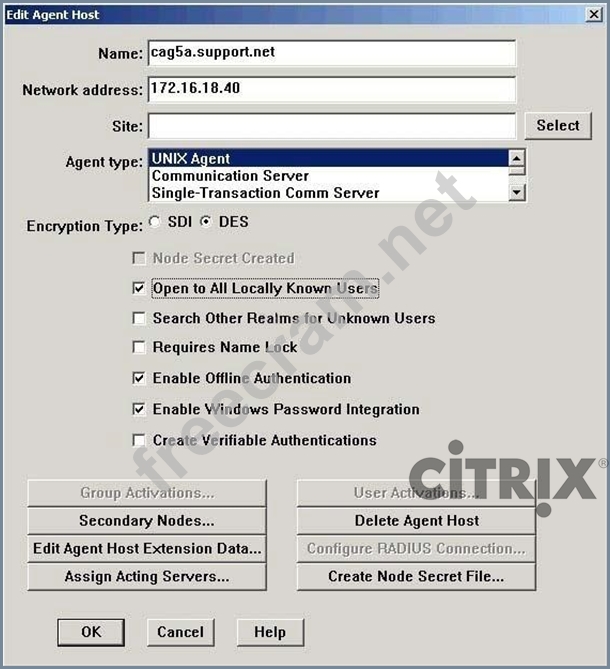
Within the RSA Authentication Manager console, choose Agent Host > Generate Configuration Files and select for One Agent Host, and choose the Agent Host created in step 1 and save the generated sdconf.rec file.
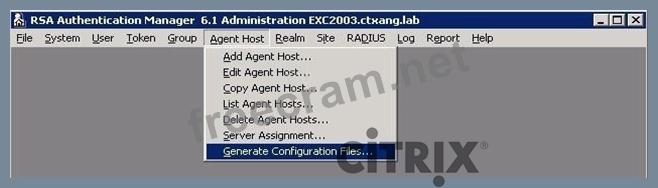
If using RSA 7.1
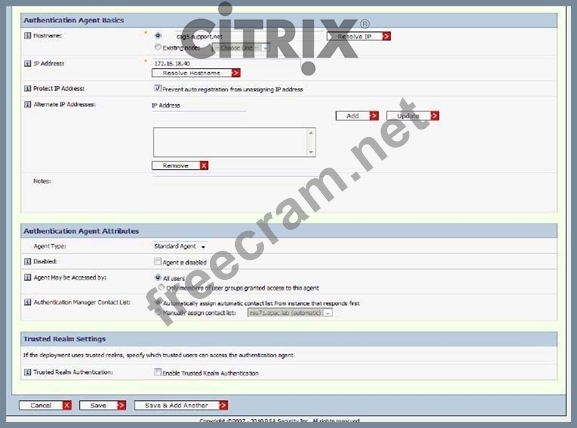
Open the RSA Security Console and navigate to Access > Authentication Agents > Add New. Enter the name and IP Address of the Access Gateway, and set Agent type to Standard Agent.
Save this new agent.
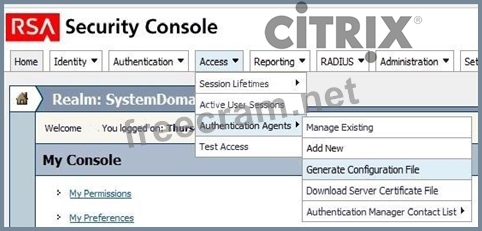
Select Access > Authentication Agents > Generate Configuration File and generate the configuration file.
There is no option to generate a configuration file for a single host in RSA 7.1. Save and extract the sdconf.rec from the generated zip file.
Log on to the Access Gateway AdminLogonPoint and go to Authentication Profiles to create an RSA authentication profile. Browse to the generated sdconf.rec file on your computer to upload it on the Appliance, and save the profile.

Additional Notes for Creating the Agent Record in RSA. The details entered into the Agent Host configuration are specific, and depend on the deployment configuration of your Access Gateway. The following are the different deployment methods and the associated configuration within the RSA Agent:
Access Gateway is a non-HA deployment in one-arm mode.
Network Address: IP address of Access Gateway
Access Gateway is a non-HA deployment in two-arm mode, traffic to the RSA server is through the interface with the Internal role
Network Address: IP address of the interface with the Internal role Access Gateway is a non-HA deployment in two-arm mode, traffic to the RSA server is through the interface with the External role.
Network Address: IP address of the interface with the Internal role Secondary Nodes: IP address of the interface with the External role Access Gateway is in an HA deployment in one-arm mode Network Address: The HA Virtual IP address
Secondary Nodes: The physical IP addresses of both Access Gateways Access Gateway is in an HA deployment in two-arm mode, traffic to the RSA server is through the interface marked as INTERNAL Network Address: The HA Internal virtual IP address
Secondary Nodes: The physical IP addresses of the interfaces with the Internal role on both Access Gateways
Access Gateway is in an HA deployment in two-arm mode, traffic to the RSA server is through the interface marked as EXTERNAL
Network Address: The HA Internal virtual IP address
Secondary Nodes: The physical IP addresses of the interfaces with the External role on both Access Gateways
*In RSA 7.1 Secondary Nodes have been renamed to Alternate IP Addresses in the Authentication Agent configuration.
Explanation:
http://support.citrix.com/article/CTX127543
This document describes how to configure Access Gateway 5.0 for authentication against an RSA SecureID Authentication server. It describes the configuration required in both the Access Gateway and the RSA server for various deployment topologies.
Within the RSA Authentication Manager console, choose Agent Host > Generate Configuration Files and select for One Agent Host, and choose the Agent Host created in step 1 and save the generated sdconf.rec file.
If using RSA 7.1
Open the RSA Security Console and navigate to Access > Authentication Agents > Add New. Enter the name and IP Address of the Access Gateway, and set Agent type to Standard Agent.
Save this new agent.
Select Access > Authentication Agents > Generate Configuration File and generate the configuration file.
There is no option to generate a configuration file for a single host in RSA 7.1. Save and extract the sdconf.rec from the generated zip file.
Log on to the Access Gateway AdminLogonPoint and go to Authentication Profiles to create an RSA authentication profile. Browse to the generated sdconf.rec file on your computer to upload it on the Appliance, and save the profile.
Additional Notes for Creating the Agent Record in RSA. The details entered into the Agent Host configuration are specific, and depend on the deployment configuration of your Access Gateway. The following are the different deployment methods and the associated configuration within the RSA Agent:
Access Gateway is a non-HA deployment in one-arm mode.
Network Address: IP address of Access Gateway
Access Gateway is a non-HA deployment in two-arm mode, traffic to the RSA server is through the interface with the Internal role
Network Address: IP address of the interface with the Internal role Access Gateway is a non-HA deployment in two-arm mode, traffic to the RSA server is through the interface with the External role.
Network Address: IP address of the interface with the Internal role Secondary Nodes: IP address of the interface with the External role Access Gateway is in an HA deployment in one-arm mode Network Address: The HA Virtual IP address
Secondary Nodes: The physical IP addresses of both Access Gateways Access Gateway is in an HA deployment in two-arm mode, traffic to the RSA server is through the interface marked as INTERNAL Network Address: The HA Internal virtual IP address
Secondary Nodes: The physical IP addresses of the interfaces with the Internal role on both Access Gateways
Access Gateway is in an HA deployment in two-arm mode, traffic to the RSA server is through the interface marked as EXTERNAL
Network Address: The HA Internal virtual IP address
Secondary Nodes: The physical IP addresses of the interfaces with the External role on both Access Gateways
*In RSA 7.1 Secondary Nodes have been renamed to Alternate IP Addresses in the Authentication Agent configuration.


- Question List (264q)
- Question 1: Scenario: An engineer has three subnets configured on a NetS...
- Question 2: Scenario: Primary NetScaler (NS1) is licensed for 10000 Maxi...
- Question 3: Scenario: A network engineer needs to implement high availab...
- Question 4: What should a network engineer do to prevent unauthorized us...
- Question 5: The network engineer is investigating issues and suspects th...
- Question 6: A network engineer needs to configure smart card-based authe...
- Question 7: Scenario: NetScaler features are NOT licensed. A NetScaler E...
- Question 8: How could an engineer configure a monitor to ensure that a s...
- Question 9: Which NetScaler feature would a NetScaler Engineer configure...
- Question 10: Scenario: A NetScaler Engineer has been tasked with reconfig...
- Question 11: Which setting would a NetScaler Engineer disable in order to...
- Question 12: A NetScaler Engineer created an SSL virtual server but the s...
- Question 13: A NetScaler Engineer needs to audit extended Access Control ...
- Question 14: In order to create a three-node NetScaler cluster, all nodes...
- Question 15: How could a NetScaler Engineer ensure that a content-switchi...
- Question 16: Scenario: A network engineer would like to prevent blacklist...
- Question 17: Scenario: A NetScaler engineer configured a service and serv...
- Question 18: Scenario: A network engineer monitoring an HTTP service-rela...
- Question 19: Scenario: An engineer implementing a NetScaler is tasked wit...
- Question 20: A security test has been completed on an SSL offload impleme...
- Question 21: A recent security audit has identified that NetScaler manage...
- Question 22: A network engineer should use a HTTP-ECV monitor type to con...
- Question 23: Scenario: A website that provides hotel bookings lists each ...
- Question 24: Scenario: A company has three HTTP servers that are load bal...
- Question 25: Scenario: A NetScaler high availability (HA) pair has the fo...
- Question 26: Scenario: An engineer needs to configure a monitor to ensure...
- Question 27: Scenario: A network engineer configured a new NetScaler MPX ...
- Question 28: Which command must an engineer use to run a cluster with les...
- Question 29: Scenario: A company is using Citrix NetScaler VPX for publis...
- Question 30: In a high-availability (HA) configuration, a NetScaler Engin...
- Question 31: Which built-in TCP profile should a NetScaler Engineer choos...
- Question 32: Which protocol is responsible for exchanging site metric, ne...
- Question 33: Scenario: A NetScaler Engineer has enabled the HTTP Compress...
- Question 34: Scenario: A NetScaler Engineer needs to enable access to a l...
- Question 35: Scenario: A client connecting to an SSL virtual server recei...
- Question 36: Scenario: The NetScaler has been connected to two external n...
- Question 37: Scenario: A NetScaler Engineer has discovered that the objec...
- Question 38: Which two of the following settings could be configured usin...
- Question 39: A network engineer might choose to use SSL_Bridge instead of...
- Question 40: Which load-balancing method is used in connection mirroring ...
- Question 41: Scenario: A security test has shown that the NetScaler is fo...
- Question 42: On which two objects could a NetScaler Engineer bind cipher ...
- Question 43: Which step is required to ensure that SSL traffic is passed ...
- Question 44: Which step could a network engineer take to prevent brute fo...
- Question 45: Which persistence method is only applicable to load-balancin...
- Question 46: A network engineer wants to hide the IP address of the outgo...
- Question 47: The Lazy Load action of Front End Optimization (FEO) improve...
- Question 48: Which two virtual servers could a NetScaler Engineer configu...
- Question 49: Scenario: A NetScaler Engineer is asked to interpret the fol...
- Question 50: Which IP address type should be bound to a VLAN in order to ...
- Question 51: Scenario: A NetScaler engineer has received an SSL certifica...
- Question 52: Scenario: A network engineer has created an SSL offload virt...
- Question 53: Scenario: A network engineer needs to re-configure the NetSc...
- Question 54: Scenario: A call center has deployed Access Gateway Enterpri...
- Question 55: While binding a certificate key pair where the key is a 2048...
- Question 56: As a result of connecting two NetScaler interfaces in the sa...
- Question 57: Scenario: A NetScaler Engineer creates a new HTTP VServer us...
- Question 58: What type of protocol does AppFlow use for reporting?...
- Question 59: The disk is full on a NetScaler appliance but NO alerts were...
- Question 60: Scenario: An engineer has been asked to implement load balan...
- Question 61: An engineer should use the filter (content filtering) featur...
- Question 62: A network engineer is investigating issues and suspects that...
- Question 63: Which troubleshooting tool will show policy hits and verify ...
- Question 64: Scenario: A network engineer has configured GSLB for a multi...
- Question 65: Scenario: An engineer has a NetScaler system with NSIP 192.1...
- Question 66: Which NetScaler IP address must a NetScaler Engineer set for...
- Question 67: A network engineer wants to configure a NetScaler for load b...
- Question 68: A network engineer has configured two NetScaler MPX applianc...
- Question 69: Scenario: When the NetScaler was set up, compression was ena...
- Question 70: Scenario: A NetScaler Engineer has created an SSL virtual se...
- Question 71: On a NetScaler system, the __________ timeout value will mar...
- Question 72: A network engineer has enabled USIP and USNIP and set a uniq...
- Question 73: Which type of authentication server could an engineer config...
- Question 74: Which outcome does the minify JavaScript option of the Front...
- Question 75: Scenario: An engineer has been given the task of selecting t...
- Question 76: Which two authentication types on the NetScaler support pass...
- Question 77: A NetScaler Engineer is required to use SNMP v3 on a NetScal...
- Question 78: Traffic to which destination is sourced from the NetScaler I...
- Question 79: Some SSL certificate files may be missing from a NetScaler a...
- Question 80: Which tool could a NetScaler Engineer use to monitor client-...
- Question 81: How could a network engineer gather detailed network informa...
- Question 82: An engineer is checking that ports are configured correctly ...
- Question 83: Scenario: A network engineer has created and bound an UDP-EC...
- Question 84: Server Name Indication (SNI) is required when __________. (C...
- Question 85: A network engineer wants to collect performance statistics r...
- Question 86: An environment network has: - High bandwidth - Low packet lo...
- Question 87: A company wants to implement a policy where all passwords sh...
- Question 88: Scenario: A NetScaler Engineer is configuring a new system w...
- Question 89: When a content-switching virtual server is used and idle cli...
- Question 90: Scenario: A NetScaler Engineer is troubleshooting a high-ava...
- Question 91: The security department just conducted a penetration test on...
- Question 92: Scenario: A network engineer plans to configure an Active Di...
- Question 93: A network engineer is investigating a recent failure of NetS...
- Question 94: When creating a link aggregation channel on the NetScaler, t...
- Question 95: During a recent security penetration test, several ports on ...
- Question 96: Scenario: A NetScaler Engineer wants to make it easier for t...
- Question 97: Scenario: A virtual server named New_Server has been disable...
- Question 98: Scenario: A NetScaler Engineer retrieves the following confi...
- Question 99: Scenario: A network engineer needs to add an NTP server to a...
- Question 100: Which command would an engineer run to deny access to destin...
- Question 101: Scenario: A NetScaler Engineer connected a new NetScaler MPX...
- Question 102: Scenario: An engineer configures two NetScaler appliances in...
- Question 103: Scenario: A web server needs to be load-balanced but the con...
- Question 104: The purpose of pre-fetch in integrated caching is to automat...
- Question 105: A NetScaler engineer would like to present different web pag...
- Question 106: A NetScaler Engineer has created a new monitor using the fol...
- Question 107: Scenario: GSLB has been configured for use within a multisit...
- Question 108: A NetScaler Engineer has created a new custom user monitor s...
- Question 109: Scenario: A network engineer has bound four policies to an H...
- Question 110: Scenario: The NetScaler is connected to two subnets. The NSI...
- Question 111: Which client c the NetScaler may use?...
- Question 112: Which two options could a NetScaler Engineer configure to en...
- Question 113: Scenario: A network engineer has configured an HTTP applicat...
- Question 114: What are two ways in which the NetScaler TCP buffering featu...
- Question 115: Scenario: A NetScaler Engineer has the following set in the ...
- Question 116: Scenario: A network engineer needs to provide web server adm...
- Question 117: Which NetScaler caching type requires proxy configuration on...
- Question 118: A NetScaler is configured with two-factor authentication. A ...
- Question 119: A NetScaler Engineer needs an SNMP alert to be sent when CPU...
- Question 120: What are two valid ways of checking that a back-end web serv...
- Question 121: A network engineer needs to configure Citrix NetScaler to pr...
- Question 122: A network engineer should use the Advanced tab when configur...
- Question 123: Which public IP address must a NetScaler Engineer set on a N...
- Question 124: Scenario: A network engineer has bound a service group conta...
- Question 125: Scenario: An organization has a fair usage policy that limit...
- Question 126: A company has two sites that host six cache web servers that...
- Question 127: A NetScaler Engineer would like to direct identical requests...
- Question 128: Which policy expression must an engineer use to enable compr...
- Question 129: Which two are HTTP response codes from a successful cache hi...
- Question 130: A network engineer needs to configure load balancing for sec...
- Question 131: Scenario: A NetScaler engineer is adding a new SSL certifica...
- Question 132: A network engineer should enable the Rate Limiting feature o...
- Question 133: Scenario: An engineer created a new test Web Interface site ...
- Question 134: Scenario: A NetScaler Engineer needs to perform a network pa...
- Question 135: A network engineer needs to configure load balancing for an ...
- Question 136: What are two benefits of using Link Aggregation Control Prot...
- Question 137: Which two response codes and pages can be cached on the NetS...
- Question 138: Scenario: A NetScaler Engineer has received complaints from ...
- Question 139: On which two types of virtual servers is the SOURCEIP persis...
- Question 140: Which option needs to be set on the service in order to main...
- Question 141: On a load-balancing virtual server with multiple bound servi...
- Question 142: A client is trying to reach a back-end server with an IP add...
- Question 143: A NetScaler implementation is experiencing intermittent netw...
- Question 144: Scenario: Company Inc. wants to modify the HTTP Server heade...
- Question 145: Which two encryption algorithms are supported on the NetScal...
- Question 146: Which command will allow an engineer to change the NetScaler...
- Question 147: Which expression must an engineer use to prevent compression...
- Question 148: What should a network engineer configure to set high availab...
- Question 149: An engineer has two NetScaler devices in two different datac...
- Question 150: Scenario: An engineer has been hired to manage the content-s...
- Question 151: Scenario: The NetScaler is configured with a NSIP of 10.20.3...
- Question 152: Scenario: A network engineer needs to generate a certificate...
- Question 153: Scenario: A NetScaler engineer is on the phone with Technica...
- Question 154: Scenario: A NetScaler Engineer is troubleshooting an issue a...
- Question 155: A network engineer has noted that the primary node in an HA ...
- Question 156: Scenario: A NetScaler Engineer is using the DataStream featu...
- Question 157: A network engineer needs to upgrade both appliances of a Hig...
- Question 158: Scenario: The NetScaler has connections to a large number of...
- Question 159: A public SSL certificate on a virtual server is about to exp...
- Question 160: A network engineer must determine which SSL protocols are en...
- Question 161: Which protocol can be monitored by Insight Center?...
- Question 162: Scenario: A NetScaler Engineer configures COOKIEINSERT persi...
- Question 163: A network engineer has started at a new company and has been...
- Question 164: What does the TCP Buffering feature on the NetScaler accompl...
- Question 165: Scenario: Users in an organization need to access several we...
- Question 166: A network engineer needs to prevent too many simultaneous HT...
- Question 167: Which NetScaler feature could be used to stall policy proces...
- Question 168: Which two compression actions could a NetScaler engineer use...
- Question 169: Scenario: Example.com runs a dating service site that provid...
- Question 170: Which two parameters in the TCP buffering settings can be co...
- Question 171: A NetScaler Engineer would like to encrypt the LDAP authenti...
- Question 172: Scenario: An engineer executes the following commands: add v...
- Question 173: Scenario: A network engineer is going to roll out an upgrade...
- Question 174: A network engineer is testing a new load balancing virtual s...
- Question 175: Scenario: A Network Engineer needs to provide a solution for...
- Question 176: Scenario: A network engineer created an IPv6 virtual server ...
- Question 177: Scenario: A network engineer deployed a new NetScaler MPX ap...
- Question 178: A NetScaler Engineer has installed Command Center, Insight C...
- Question 179: In which two places could a NetScaler Engineer enable TCP Bu...
- Question 180: Scenario: The network engineer is unable to access a specifi...
- Question 181: Scenario: A network engineer suspects that there is a duplex...
- Question 182: An engineer has bound a policy to a test virtual server. How...
- Question 183: Scenario: Company Inc. wants to tag incoming requests with a...
- Question 184: A NetScaler Engineer is reviewing the performance of a NetSc...
- Question 185: A company has a new CEO and wants to update their website wi...
- Question 186: Scenario: A NetScaler Engineer is viewing Authentication, Au...
- Question 187: Why would an engineer want to specify a TCP Profile for a sp...
- Question 188: Which two certificate formats are supported when creating a ...
- Question 189: A NetScaler Engineer has been given the task of protecting a...
- Question 190: While performing some re-cabling, a NetScaler engineer notic...
- Question 191: A network engineer notes that a high availability pair (HA) ...
- Question 192: Which two NetScaler command-line interface commands could an...
- Question 193: Scenario: A NetScaler Engineer is using the following policy...
- Question 194: Scenario: Users complain that they are NOT able to connect t...
- Question 195: Which two of the listed statements are true about Access Con...
- Question 196: Scenario: A network engineer has created two selectors to us...
- Question 197: What is the key benefit to enabling Session Reuse on an SSL ...
- Question 198: Scenario: A NetScaler Engineer is configuring a NetScaler th...
- Question 199: Scenario: The marketing department would like a short URL to...
- Question 200: A network engineer wants to optimize a published load balanc...
- Question 201: Scenario: A NetScaler Engineer has configured COOKIEINSERT p...
- Question 202: A network engineer runs the following command: nsconmsg -K /...
- Question 203: The network engineer would like all HTTP and HTTPS requests ...
- Question 204: Scenario: A network engineer gets an error message when usin...
- Question 205: When binding a certificate to a virtual server, which two ce...
- Question 206: Scenario: A network engineer has modified the configuration ...
- Question 207: Which connection state is included in the Current Server Con...
- Question 208: An engineer has configured a DNS virtual server on a NetScal...
- Question 209: Which two content types are, by default, compressible conten...
- Question 210: Scenario: A network engineer created an SSL virtual server a...
- Question 211: Which of the listed options is a simple Access Control List ...
- Question 212: When would it be necessary to configure Failover Interface S...
- Question 213: Scenario: A pair of NetScaler devices have recently been ins...
- Question 214: Scenario: An application that uses HTTP for connections and ...
- Question 215: Scenario: An engineer is configuring services to allow load ...
- Question 216: What is the purpose of the flash cache option in integrated ...
- Question 217: Which option must a NetScaler Engineer set to enable client ...
- Question 218: Scenario: A network engineer is managing a NetScaler environ...
- Question 219: In order to configure integrated cache, a NetScaler Engineer...
- Question 220: What is the purpose of binding Certificate Authority (CA) ce...
- Question 221: A NetScaler Engineer plans to deploy a third-party applicati...
- Question 222: An end user is receiving authentication errors when accessin...
- Question 223: Scenario: A NetScaler appliance currently has a manually con...
- Question 224: Company policy states that SNMP management should only be al...
- Question 225: Scenario: NetScaler is configured with a Subnet IP (SNIP) 19...
- Question 226: Scenario: A company is hosting an external, Internet-facing ...
- Question 227: Users have reported that they are receiving a confusing erro...
- Question 228: When using static proximity load-balancing method for a Glob...
- Question 229: Which setting must an engineer ensure is configured before a...
- Question 230: What are the supported protocols for management authenticati...
- Question 231: A network engineer has been tasked with identifying the caus...
- Question 232: What is the purpose of the SSL Certificate Authority (CA) ro...
- Question 233: Which client header indicates support for the type of compre...
- Question 234: Which feature could a Network Engineer configure in order to...
- Question 235: Scenario: An engineer has configured a virtual server that u...
- Question 236: What is the default load-balancing method?...
- Question 237: Scenario: A NetScaler environment uses two-factor authentica...
- Question 238: Which two virtual server types could have a compression poli...
- Question 239: Scenario: A NetScaler Engineer has configured a virtual serv...
- Question 240: Which item needs to be configured to enable content prefetch...
- Question 241: What would a NetScaler Engineer configure to allow internal ...
- Question 242: An network engineer is asked to perform an export of the cap...
- Question 243: Company policy states that all passwords should travel the n...
- Question 244: Scenario: A NetScaler Engineer has created a local account f...
- Question 245: A network engineer has enabled BGP routing. Which two additi...
- Question 246: When a network engineer logs onto a new NetScaler device in ...
- Question 247: Scenario: An engineer is upgrading the NetScaler firmware fr...
- Question 248: What should a NetScaler Engineer configure to create load-ba...
- Question 249: The upgrade script copies the updated NetScaler kernel file ...
- Question 250: A network engineer needs to investigate why a few users have...
- Question 251: A network engineer selected the option on a SSL certificate ...
- Question 252: Scenario: A network engineer has configured a load balancing...
- Question 253: Which three command-line interface commands should a NetScal...
- Question 254: Scenario: A NetScaler Engineer has a high-availability (HA) ...
- Question 255: Scenario: A NetScaler Engineer is configuring LACP (Link Agg...
- Question 256: What is the only input format supported by the NetScaler whe...
- Question 257: Scenario: For security reasons, the NSIP needs to be configu...
- Question 258: Scenario: A network engineer has bound four policies to a vi...
- Question 259: A NetScaler engineer generates a techsupport archive to be s...
- Question 260: Scenario: A NetScaler Engineer must implement load-balancing...
- Question 261: Scenario: An organization has recently been penetration-test...
- Question 262: A NetScaler Engineer created an HTTP service and did NOT bin...
- Question 263: NSROOT is the only account configured with super user rights...
- Question 264: Which service setting would a NetScaler Engineer use in the ...
