- Home
- Cisco
- Implementing Cisco Service Provider Next-Generation Core Network Services
- Cisco.642-887.v2018-04-02.q160
- Question 48
Valid 642-887 Dumps shared by EduDump.com for Helping Passing 642-887 Exam! EduDump.com now offer the newest 642-887 exam dumps, the EduDump.com 642-887 exam questions have been updated and answers have been corrected get the newest EduDump.com 642-887 dumps with Test Engine here:
Access 642-887 Dumps Premium Version
(231 Q&As Dumps, 35%OFF Special Discount Code: freecram)
<< Prev Question Next Question >>
Question 48/160
Instructions:
Enter the proper CLI commands and analysis the outputs on the Cisco routers to answer the multiple- choice questions.
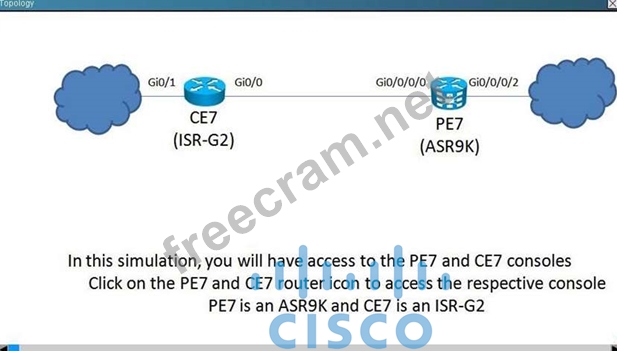
From the network topology diagram, click on the router icon to gain access to the console of the router.
No console or enable passwords are required.
There are four multiple-choice questions with this task. Be sure to answer all four questions before selecting the Next button.
Not all the CLI commands or commands options are supported or required for this simulation.
All the devices in this simulation have been pre-configured and you are not required to enter in any configurations.
Scenario:
Referring to the network topology diagram shown in the exhibit, use the proper CLI commands on the CE7 and PE7 routers and interpret the supported CLI commands outputs to answer the four multiple choice questions.

After reviewing present router configuration CE7 which two statements are correct regarding behavior of the "IIq" policy-map? (Choose 2)
Enter the proper CLI commands and analysis the outputs on the Cisco routers to answer the multiple- choice questions.
From the network topology diagram, click on the router icon to gain access to the console of the router.
No console or enable passwords are required.
There are four multiple-choice questions with this task. Be sure to answer all four questions before selecting the Next button.
Not all the CLI commands or commands options are supported or required for this simulation.
All the devices in this simulation have been pre-configured and you are not required to enter in any configurations.
Scenario:
Referring to the network topology diagram shown in the exhibit, use the proper CLI commands on the CE7 and PE7 routers and interpret the supported CLI commands outputs to answer the four multiple choice questions.
After reviewing present router configuration CE7 which two statements are correct regarding behavior of the "IIq" policy-map? (Choose 2)
Correct Answer: A,D
Explanation/Reference:
You will notice that "cisco1" class map is assigned to the priority queue (the command is configured under policy-map IIq class cisco1 priority xxx)
"cisco2" class map: is indeed configured using bandwidth 30%, however that defines the minimum bandwidth but not the maximum.
"cisco3" class map: is indeed configured using "bandwidth 20%", No priority configured and that will define the minimum guaranteed bandwidth.
The last choice is wrong! check under "show policy-map interface" There are 4 or more packets being matched by the "class-default" traffic class in the "IIq" policy.
Class-map: class-default (match-any)
4 packets, 968 bytes
You will notice that "cisco1" class map is assigned to the priority queue (the command is configured under policy-map IIq class cisco1 priority xxx)
"cisco2" class map: is indeed configured using bandwidth 30%, however that defines the minimum bandwidth but not the maximum.
"cisco3" class map: is indeed configured using "bandwidth 20%", No priority configured and that will define the minimum guaranteed bandwidth.
The last choice is wrong! check under "show policy-map interface" There are 4 or more packets being matched by the "class-default" traffic class in the "IIq" policy.
Class-map: class-default (match-any)
4 packets, 968 bytes


- Question List (160q)
- Question 1: Referring to the Cisco IOS XR show command output exhibit, (...
- Question 2: The Cisco IOS and IOS XE qos pre-classify command allows whi...
- Question 3: Which option is the appropriate method for CBWFQ WRED implem...
- Question 4: Which option is a Cisco-recommended congestion management or...
- Question 5: An engineer deployed a Cisco MPLS TE next-hop protection ove...
- Question 6: Which two values must be specified in a Cisco NBAR configura...
- Question 7: DRAG DROP Referring to Cisco MPLS TE path setup operations u...
- Question 8: Referring to the show output exhibit, which statement is cor...
- Question 9: Instructions: Enter the proper CLI commands and analysis the...
- Question 10: You are tasked to enable LDP on many of the interfaces on th...
- Question 11: Refer to the exhibit. This WRED policy configuration is impl...
- Question 12: An engineer sets up QoS over MPLS networks. How many classes...
- Question 13: Which three options are class maps able to match? (Choose th...
- Question 14: Which IOS XR Software feature supports establishing point-to...
- Question 15: Refer to the partial Cisco IOS XR configurations exhibit for...
- Question 16: Which QoS technique can be used to protect customer traffic ...
- Question 17: Instructions: Enter the proper CLI commands and analysis the...
- Question 18: Which method is used to mark traffic matched by class-map MY...
- Question 19: Which option is the correct definition of the LB on a Cisco ...
- Question 20: Which configuration can a network engineer use to establish ...
- Question 21: What is the function of MPLS FRR?...
- Question 22: When troubleshooting LDP operations on the Cisco IOS and IOS...
- Question 23: When using the tunnel mpls traffic-eng path-option 1 explici...
- Question 24: What is the term that is used for the label that an LSR assi...
- Question 25: Which class-map configuration selects the following traffic?...
- Question 26: Refer to the exhibit/ While configuring traffic shaping, you...
- Question 27: An engineer is deploying CB-WRED across the entire core netw...
- Question 28: Cisco MPLS TE path setup can be affected by which three tunn...
- Question 29: Which three commands are used to troubleshoot why IP packets...
- Question 30: DS-TE implementations on Cisco routers support which bandwid...
- Question 31: In which two Cisco IOS XR configuration modes can mpls ldp i...
- Question 32: Instructions: Enter the proper CLI command and analysis the ...
- Question 33: Which two values are class-selector DSCP values? (Choose two...
- Question 34: Which four options are methods by which labels can be assign...
- Question 35: Which message is sent through the desired LSP path by the he...
- Question 36: A network engineer must make a reservable maximum bandwidth ...
- Question 37: When implementing Cisco MPLS TE, the constrained-based path ...
- Question 38: Refer to the exhibit. You are about to implement security fe...
- Question 39: Which three conditions can occur when metering traffic using...
- Question 40: Which are typical class-based marking policies that are impl...
- Question 41: Which three statements are correct regarding a Cisco MPLS TE...
- Question 42: When implementing MPLS TE tunnels on Cisco IOS XR routers, w...
- Question 43: A service provider runs MPLS in its core. What is the relati...
- Question 44: On a Cisco router, when will the router actually reserve the...
- Question 45: Which statement defines how MPLS LDT Graceful Restart works ...
- Question 46: Which Cisco IOS XR command should be used to identify if MPL...
- Question 47: In Cisco MPLS TE implementations, what can cause the tunnel ...
- Question 48: Instructions: Enter the proper CLI commands and analysis the...
- Question 49: A recent analysis of a service provider network infrastructu...
- Question 50: An engineer wants to extend the trust boundary to a Cisco IP...
- Question 51: How many labels does an MPLS packet have, with a bottom-of-s...
- Question 52: Which affinity value will be matched by the affinity bit mas...
- Question 53: Refer to the exhibit. Which configuration error prevents thi...
- Question 54: The network architecture team is proposing to enable Cisco M...
- Question 55: Which two fields are in the traffic engineering topology dat...
- Question 56: Which three fields must be the same in an IPv6 header to con...
- Question 57: Which queuing mechanism should an engineer implement on dela...
- Question 58: At which layer does Cisco recommend the QoS trust boundary b...
- Question 59: What is an important requirement with MPLS applications like...
- Question 60: When configuring LLQ (strict priority queue) on a traffic cl...
- Question 61: Instructions: Enter the proper CLI command and analysis the ...
- Question 62: Which method maps MPLS EXP bit 5 to COS 5 on Cisco IOS XE?...
- Question 63: A service provider experiences routing issues in a customer ...
- Question 64: Which two characteristics describe the difference between MP...
- Question 65: Which three options can an engineer select for a traffic pol...
- Question 66: DRAG DROP Drag the MPLS Diff-Serv tunneling mode on the left...
- Question 67: Referring to the Cisco IOS XR configuration exhibit, (Exhibi...
- Question 68: Which configuration fulfills the requirement of configuring ...
- Question 69: Implementing IPoDWDM interfaces on Cisco CRS routers elimina...
- Question 70: Refer to the exhibit. What happens to the traffic that excee...
- Question 71: Which statement is correct regarding the default MPLS TTL be...
- Question 72: A network architect recently deployed AToM solutions for lar...
- Question 73: Which two interface types can support qos pre-classify (Choo...
- Question 74: Which Cisco IOS XR high-availability feature is used to prev...
- Question 75: Instructions: Enter the proper CLI command and analysis the ...
- Question 76: What is a primary difference between QoS operations on IOS a...
- Question 77: In an IPv6 header, what does a flow label of zero indicate?...
- Question 78: DRAG DROP You create an MPLS TE tunnel in IOS XR Software an...
- Question 79: Which four options describe the functions of the control wor...
- Question 80: On the Cisco IOS XR, which MQC configuration is different th...
- Question 81: An engineer is having a problem getting an operational 10 Gi...
- Question 82: Which three mechanisms are used to implement MPLS TE? (Choos...
- Question 83: You are configuring MPLS LDP in a new network segment and no...
- Question 84: Refer to the Cisco IOS XR policy-map configuration exhibit. ...
- Question 85: DRAG DROP Drag the QoS model on the left to match its correc...
- Question 86: Which two of the following statements are correct regarding ...
- Question 87: A network operations center analyzes a Wireshark capture and...
- Question 88: DRAG DROP Drag each of the QoS mechanisms on the left to mat...
- Question 89: An engineer has been tasked to configure a guaranteed 10 Mbp...
- Question 90: Which four pieces of information are stored for each prefix ...
- Question 91: Refer to the exhibit. From which table was the information o...
- Question 92: Which two traffic types are recognized by NBAR default confi...
- Question 93: An engineer has been tasked to configure a guaranteed 2 Mbps...
- Question 94: How is bandwidth recalculated when utilizing the automatic b...
- Question 95: What are the four fields inside the MPLS shim header? (Choos...
- Question 96: On a Cisco IOS XR router, which mechanism protects the route...
- Question 97: Refer to the Cisco IOS XR configuration exhibit. (Exhibit) W...
- Question 98: On Cisco routers, how is hierarchical QoS implemented?...
- Question 99: LDP session protection uses which one to maintain the LDP se...
- Question 100: (Exhibit) Referring to the Cisco IOS XR show command output ...
- Question 101: Which QoS mechanism is used for congestion avoidance?...
- Question 102: The regional operation center deploys a Cisco MPLS TE tunnel...
- Question 103: Which three network services can be implemented using MPLS w...
- Question 104: (Exhibit) Refer to the exhibit. MPLS TE Tunnel 138 has a hea...
- Question 105: Which statement describes the QoS behavior between P and PE ...
- Question 106: Only based on the Cisco IOS XR policy-map configuration exhi...
- Question 107: Which two considerations are important when implementing a C...
- Question 108: An engineer is allocating a determined amount of bandwidth t...
- Question 109: (Exhibit) Refer to the exhibit. Which two commands can be us...
- Question 110: On Cisco routers, which three methods can be used to map tra...
- Question 111: (Exhibit) Refer to the exhibit. XR2 needs to have LDP config...
- Question 112: Which two protocols facilitate label bindings by neighboring...
- Question 113: Given this configuration of an interface for MPLS traffic en...
- Question 114: On Cisco routers, which QoS marker is only locally significa...
- Question 115: When implementing MPLS DS-TE on Cisco IOS XR routers, all ag...
- Question 116: A DSCP value of 41 in decimal corresponds to which IP preced...
- Question 117: Refer to the exhibit. Which result occurs from this configur...
- Question 118: On the Cisco IOS XR, when using the match protocol command w...
- Question 119: Which two advantages are reasons that service providers migh...
- Question 120: A network operations center requests support to configure a ...
- Question 121: An LDP session is established between two neighbors. Over wh...
- Question 122: A network engineer wants to implement QoS in an environment ...
- Question 123: Which two statements are correct in describing ISP environme...
- Question 124: A network engineer must design a core network routing domain...
- Question 125: An engineer is tasked to deploy Fast Reroute for Cisco MPLS ...
- Question 126: A company is experiencing congestion on Internet T1 links th...
- Question 127: (Exhibit) Refer to the exhibit. Based on the raw format of a...
- Question 128: Which two options are true regarding the Pipe and Short Pipe...
- Question 129: Which two features are used to provide Cisco MPLS TE node an...
- Question 130: Instructions: Enter the proper CLI command and analysis the ...
- Question 131: The Cisco IOS and IOS XE qos pre-classify command allows whi...
- Question 132: Which feature should you configure to enable routers to main...
- Question 133: Which protocol is used to send MPLS OAM traffic over an MPLS...
- Question 134: With unmanaged CE routers, at which point in the service pro...
- Question 135: Which three steps are required to configure QPPB on Cisco IO...
- Question 136: According to the Intserv model, which two options are traffi...
- Question 137: Which option describes what happens when a labelled packet w...
- Question 138: Which option describes the IPv6 flow label field?...
- Question 139: Which field in the MPLS shim header is used to support diffe...
- Question 140: When a link flaps, an mpls ldp session will also flap. Which...
- Question 141: A customer MPLS domain recently required an excessive time t...
- Question 142: Which Cisco IOS XR command should be used in order to enable...
- Question 143: In Cisco IOS, what must be configured to ensure that an MPLS...
- Question 144: Which option describes the function of an IPv6 flow label?...
- Question 145: Which two factors must you consider when configuring MPLS EX...
- Question 146: Which high-availability feature does not require communicati...
- Question 147: Which two network devices are trusted endpoints in a network...
- Question 148: Which configuration set enables outbound label filtering so ...
- Question 149: When configuring class-based WRED on Cisco routers, which WR...
- Question 150: Which option is the appropriate way to configure a color-awa...
- Question 151: On the Cisco ASR9K router, when using the bandwidth command ...
- Question 152: A service provider recently defined new SLA services that pr...
- Question 153: Which item is not available to be used for QoS classificatio...
- Question 154: Which affinity and mask value will match the link affinity t...
- Question 155: Refer to the exhibit. A network engineer who is working for ...
- Question 156: Refer to the exhibit. What is the available reservable bandw...
- Question 157: An engineer is setting up a routing instance to route the tr...
- Question 158: Referring to the traceroute output exhibit that is shown, (E...
- Question 159: Which of the following three statements are correct regardin...
- Question 160: Cisco MPLS TE tunnels recently have been deployed to minimiz...
