Valid 400-351 Dumps shared by ExamDiscuss.com for Helping Passing 400-351 Exam! ExamDiscuss.com now offer the newest 400-351 exam dumps, the ExamDiscuss.com 400-351 exam questions have been updated and answers have been corrected get the newest ExamDiscuss.com 400-351 dumps with Test Engine here:
Access 400-351 Dumps Premium Version
(520 Q&As Dumps, 35%OFF Special Discount Code: freecram)
<< Prev Question Next Question >>
Question 5/91
Two wireless IP phones are never able to call each other when connected to the same autonomous AP.
However, they can place calls to other wireless IP phones that are connected to other APs or to wired IP phones. The wireless phones are operating on VLAN100. Based on this output, which statement about the problem is true?
ap(config-subif)#do show run interface do 0.100
Building configuration...
Current configuration: 320 bytes
!
interface Dot11Radio1.100
encapsulation dot1Q 100
no ip route-cache
bridge-group 100
bridge-group 100 subscriber-loop-control
bridge-group 100 port-protected
bridge-group 100 block-unknown-source
no bridge-group 100 source-learning
no bridge-group 100 unicast-flooding
bridge-group 100 spanning-disabled
end
However, they can place calls to other wireless IP phones that are connected to other APs or to wired IP phones. The wireless phones are operating on VLAN100. Based on this output, which statement about the problem is true?
ap(config-subif)#do show run interface do 0.100
Building configuration...
Current configuration: 320 bytes
!
interface Dot11Radio1.100
encapsulation dot1Q 100
no ip route-cache
bridge-group 100
bridge-group 100 subscriber-loop-control
bridge-group 100 port-protected
bridge-group 100 block-unknown-source
no bridge-group 100 source-learning
no bridge-group 100 unicast-flooding
bridge-group 100 spanning-disabled
end
Correct Answer: E
Explanation/Reference:
Explanation:
Public Secure Packet Forwarding (PSPF) prevents client devices associated to an access point from inadvertently sharing files or communicating with other client devices associated to the access point. It provides Internet access to client devices without providing other capabilities of a LAN. This feature is useful for public wireless networks like those installed in airports or on college campuses.

Note To prevent communication between clients associated to different access points, you must set up protected ports on the switch to which the wireless devices are connected. See the "Configuring Protected Ports" section for instructions on setting up protected ports.
To enable and disable PSPF using CLI commands on the wireless device, you use bridge groups. You can find a detailed explanation of bridge groups and instructions for implementing them in this document:
* Cisco IOS Bridging and IBM Networking Configuration Guide, Release 12.2. Click this link to browse to the Configuring Transparent Bridging chapter: http://www.cisco.com/univercd/cc/td/doc/product/software/ ios122/122cgcr/fibm_c/bcfpart1/bcftb.htm
You can also enable and disable PSPF using the web-browser interface. The PSPF setting is on the Radio Settings pages.
PSPF is disabled by default. Beginning in privileged EXEC mode, follow these steps to enable PSPF:
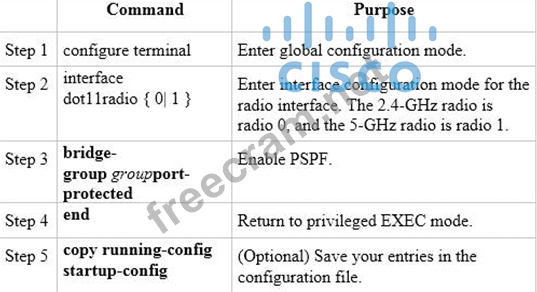
http://www.cisco.com/c/en/us/td/docs/wireless/access_point/12-3_8_JA/configuration/guide/1238jasc/ s38rf.html#wp1038494
Explanation:
Public Secure Packet Forwarding (PSPF) prevents client devices associated to an access point from inadvertently sharing files or communicating with other client devices associated to the access point. It provides Internet access to client devices without providing other capabilities of a LAN. This feature is useful for public wireless networks like those installed in airports or on college campuses.
Note To prevent communication between clients associated to different access points, you must set up protected ports on the switch to which the wireless devices are connected. See the "Configuring Protected Ports" section for instructions on setting up protected ports.
To enable and disable PSPF using CLI commands on the wireless device, you use bridge groups. You can find a detailed explanation of bridge groups and instructions for implementing them in this document:
* Cisco IOS Bridging and IBM Networking Configuration Guide, Release 12.2. Click this link to browse to the Configuring Transparent Bridging chapter: http://www.cisco.com/univercd/cc/td/doc/product/software/ ios122/122cgcr/fibm_c/bcfpart1/bcftb.htm
You can also enable and disable PSPF using the web-browser interface. The PSPF setting is on the Radio Settings pages.
PSPF is disabled by default. Beginning in privileged EXEC mode, follow these steps to enable PSPF:
http://www.cisco.com/c/en/us/td/docs/wireless/access_point/12-3_8_JA/configuration/guide/1238jasc/ s38rf.html#wp1038494


- Question List (91q)
- Question 1: When configuring an autonomous access point, which configura...
- Question 2: Which statement about network automation and/or network orch...
- Question 3: VLAN Trunking Protocol is a Cisco protocol that propagates t...
- Question 4: Which object table contains information about the clients kn...
- Question 5: Two wireless IP phones are never able to call each other whe...
- Question 6: (Exhibit) Refer to the exhibit. You are troubleshooting loca...
- Question 7: What are two features that help to mitigate man-in-the-middl...
- Question 8: Which two statements about AP Local Authentication by FlexCo...
- Question 9: Which three statements about the high availability configura...
- Question 10: A user is presented with the underlying hardware and softwar...
- Question 11: Which event happens when a wireless client connects to a Cis...
- Question 12: Which two effects does TSPEC-based admission control have as...
- Question 13: Which four options are the HTTP methods supported by a REST ...
- Question 14: Which two statements about header attacks are true? (Choose ...
- Question 15: (Exhibit) Refer to the exhibit. You cannot establish IP comm...
- Question 16: (Exhibit) Refer to the exhibit. Which three statements about...
- Question 17: On a Cisco autonomous AP, the maximum number of attempts to ...
- Question 18: You are designing a wireless network for a museum. One of th...
- Question 19: (Exhibit) Refer to the exhibit. An Apple TV is associated to...
- Question 20: Which two options are new features that are supported by IGM...
- Question 21: Which two features were added as part of the 802.11h amendme...
- 1 commentQuestion 22: DRAG DROP Consider the association process of a wireless cli...
- Question 23: Which mechanism incorporates the channel capacity into the C...
- Question 24: (Exhibit) Refer to the exhibit. What is the best way to reso...
- Question 25: When your wireless client device roams from one AP to anothe...
- Question 26: Which action is needed to edit the settings of an RF profile...
- Question 27: Which statement about the integration of ISE with Cisco Prim...
- Question 28: DRAG DROP Select and Place: (Exhibit)...
- Question 29: 77 DRAG DROP Match the dBm values on the left to the correct...
- Question 30: In a common IoT infrastructure architecture, which technolog...
- Question 31: For "Local mode" APs, which multicast mode is recommended wh...
- Question 32: You are working on a deployment that uses two Cisco APs as w...
- Question 33: Which three conditions can trigger a client exclusion policy...
- Question 34: You are the network administrator at ACME Corporation and cu...
- Question 35: (Exhibit) Refer to the exhibit, which is a configuration sni...
- Question 36: You have been hired to install new Cisco switches at ACME Co...
- Question 37: (Exhibit) Refer to the exhibit. Which feature (and associate...
- Question 38: Your customer has a Cisco Unified Wireless Network running A...
- Question 39: Which option in the Cisco Identity Services Engine check tha...
- Question 40: Which feature intersection of a Cisco 5760 Wireless LAN Cont...
- Question 41: (Exhibit) Refer to the exhibit. It belongs to a Cisco IOS AP...
- Question 42: DRAG DROP Drag and drop the wireless deployment modes on the...
- Question 43: (Exhibit) Refer to the exhibit. Which statement about this C...
- Question 44: DRAG DROP Drag and drop the OpenStack function from the left...
- Question 45: DRAG DROP Drag and drop the Cisco AVVID IP DSCP values on th...
- Question 46: You want to set up Prime Infrastructure to be notified when ...
- Question 47: Which three statements about enabling the wireless feature o...
- Question 48: Which options describes the function of the Intercloud Fabri...
- Question 49: With the introduction of Mdns Policies in AireOS release 8.0...
- Question 50: A Cisco Unified 7925G Wireless IP Phone is operating on the ...
- Question 51: You have received a new Cisco 5760 Controller and have gone ...
- Question 52: Which two advanced WLAN options are required when deploying ...
- Question 53: Which AireOS release is the first to support New Mobility on...
- Question 54: Which IEEE protocol can help a wireless client device to ide...
- Question 55: Your customer is having wireless VoIP problems. When the Cis...
- Question 56: Which enhancement was introduced in 802.11 ac Wave 2 and was...
- Question 57: Which two statements are true about adding Identity Services...
- Question 58: When connecting an autonomous access point in workgroup brid...
- Question 59: Heartbeats are used to maintain the high-availability status...
- Question 60: You are the wireless administrator for ACME corporation. You...
- Question 61: You have configured Video Stream on a Cisco WLC and users ar...
- Question 62: Which three types of ACLs are supported by the Cisco 5760 WL...
- Question 63: Which two configurations are required on the Cisco 5760 WLC ...
- Question 64: (Exhibit) Refer to the exhibit. A network administrator is i...
- Question 65: Which three statements about 802.11ac are true? (Choose thre...
- Question 66: (Exhibit) Refer to the exhibit. Which statement about the ro...
- Question 67: Which statement about the high availability feature on Cisco...
- Question 68: FlexConnect APs have already been deployed in a branch offic...
- Question 69: DRAG DROP Prime infrastructure allows you to change an alarm...
- Question 70: (Exhibit) Refer to the exhibit. Your customer is testing nat...
- Question 71: You are the network administrator of a Cisco Autonomous AP d...
- Question 72: Which two IETF RADIUS attributes the Cisco WLC can be used t...
- Question 73: (Exhibit) Refer to the exhibit. Which option describes what ...
- Question 74: You are the network administrator for ACME corporation. Your...
- Question 75: Which two statements about local profiling on a Cisco WLC ru...
- Question 76: Which statement about a Cisco Mesh Network when a radar even...
- Question 77: In which direction does Application Visibility and Control m...
- Question 78: While troubleshooting a failed central web authentication co...
- Question 79: When a FlexConnect AP is in the "local authentication, local...
- Question 80: Which two statements about accessing the GUI and CLI of Cisc...
- Question 81: DRAG DROP Drag and drop the AVC configuration features from ...
- Question 82: Which option is a feature of a Cisco Autonomous AP that prev...
- Question 83: DRAG DROP Drag and drop the CAPWAP events on the left into t...
- Question 84: You are a network administrator at ACME corporation where yo...
- Question 85: You are setting up a Cisco access point in repeater mode wit...
- Question 86: Which two options are benefits of moving the application dev...
- Question 87: Which major block is not included in the ETSI Network Functi...
- Question 88: Which two IEEE protocols combined provide a wireless client ...
- Question 89: Which of the below characteristics of RPL is true?...
- Question 90: You are installing Converged Access controllers that run Cis...
- Question 91: Which two statements about deploying a mesh network by MAPs ...
