- Home
- Cisco
- Interconnecting Cisco Networking Devices Part 2 (ICND2 v3.0)
- Cisco.200-105.v2018-12-19.q375
- Question 335
Valid 200-105 Dumps shared by ExamDiscuss.com for Helping Passing 200-105 Exam! ExamDiscuss.com now offer the newest 200-105 exam dumps, the ExamDiscuss.com 200-105 exam questions have been updated and answers have been corrected get the newest ExamDiscuss.com 200-105 dumps with Test Engine here:
Access 200-105 Dumps Premium Version
(775 Q&As Dumps, 35%OFF Special Discount Code: freecram)
<< Prev Question Next Question >>
Question 335/375
Instructions
Enter Cisco IOS commands on device to verify network operation and answer for multiple-choice

questions.
THIS TASK DOES NOT REQUIRE DEVICE CONFIGURATION.
Click the device icon to gain access to the console of the router. No console or enable passwords are
required.
To access the multiple-choice questions, click the numbered boxes on the left of the top panel.
This task has four multiple-choice questions. Be sure to answer all four questions before clicking the
Next button.
Scenario
You are implementing PPP over serial links between R1 router and branch offices. In Phase 1 you must implement and verify PPP and GRE tunnel configurations as mentioned in the topology. In Phase 2 your colleague is expected to do NAT and ISP configurations between R1 and ISP router.
Identify the issues that you encounter during PPP over serial links implementation.
Routers Branch1, Branch2, and Branch3 connect to Router R1 in the main office over serial links.
PPP multilink implementation is recommended between R1 and Branch1 routers.
The GRE tunnel is configured between R2 and Branch2 routers, and traffic between Server farm1
10.10.10.0/24 network and Branch2 LAN 10.10.20.0/24 network, is routed over GRE tunnel using static route.
You have console access on R1, R2, Branch1, Branch2, and Branch3 devices. Use only show commands to troubleshoot the issues.
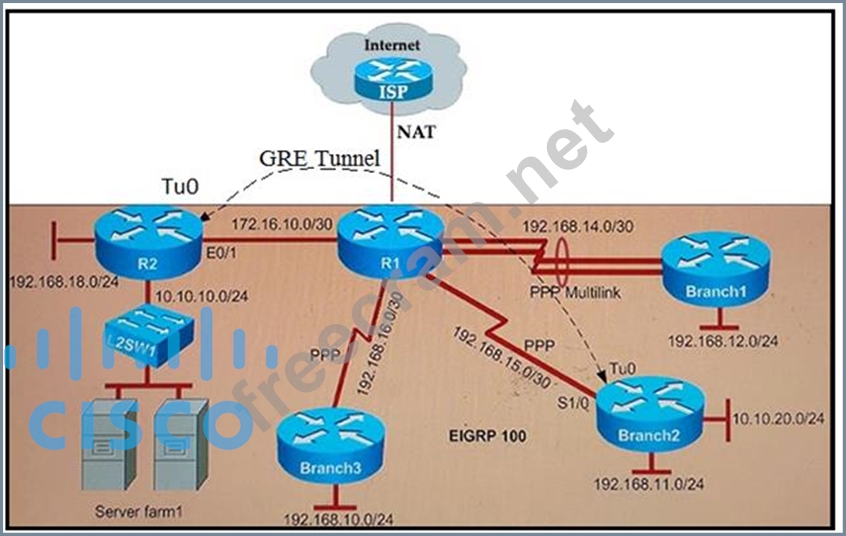
Why is the Branch2 network 10.10.20.0/24 unable to communicate with the Server farm1 network
10.10.10.0/24 over the GRE tunnel?
Enter Cisco IOS commands on device to verify network operation and answer for multiple-choice
questions.
THIS TASK DOES NOT REQUIRE DEVICE CONFIGURATION.
Click the device icon to gain access to the console of the router. No console or enable passwords are
required.
To access the multiple-choice questions, click the numbered boxes on the left of the top panel.
This task has four multiple-choice questions. Be sure to answer all four questions before clicking the
Next button.
Scenario
You are implementing PPP over serial links between R1 router and branch offices. In Phase 1 you must implement and verify PPP and GRE tunnel configurations as mentioned in the topology. In Phase 2 your colleague is expected to do NAT and ISP configurations between R1 and ISP router.
Identify the issues that you encounter during PPP over serial links implementation.
Routers Branch1, Branch2, and Branch3 connect to Router R1 in the main office over serial links.
PPP multilink implementation is recommended between R1 and Branch1 routers.
The GRE tunnel is configured between R2 and Branch2 routers, and traffic between Server farm1
10.10.10.0/24 network and Branch2 LAN 10.10.20.0/24 network, is routed over GRE tunnel using static route.
You have console access on R1, R2, Branch1, Branch2, and Branch3 devices. Use only show commands to troubleshoot the issues.
Why is the Branch2 network 10.10.20.0/24 unable to communicate with the Server farm1 network
10.10.10.0/24 over the GRE tunnel?
Correct Answer: C
Explanation/Reference:
Explanation:
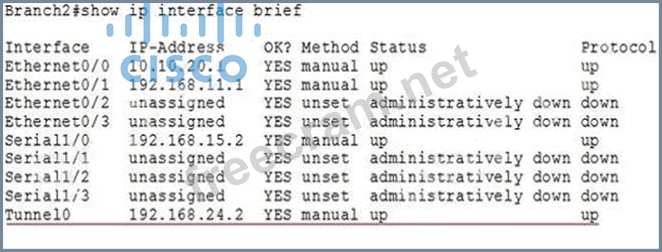
The Branch2 network is communicating to the Server farm, which is connected to R2, via GRE Tunnel so we should check the GRE tunnel first to see if it is in "up/up" state with the "show ip interface brief" command on the two routers.
On Branch2:
On R2:
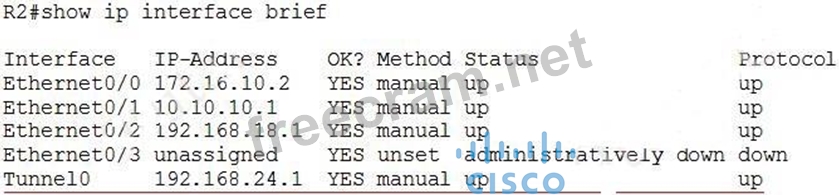
We see interfaces Tunnel0 at two ends are "up/up" which are good so we should check for the routing part on two routers with the "show running-config" command and pay attention to the static routing of each router. On Branch2 we see:

The destination IP address for this static route is not correct. It should be 192.168.24.1 (Tunnel0's IP address of R2), not 192.168.24.10 -> Answer C is correct.
Note: You can use the "show ip route" command to check the routing configuration on each router but if the destination is not reachable (for example: we configure "ip route 10.10.10.0 255.255.255.0 192.168.24.10" on Branch2, but if 192.168.24.10 is unknown then Branch2 router will not display this routing entry in its routing table.
Note: The IP address or configuration may be different in the exam.
Explanation:
The Branch2 network is communicating to the Server farm, which is connected to R2, via GRE Tunnel so we should check the GRE tunnel first to see if it is in "up/up" state with the "show ip interface brief" command on the two routers.
On Branch2:
On R2:
We see interfaces Tunnel0 at two ends are "up/up" which are good so we should check for the routing part on two routers with the "show running-config" command and pay attention to the static routing of each router. On Branch2 we see:
The destination IP address for this static route is not correct. It should be 192.168.24.1 (Tunnel0's IP address of R2), not 192.168.24.10 -> Answer C is correct.
Note: You can use the "show ip route" command to check the routing configuration on each router but if the destination is not reachable (for example: we configure "ip route 10.10.10.0 255.255.255.0 192.168.24.10" on Branch2, but if 192.168.24.10 is unknown then Branch2 router will not display this routing entry in its routing table.
Note: The IP address or configuration may be different in the exam.


- Question List (375q)
- Question 1: Which router command can be used to verify the type of cable...
- Question 2: What are two characteristics of a switch that is configured ...
- Question 3: Which option is the main function of congestion management?...
- Question 4: Which of these represents an IPv6 link-local address?...
- Question 5: What is the default encapsulation type for Cisco WAN serial ...
- Question 6: Which three protocols does APIC-EM support with Path Trace? ...
- Question 7: When is the most appropriate time to escalate an issue that ...
- Question 8: Instructions This item contains several questions that you m...
- Question 9: The network administrator is asked to configure 113 point-to...
- Question 10: The internetwork infrastructure of company XYZ consists of a...
- Question 11: A network administrator needs to allow only one Telnet conne...
- Question 12: What command visualizes the general NetFlow data on the comm...
- Question 13: In which solution is a router ACL used?...
- Question 14: Which protocol can be used between administrative domains?...
- Question 15: Which command helps a network administrator to manage memory...
- Question 16: Which two statements about CHAP are true? (Choose two.)...
- Question 17: Unauthorized users have used Telnet to gain access to a comp...
- Question 18: Which two statements about VTP are true? (Choose two.)...
- Question 19: A router has been configured to provide the nine users on th...
- Question 20: After you configure a GRE tunnel between two networks, the t...
- Question 21: Which two authentication methods are compatible with MLPPP o...
- Question 22: Which command can you enter to determine whether a voice VLA...
- Question 23: Instructions This item contains several questions that you m...
- Question 24: A network administrator needs to configure port security on ...
- Question 25: For which reason can a GRE tunnel have an Up/DOWN status?...
- Question 26: Host is able to ping a web server but it is not able to do H...
- Question 27: Which two steps must you perform on each device that is conf...
- Question 28: Which two statements are characteristics of a distance vecto...
- Question 29: Which two EtherChannel PAgP modes can you configure? (Choose...
- Question 30: Instructions: Enter IOS commands on the Dubai router to veri...
- Question 31: What three pieces of information can be used in an extended ...
- Question 32: What is the default DTP mode on a switch port?...
- Question 33: Which WAN solution is secured by default?...
- Question 34: Which command reveals the last method used to powercycle a r...
- Question 35: Which name describes an IPv6 host-enabled tunneling techniqu...
- Question 36: Which HSRP feature do you configure so that the device with ...
- Question 37: Refer to the exhibit. A network engineer is troubleshooting ...
- Question 38: Which two statements about eBGP neighbor relationships are t...
- Question 39: Refer to the exhibit. A junior network engineer has prepared...
- Question 40: When using the CLI, which banner displays a message upon eve...
- Question 41: A network administrator is configuring the routers in the gr...
- Question 42: Which protocol provides a method of sharing VLAN configurati...
- Question 43: A network administrator has configured access list 173 to pr...
- Question 44: Which command do you enter to verify that a VLAN has been re...
- Question 45: Refer to the exhibit. Given the partial configuration shown ...
- Question 46: What are three features of the IPv6 protocol? (Choose three....
- Question 47: Which command can be used from a router to verify the Layer ...
- Question 48: Which two commands debug a PPPoE connection that has failed ...
- Question 49: Which command can you enter in a network switch configuratio...
- Question 50: Which channel mode is available to static EhterChannels?...
- Question 51: Which command do you enter to verify an SVI?...
- Question 52: Which RPVST+ port state is excluded from all STP operations?...
- Question 53: What is the default value of the Read-Write-All-SNMP communi...
- Question 54: Refer to the exhibit. The ABC Company has the internetwork i...
- Question 55: Refer to the exhibit. After you apply the give configuration...
- Question 56: Which technology can provide security when connection multip...
- Question 57: Which six-byte field in a basic Ethernet frame must be an in...
- Question 58: A switch is configured with all ports assigned to vlan 2 wit...
- Question 59: Which three statements about the features of SNMPv2 and SNMP...
- Question 60: Instructions This item contains several questions that you m...
- Question 61: What 8-bit field exists in IP packet for QoS?...
- Question 62: Which options are the two differences between HSRP versions ...
- Question 63: Which three responses does TACAS+ give while querying. (Choo...
- Question 64: What is the maximum cost for hello and dead packets in OSPF?...
- Question 65: Refer to the exhibit. Host A pings interface S0/0 on router ...
- Question 66: When you are troubleshooting an ACL issue on a router, which...
- Question 67: Which command is necessary to permit SSH or Telnet access to...
- Question 68: Which information is provided by the output of the show snmp...
- Question 69: Select the action that results from executing these commands...
- Question 70: Which option describes a drawback of proxy ARP?...
- Question 71: Refer to the exhibit. The following commands are executed on...
- Question 72: Which command can you enter on a switch to determine the cur...
- Question 73: Which two statements about the OSPF Router ID are true? (Cho...
- Question 74: How does a router handle an incoming packet whose destinatio...
- Question 75: In which integration method is an IPv6 packet encapsulated w...
- Question 76: Refer to the exhibit. HostA cannot ping HostB. Assuming rout...
- Question 77: Which functionality does an SVI provide?...
- Question 78: Which encapsulation type is a Frame Relay encapsulation type...
- Question 79: Through which three states does a BGP routing process pass w...
- Question 80: You have been asked to come up with a subnet mask that will ...
- Question 81: Which three fields can be marked with QoS? (Choose three.)...
- Question 82: Which two options are valid WAN connectivity methods? (Choos...
- Question 83: Refer to the exhibit. Which command do you enter so that R1 ...
- Question 84: Refer to the exhibit. The user at Workstation B reports that...
- Question 85: Which two statements about switch stacking are true? (Choose...
- Question 86: What are three factors a network administrator must consider...
- Question 87: Which command can be used from a PC to verify the connectivi...
- Question 88: Which value can you modify to configure a specific interface...
- Question 89: Which configuration command can u apply to a HSRP router so ...
- Question 90: A network administrator would like to implement NAT in the n...
- Question 91: Which type does a port become when it receives the best BPDU...
- Question 92: Which utility can you use to identify redundant or shadow ru...
- Question 93: Which protocol specified by RFC 2281 provides network redund...
- Question 94: Which IPv6 address is valid?
- Question 95: If primary and secondary root switches with priority 16384 b...
- Question 96: What occurs on a Frame Relay network when the CIR is exceede...
- Question 97: Which mode is compatible with Trunk, Access, and desirable p...
- Question 98: What are the benefit of using Netflow? (Choose three.)...
- Question 99: Two hosts are attached to a switch with the default configur...
- Question 100: Which two statements describe the process identifier that is...
- Question 101: Instructions Enter Cisco IOS commands on device to verify ne...
- Question 102: Refer to the exhibit. What command sequence will enable PAT ...
- Question 103: Instructions Enter Cisco IOS commands on device to verify ne...
- Question 104: What does it take for BGP to establish connection? (Choose t...
- Question 105: Which command displays the CHAP authentication process as it...
- Question 106: What authentication type is used by SNMPv2?...
- Question 107: Refer to the topology shown in the exhibit. Which ports will...
- Question 108: A network administrator receives an error message while tryi...
- Question 109: Which IEEE standard protocol is initiated as a result of suc...
- Question 110: Which of the following is needed to be enable back the role ...
- Question 111: Refer to the exhibit. Assuming that the entire network topol...
- Question 112: Two switches are connected through a trunk link. Which two c...
- Question 113: What does the "Inside Global" address represent in the confi...
- Question 114: What does split horizon prevent?...
- Question 115: Which protocol can cause overload on a CPU of a managed devi...
- Question 116: Which two options are primary responsibilities of the APIC-E...
- Question 117: Which two data integrity algorithms are commonly used in VPN...
- Question 118: Refer to the exhibit. A network associate has configured OSP...
- Question 119: What are three reasons that an organization with multiple br...
- Question 120: Which four options are the HSRP states for a router? (Choose...
- Question 121: In order to comply with new auditing standards, a security a...
- Question 122: What is the purpose of Inverse ARP?...
- Question 123: Which encryption method does CHAP authentication use for the...
- Question 124: In a GLBP network, who is responsible for the arp request?...
- Question 125: Refer to the exhibit. Host A has tested connectivity to a re...
- Question 126: Which address is the IPv6 all-RIP-routers multicast group ad...
- Question 127: Which value to use in HSRP protocol election process?...
- Question 128: Identify the four valid IPv6 addresses. (Choose four.)...
- Question 129: Which three approaches can be used while migrating from an I...
- Question 130: An access list has been designed to prevent Telnet traffic f...
- Question 131: Which three options are types of slow VLAN connectivity? (Ch...
- Question 132: About statement of HDLC IP address....
- Question 133: Which two privileged mode Cisco IOS commands can be used to ...
- Question 134: Which statement about spanning-tree root-bridge election is ...
- Question 135: What is the default Syslog facility level?...
- Question 136: Refer to the exhibit. How should Switch1 and Switch2 be conn...
- Question 137: Refer to the topology and partial router configurations show...
- Question 138: Where must you configure switch-level global features on a s...
- Question 139: Which feature or value must be configured to enable EIGRPv6?...
- Question 140: Which two statistics appear in show frame-relay map output? ...
- Question 141: Refer to the exhibit. What is the cause of the Syslog output...
- Question 142: Which two of these statements are true of IPv6 address repre...
- Question 143: The network administrator of the Oregon router adds the foll...
- Question 144: Which two statements about MPLS are true? (Choose two.)...
- Question 145: Instructions: Enter IOS commands on the Dubai router to veri...
- Question 146: What two options are causes of network slowness that can res...
- Question 147: Which three statements about DTP are true? (Choose three.)...
- Question 148: Which technology supports multiple dynamic secure connection...
- Question 149: Which statement about snmpv2 is true?...
- Question 150: Which command can you enter to display the default VLAN?...
- Question 151: Which Cisco IOS feature can you use to dynamically identify ...
- Question 152: If two OSPF neighbors have formed complete adjacency and are...
- Question 153: The network administrator has been asked to give reasons for...
- Question 154: Which command do you enter to determine the root priority?...
- Question 155: What can be done to Frame Relay to resolve split-horizon iss...
- Question 156: How does using the service password-encryption command on a ...
- Question 157: When you deploy multilink PPP on your network, where must yo...
- Question 158: Which statement describes VRRP object tracking?...
- Question 159: Which form of NAT maps multiple private IP addresses to a si...
- Question 160: Which two statements describe characteristics of IPv6 unicas...
- Question 161: Which command must you enter to prepare an interface to carr...
- Question 162: Which configuration do you apply to an HSRP router so that i...
- Question 163: Which component of VPN technology ensures that data is unalt...
- Question 164: What OSPF command, when configured, will include all interfa...
- Question 165: Which command do you enter to determine whether LACP is in u...
- Question 166: Which command do you enter so that a switch configured with ...
- Question 167: On which layer tcp/ip is ACL Apic-EM path?...
- Question 168: What about HSRP IP Address is true?...
- Question 169: What is the correct DSCP value used for voice traffic?...
- Question 170: Refer to the exhibit. Some 2950 series switches are connecte...
- Question 171: Which feature can you implement to reserve bandwidth for voi...
- Question 172: Which three options are benefits of using TACACS+ on a devic...
- Question 173: What information does a router running a link-state protocol...
- Question 174: What are three benefits of GLBP? (Choose three.)...
- Question 175: Which feature can you use to restrict SNMP queries to a spec...
- Question 176: Which two statements about data vlans on access ports are tr...
- Question 177: Which utility do you use to view IP traffic that is switched...
- Question 178: Which two actions must you take to configure a PAgP Ethernet...
- Question 179: A department decides to replace its hub with a Catalyst 2950...
- Question 180: Syslog was configured with a level 3 trap. Which 3 types of ...
- Question 181: Which two statement about proxy ARP are true? (Choose two)...
- Question 182: What is the minimum command to turn on encryption on SNMP?...
- Question 183: Scenario Refer to the topology. Your company has decided to ...
- Question 184: Which interface counter can you use to diagnose a duplex mis...
- Question 185: A network engineer wants to allow a temporary entry for a re...
- Question 186: Which VLAN bridge priority value will make a switch as root ...
- Question 187: Refer to the exhibit. Which route will be found in the routi...
- Question 188: Which command should you enter to allow carrying voice?...
- Question 189: Which function allows EIGRP peers to receive notice of imple...
- Question 190: Refer to the exhibit. What address is a feasible successor? ...
- Question 191: Instructions: Enter IOS commands on the Dubai router to veri...
- Question 192: Which type of IPv6 ACL is applied first in the order of prec...
- Question 193: Which term represents the minimum bandwidth provided in a Me...
- Question 194: What is the alternative notation for the IPv6 address B514:8...
- Question 195: In which two models can control-plane functionality be imple...
- Question 196: Which WAN topology provides a direct connection from each si...
- Question 197: Refer to the exhibit. Which subnet mask will place all hosts...
- Question 198: A router has learned three possible routes that could be use...
- Question 199: What's DTP's default in a switch?...
- Question 200: Refer to the exhibit. Router4 can ping Router5 (172.16.6.5),...
- Question 201: Which three commands do you use to verify that IPSec over a ...
- Question 202: The company internetwork is subnetted using 29 bits. Which w...
- Question 203: What are three reasons to collect Netflow data on a company ...
- Question 204: Which three describe the reasons large OSPF networks use a h...
- Question 205: What are the three things that the Netflow uses to consider ...
- Question 206: Which three are the components of SNMP? (Choose three.)...
- Question 207: Which three of these statements regarding 802.1Q trunking ar...
- Question 208: Refer to the exhibit. On R1 which routing protocol is in use...
- Question 209: Which command can you enter to block HTTPS traffic from the ...
- Question 210: Which feature facilitates the tagging of frames on a specifi...
- Question 211: Which STP mode supports spanning-tree interoperability betwe...
- Question 212: A network administrator enters the following command on a ro...
- Question 213: Which protocol is a Cisco proprietary implementation of STP?...
- Question 214: Instructions: Enter IOS commands on the Dubai router to veri...
- Question 215: An organization is concerned that too many employees are was...
- Question 216: Which two traffic types must always be transmitted on VLAN 1...
- Question 217: (Exhibit) Refer to the exhibit. How will the router handle a...
- Question 218: What are three benefits of implementing VLANs? (Choose three...
- Question 219: Scenario Refer to the topology. Your company has decided to ...
- Question 220: Which option is the industry-standard protocol for Etherchan...
- Question 221: What is the status of port-channel if LACP is misconfigured?...
- Question 222: Which type of attack can be mitigated by configuring the def...
- Question 223: Which protocol is an open standard protocol framework that i...
- Question 224: Which option is the master redundancy scheme for stacked swi...
- Question 225: Workstation A has been assigned an IP address of 192.0.2.24/...
- Question 226: If you configure syslog messages without specifying the logg...
- Question 227: Which command allows you to verify the encapsulation type (C...
- Question 228: Which PPP subprotocol negotiates authentication options?...
- Question 229: Which purpose of the network command in the BGP configuratio...
- Question 230: Which command do you enter to allow a new VLAN across a trun...
- Question 231: On which options are standard access lists based?...
- Question 232: Which two statements about static NAT translations are true?...
- Question 233: What are two enhancements that OSPFv3 supports over OSPFv2? ...
- Question 234: Refer to the exhibit. To what does the 128 refer in the rout...
- Question 235: Which function does traffic shaping perform?...
- Question 236: Which command can you enter to assign an interface to the de...
- Question 237: Which command do you enter so that a port enters the forward...
- Question 238: Which command must you enter to enable OSPFV2 in an IPV4 net...
- Question 239: Which three elements must be used when you configure a route...
- Question 240: A router has two Fast Ethernet interfaces and needs to conne...
- Question 241: Which device might be installed at a branch office to enable...
- Question 242: Refer to the exhibit. Which statement describes DLCI 17? (Ex...
- Question 243: Refer to the exhibit. How should the FastEthernet0/1 ports o...
- Question 244: Routers R1 and R2 are on the same network segment, and both ...
- Question 245: Which of the port is not part of STP protocol?...
- Question 246: A security administrator wants to profile endpoints and gain...
- Question 247: Which device classes are used over serial links? (Choose two...
- Question 248: Which three features are added in SNMPv3 over SNMPv2? (Choos...
- Question 249: What can you change to select switch as root bridge?...
- Question 250: Assuming the default switch configuration, which VLAN range ...
- Question 251: Which value is used to determine the active router in an HSR...
- Question 252: Refer to the exhibit. A network technician enters the follow...
- Question 253: Which HSRP Feature was new in HSRPv2?...
- Question 254: Which command shows your active Telnet connections?...
- Question 255: Which commands are required to properly configure a router t...
- Question 256: Which protocol provides a method of sharing VLAN configurati...
- Question 257: Refer to the exhibit. Which WAN protocol is being used? (Exh...
- Question 258: Which command do you enter to enable local authentication fo...
- Question 259: When you enable PortFast on a switch port, the port immediat...
- Question 260: Which three options are types of Layer 2 network attack? (Ch...
- Question 261: Refer to the exhibit. A frame on VLAN 1 on switch S1 is sent...
- Question 262: Refer to the exhibit. What does STATUS=ACTIVE refer to in th...
- Question 263: Refer to the exhibit. Which two statements about the configu...
- Question 264: Refer to the graphic. Users on the Holyoke router are unable...
- Question 265: Which two are features of IPv6? (Choose two.)...
- Question 266: VLAN 3 is not yet configured on your switch. What happens if...
- Question 267: What command instructs the device to timestamp Syslog debug ...
- Question 268: Which two protocols can detect native vlan mismatch errors? ...
- Question 269: A network administrator is configuring ACLs on a Cisco route...
- Question 270: Which of the following HSRP router states does an active rou...
- Question 271: Which statement about IPv6 is true?...
- Question 272: Which set of commands is recommended to prevent the use of a...
- Question 273: At which layer of the OSI model does PPP perform?...
- Question 274: Refer to the exhibit. What is the result of setting the no l...
- Question 275: Which IPsec security protocol should be used when confidenti...
- Question 276: Refer to the graphic and routing table for router R1. Based ...
- Question 277: What are two benefits of using NAT? (Choose two.)...
- Question 278: Refer to the exhibit. How many interfaces on R1 should be co...
- Question 279: Which IPv6 address is the equivalent of the IPv4 interface l...
- Question 280: Refer to the exhibit. Statements A, B, C, and D of ACL 10 ha...
- Question 281: What are two characteristics of Frame Relay point-to-point s...
- Question 282: Which Layer 2 protocol encapsulation type supports synchrono...
- Question 283: Which WAN topology is most appropriate for a centrally locat...
- Question 284: Which three statements about Syslog utilization are true? (C...
- Question 285: Instructions This item contains several questions that you m...
- Question 286: Which two data link layers are supported by Cisco IOS Softwa...
- Question 287: Which three commands must you enter to create a trunk that a...
- Question 288: Which three are characteristics of an IPv6 anycast address? ...
- Question 289: A network administrator must configure 200 switch ports to a...
- Question 290: What SNMP message alerts the manager to a condition on the n...
- Question 291: What are three valid reasons to assign ports to VLANs on a s...
- Question 292: What type of attack is when trusted source replace mac table...
- Question 293: Under normal operations, Cisco recommends that you configure...
- Question 294: Given an IP address 172.16.28.252 with a subnet mask of 255....
- Question 295: Which three effects of using local SPAN are true? (Choose th...
- Question 296: Which command is used to enable CHAP authentication, with PA...
- Question 297: A network administrator needs to configure a serial link bet...
- Question 298: What is true about Ethernet? (Choose two.)...
- Question 299: What are three advantages of vlans? (Choose three.)...
- Question 300: Which three features are represented by A letter in AAA? (Ch...
- Question 301: When troubleshooting Ethernet connectivity issues how can yo...
- Question 302: Refer to the exhibit. You are connected to the router as use...
- Question 303: The command show frame-relay map gives the following output:...
- Question 304: What is the alert message generated by SNMP agents called? (...
- Question 305: Which routing protocols are compatible with stubs. (Choose t...
- Question 306: What Netflow component can be applied to an interface to tra...
- Question 307: Which value must you configure on a device before EIGRP for ...
- Question 308: Which three statements about VTP features are true? (Choose ...
- Question 309: What is the Cisco recommended DSCP value for voice traffic?...
- Question 310: Which WAN technology uses labels to make decisions about dat...
- Question 311: For which two reasons might you choose chassis aggregation i...
- Question 312: How can you mitigate VLAN hopping attacks?...
- Question 313: What are the Popular destinations for syslog messages to be ...
- Question 314: After you configure multiple point-to-point tunnels on one i...
- Question 315: Which Layer 2 attack is specifically mitigated by changing t...
- Question 316: Refer to the exhibit. (Exhibit) While you troubleshoot a con...
- Question 317: What IP SLA ICMP Echo measures?...
- Question 318: What is the advantage of using a multipoint interface instea...
- Question 319: Refer to the exhibit. (Exhibit) Which option is the effect o...
- Question 320: Refer to the exhibit. What can be concluded from the output ...
- Question 321: Which two statements about Ethernet standards are true? (Cho...
- Question 322: Refer to the exhibit. The network shown in the exhibit has j...
- Question 323: Which step must you perform first to enable OSPFv3 process 2...
- Question 324: Refer to the graphic. A company wants to use NAT in the netw...
- Question 325: Refer to the exhibit. A technician is testing connection pro...
- Question 326: Which command do you enter to enable an interface to support...
- Question 327: Which two characteristics of stacked switches are true? (Cho...
- Question 328: An administrator is troubleshooting a problem between router...
- Question 329: What is the default Local Management Interface frame type tr...
- Question 330: Which feature can prevent a rogue device from assuming the r...
- Question 331: Which combination of values is valid for a router-on-a-stick...
- Question 332: In which circumstance are multiple copies of the same unicas...
- Question 333: Which two types of cloud services may require you to alter t...
- Question 334: What is the result of issuing the frame-relay map ip 192.168...
- Question 335: Instructions Enter Cisco IOS commands on device to verify ne...
- Question 336: Which IPv6 routing protocol uses multicast group FF02::9 to ...
- Question 337: What are three characteristics of the OSPF routing protocol?...
- Question 338: A network administrator wants to ensure that only the server...
- Question 339: Which option describes a benefit of a point-to-point leased ...
- Question 340: (Exhibit) Refer to the exhibit. A technician has configured ...
- Question 341: Which pairing reflects a correct protocol-and-metric relatio...
- Question 342: You are working in a data center environment and are assigne...
- Question 343: How can you manually configure a switch so that it is select...
- Question 344: Refer to the exhibit. Given the output from the show ip eigr...
- Question 345: Which type of EIGRP route entry describes a feasible success...
- Question 346: In GLBP, which router will respond to client ARP requests?...
- Question 347: What are three components that comprise the SNMP framework? ...
- Question 348: Refer to the exhibit. What is the most appropriate summariza...
- Question 349: Refer to the exhibit. Which address range efficiently summar...
- Question 350: The ROUTE company has a small network. The network consists ...
- Question 351: Scenario Refer to the topology. Your company has decided to ...
- Question 352: Refer to the exhibit. If RTR01 is configured as shown, which...
- Question 353: What is the default administrative distance of the OSPF rout...
- Question 354: Which two Cisco IOS commands, used in troubleshooting, can e...
- Question 355: Which value must you configure on a device before EIGRP for ...
- Question 356: Refer to the exhibit. If the router Cisco returns the given ...
- Question 357: Refer to the exhibit. A network technician enters the follow...
- Question 358: Which of the following are the valid numbers of standard ACL...
- Question 359: Refer to the output from the show running-config command in ...
- Question 360: Which feature must you enable to distribute vlans automatica...
- Question 361: The network technician is planning to use the 255.255.255.22...
- Question 362: Refer to the exhibit. What statement is true of the configur...
- Question 363: Disadvantages of using proxy ARP?...
- Question 364: Which IPv6 address is the all-router multicast group?...
- Question 365: Which command do use we to see SNMP version?...
- Question 366: Refer to the exhibit. The router has been configured with th...
- Question 367: When are packets processed by an inbound access list?...
- Question 368: Which protocol should be used to establish a secure terminal...
- Question 369: Refer to the exhibit. What can be determined about the inter...
- Question 370: Which two statements about using the CHAP authentication mec...
- Question 371: Which two values are needed to run the APIC-EM ACL Analysis ...
- Question 372: What Cisco IOS feature can be enabled to pinpoint an applica...
- Question 373: Which two commands correctly verify whether port security ha...
- Question 374: While troubleshooting a connection problem on a computer, yo...
- Question 375: Which component of an IPv6 OSPFv3 connection must be configu...
