- Home
- Cisco
- Interconnecting Cisco Networking Devices Part 2 (ICND2 v3.0)
- Cisco.200-105.v2018-06-20.q119
- Question 32
Valid 200-105 Dumps shared by EduDump.com for Helping Passing 200-105 Exam! EduDump.com now offer the newest 200-105 exam dumps, the EduDump.com 200-105 exam questions have been updated and answers have been corrected get the newest EduDump.com 200-105 dumps with Test Engine here:
Access 200-105 Dumps Premium Version
(775 Q&As Dumps, 35%OFF Special Discount Code: freecram)
<< Prev Question Next Question >>
Question 32/119
Refer to the exhibit.
What three actions will the switch take when a frame with an unknown source MAC address arrives at the interface? (Select three.)
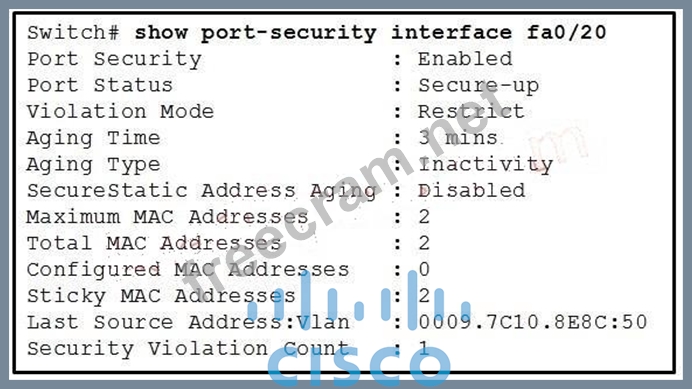
What three actions will the switch take when a frame with an unknown source MAC address arrives at the interface? (Select three.)
Correct Answer: A,B,C
Explanation/Reference:
Switchport Security Concepts and Configuration
Reference:
http://www.ciscopress.com/articles/article.asp?p=1722561
Explanation:
Switchport Security Violations
The second piece of switchport port-security that must be understood is a security violation including what it is what causes it and what the different violation modes that exist. A switchport violation occurs in one of two situations:
When the maximum number of secure MAC addresses has been reached (by default, the maximum number of secure MAC addresses per switchport is limited to 1) An address learned or configured on one secure interface is seen on another secure interface in the same VLAN The action that the device takes when one of these violations occurs can be configured:
Protect-This mode permits traffic from known MAC addresses to continue to be forwarded while

dropping traffic from unknown MAC addresses when over the allowed MAC address limit. When configured with this mode, no notification action is taken when traffic is dropped.
Restrict-This mode permits traffic from known MAC addresses to continue to be forwarded while
dropping traffic from unknown MAC addresses when over the allowed MAC address limit. When configured with this mode, a syslog message is logged, a Simple Network Management Protocol (SNMP) trap is sent, and a violation counter is incremented when traffic is dropped.
Shutdown-This mode is the default violation mode; when in this mode, the switch will automatically
force the switchport into an error disabled (err-disable) state when a violation occurs. While in this state, the switchport forwards no traffic. The switchport can be brought out of this error disabled state by issuing the errdisable recovery cause CLI command or by disabling and re-enabling the switchport.
Shutdown VLAN-This mode mimics the behavior of the shutdown mode but limits the error disabled
state the specific violating VLAN.
Switchport Security Concepts and Configuration
Reference:
http://www.ciscopress.com/articles/article.asp?p=1722561
Explanation:
Switchport Security Violations
The second piece of switchport port-security that must be understood is a security violation including what it is what causes it and what the different violation modes that exist. A switchport violation occurs in one of two situations:
When the maximum number of secure MAC addresses has been reached (by default, the maximum number of secure MAC addresses per switchport is limited to 1) An address learned or configured on one secure interface is seen on another secure interface in the same VLAN The action that the device takes when one of these violations occurs can be configured:
Protect-This mode permits traffic from known MAC addresses to continue to be forwarded while
dropping traffic from unknown MAC addresses when over the allowed MAC address limit. When configured with this mode, no notification action is taken when traffic is dropped.
Restrict-This mode permits traffic from known MAC addresses to continue to be forwarded while
dropping traffic from unknown MAC addresses when over the allowed MAC address limit. When configured with this mode, a syslog message is logged, a Simple Network Management Protocol (SNMP) trap is sent, and a violation counter is incremented when traffic is dropped.
Shutdown-This mode is the default violation mode; when in this mode, the switch will automatically
force the switchport into an error disabled (err-disable) state when a violation occurs. While in this state, the switchport forwards no traffic. The switchport can be brought out of this error disabled state by issuing the errdisable recovery cause CLI command or by disabling and re-enabling the switchport.
Shutdown VLAN-This mode mimics the behavior of the shutdown mode but limits the error disabled
state the specific violating VLAN.


- Question List (119q)
- Question 1: What is the purpose of Inverse ARP?...
- Question 2: The command show frame-relay map gives the following output:...
- Question 3: Refer to the exhibit. The company uses EIGRP as the routing ...
- Question 4: What is the default administrative distance of OSPF?...
- Question 5: What information does a router running a link-state protocol...
- Question 6: Refer to the exhibit. The output that is shown is generated ...
- Question 7: A network administrator needs to configure port security on ...
- Question 8: Refer to the exhibit. A packet with a source IP address of 1...
- Question 9: Hotspot Question (Exhibit) R1 is configured with the default...
- Question 10: When a router undergoes the exchange protocol within OSPF, i...
- Question 11: The output of the show frame-relay pvc command shows "PVC ST...
- Question 12: What is the advantage of using a multipoint interface instea...
- Question 13: Refer to the exhibit. The network associate is configuring O...
- Question 14: Which one of these is a valid HSRP Virtual Mac Address?...
- Question 15: Refer to the exhibit. Assuming that the entire network topol...
- Question 16: A router receives information about network 192.168.10.0/24 ...
- Question 17: What can be done to secure the virtual terminal interfaces o...
- Question 18: Drag and Drop Question Drag the Frame Relay acronym on the l...
- Question 19: Which protocol is an open standard protocol framework that i...
- Question 20: Refer to the exhibit. Based on the exhibited routing table, ...
- Question 21: What are three benefits of GLBP? (Choose three.)...
- Question 22: Drag and Drop Question Drag each description on the left to ...
- Question 23: The internetwork infrastructure of company XYZ consists of a...
- Question 24: Which three statements about RSTP are true? (Choose three.)...
- Question 25: The following configuration is applied to a Layer 2 Switch (...
- Question 26: Which command is used to enable CHAP authentication, with PA...
- Question 27: What Netflow component can be applied to an interface to tra...
- Question 28: Users have been complaining that their Frame Relay connectio...
- Question 29: Which two statistics appear in show frame-relay map output? ...
- Question 30: Refer to the exhibit. The show interfaces serial 0/1 command...
- Question 31: A router is running three routing processes: RIP, OSPF, and ...
- Question 32: Refer to the exhibit. What three actions will the switch tak...
- Question 33: Refer to the exhibit, Host A pings interface S0/0 on router ...
- Question 34: Which commands are required to properly configure a router t...
- Question 35: Which two states are the port states when RSTP has converged...
- Question 36: The command frame-relay map ip 10.121.16.8 102 broadcast was...
- Question 37: What command is used to verify the DLCI destination address ...
- Question 38: Refer to the exhibit. Which WAN protocol is being used? (Exh...
- Question 39: What are three reasons that an organization with multiple br...
- Question 40: At which layer of the OSI model does PPP perform?...
- Question 41: Refer to the exhibit. A network associate has configured OSP...
- Question 42: What are three characteristics of the OSPF routing protocol?...
- Question 43: Refer to the exhibit. RTA is configured with a basic configu...
- Question 44: Which command allows you to verify the encapsulation type (C...
- Question 45: Refer to the exhibit. When running EIGRP, what is required f...
- Question 46: Which three statements are typical characteristics of VLAN a...
- Question 47: What is the default maximum number of equal-cost paths that ...
- Question 48: Which PPP subprotocol negotiates authentication options?...
- Question 49: Refer to the exhibit. Which statement describes DLCI 17? (Ex...
- Question 50: Which parameter would you tune to affect the selection of a ...
- Question 51: It has become necessary to configure an existing serial inte...
- Question 52: A network administrator is troubleshooting an EIGRP problem ...
- Question 53: Refer to the exhibit. Why has this switch not been elected t...
- Question 54: Hotspot Question (Exhibit) To allow or prevent load balancin...
- Question 55: What does a router do if it has no EIGRP feasible successor ...
- Question 56: What occurs on a Frame Relay network when the CIR is exceede...
- Question 57: Drag and Drop Question Drag the term on the left to its defi...
- Question 58: Hotspot Question (Exhibit) Which connection uses the default...
- Question 59: Refer to the exhibit. Assume that all of the router interfac...
- Question 60: What does the frame-relay interface-dlci command configure?...
- Question 61: Refer to the exhibit. From R1, a network administrator is ab...
- Question 62: What are two characteristics of Frame Relay point-to-point s...
- Question 63: Refer to the exhibit. What commands must be configured on th...
- Question 64: Refer to the exhibit. What information about the interfaces ...
- Question 65: A network administrator needs to configure a serial link bet...
- Question 66: Which port state is introduced by Rapid-PVST?...
- Question 67: Which two are advantages of static routing when compared to ...
- Question 68: What is the result of issuing the frame-relay map ip 192.168...
- Question 69: Hotspot Question (Exhibit) After the network has converged, ...
- Question 70: Hotspot Question (Exhibit) What would be the destination Lay...
- Question 71: Refer to the exhibit. Given the output for this command, if ...
- Question 72: Which two options are valid WAN connectivity methods? (Choos...
- Question 73: Which command is used to display the collection of OSPF link...
- Question 74: Refer to the exhibit. What is the meaning of the term dynami...
- Question 75: Refer to the exhibit. How will the router handle a packet de...
- Question 76: Refer to the exhibit. Each of these four switches has been c...
- Question 77: Lab - NAT A network associate is configuring a router for th...
- Question 78: What are two drawbacks of implementing a link-state routing ...
- Question 79: Drag and Drop Question Drag the description on the left to t...
- Question 80: Which command enables IPv6 forwarding on a Cisco router?...
- Question 81: Which three of these statements regarding 802.1Q trunking ar...
- Question 82: Hotspot Question (Exhibit) If required, what password should...
- Question 83: Which two statements about using the CHAP authentication mec...
- Question 84: The network administrator has been asked to give reasons for...
- Question 85: Which statements are true about EIGRP successor routes? (Cho...
- Question 86: Refer to the exhibit. C-router is to be used as a "router-on...
- Question 87: Refer to the exhibit. Which of these correctly describes the...
- Question 88: Lab - OSPF A sporting goods manufacturer has decided to netw...
- Question 89: What are the benefit of using Netflow? (Choose three.)...
- Question 90: In the Frame Relay network, which IP addresses would be assi...
- Question 91: Which type of EIGRP route entry describes a feasible success...
- Question 92: Which two statements describe the process identifier that is...
- Question 93: Which protocol provides a method of sharing VLAN configurati...
- Question 94: A technician pastes the configurations in the exhibit into t...
- Question 95: Refer to the exhibit. Assume that all router interfaces are ...
- Question 96: Which two of these statements regarding RSTP are correct? (C...
- Question 97: Refer to the exhibit. Given the output shown from this Cisco...
- Question 98: Which feature does PPP use to encapsulate multiple protocols...
- Question 99: What is one benefit of PVST+?
- Question 100: Refer to the exhibit. Which two statements are true about th...
- Question 101: Refer to the exhibit. A technician has configured the FastEt...
- Question 102: What is the purpose of LCP?
- Question 103: Refer to the exhibit. Hosts in network 192.168.2.0 are unabl...
- Question 104: Refer to the exhibit. Which switch provides the spanning-tre...
- Question 105: Hotspot Question (Exhibit) OSPF is configured using default ...
- Question 106: Which term describes a spanning-tree network that has all sw...
- Question 107: Refer to the exhibit. At the end of an RSTP election process...
- Question 108: Refer to the exhibit. Given the output from the show ip eigr...
- Question 109: At which layer of the OSI model is RSTP used to prevent loop...
- Question 110: Refer to the exhibit. The Lakeside Company has the internetw...
- Question 111: Which encapsulation type is a Frame Relay encapsulation type...
- Question 112: Which statement is true, as relates to classful or classless...
- Question 113: Hotspot Question (Exhibit) A static map to the S-AMER locati...
- Question 114: Which Layer 2 protocol encapsulation type supports synchrono...
- Question 115: What are two characteristics of a switch that is configured ...
- Question 116: Refer to the exhibit. Which two statements are true about in...
- Question 117: What can be done to Frame Relay to resolve split-horizon iss...
- Question 118: Which of these represents an IPv6 link-local address?...
- Question 119: What are three reasons to collect Netflow data on a company ...
