- Home
- Cisco
- Cisco Interconnecting Cisco Networking Devices Part 1 (ICND1 v3.0)
- Cisco.100-105.v2019-05-07.q360
- Question 105
Valid 100-105 Dumps shared by ExamDiscuss.com for Helping Passing 100-105 Exam! ExamDiscuss.com now offer the newest 100-105 exam dumps, the ExamDiscuss.com 100-105 exam questions have been updated and answers have been corrected get the newest ExamDiscuss.com 100-105 dumps with Test Engine here:
Access 100-105 Dumps Premium Version
(832 Q&As Dumps, 35%OFF Special Discount Code: freecram)
<< Prev Question Next Question >>
Question 105/360
SIMULATION
Instructions
To configure the router (Gotha) click on the console host icon that is connected to a router by a serial console cable (shown in the diagram as a dashed black line).
You can click on the buttons below to view the different windows.
Each of the windows can be minimized by clicking on the [-]. You can also reposition a window by dragging it by the title bar.
The "Tab" key and most commands that use the "Control" or "Escape" keys are not supported and are not necessary to complete this simulation. The help command does not display all commands of the help system.
Scenario
Central Florida Widgets recently installed a new router in their Gotha office. Complete the network installation by performing the initial router configurations and configuring RIPv2 routing using the router command line interface (CLI) on the Gotha router.
Configure the router per the following requirements:
Name of the router is Gotha
Enable-secret password is mi222ke
The password access user EXEC mode using the console is G8tors1
The password to allow telnet access to the router is dun63ap
IPv4 addresses must be configured as follows:
Ethernet network 209.165.201.0/27 - router has fourth assignable host address in subnet.
Serial network is 192.0.2.176/28 - router has last assignable host address in the subnet.
Interface should be enabled.
Routing protocol is RIPv2.
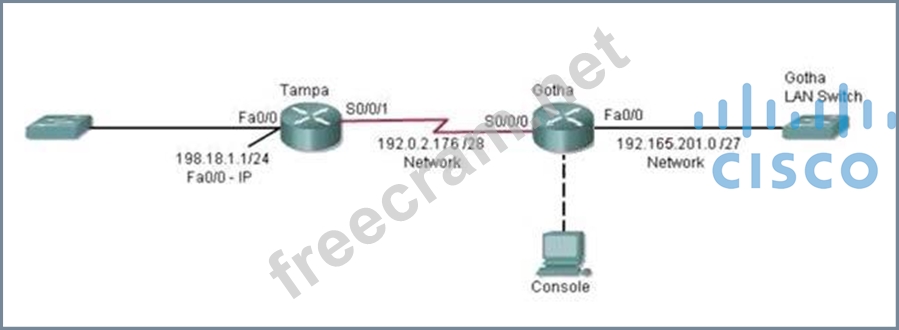
Attention:
In practical examinations, please note the following, the actual information will prevail.
1. Name of the router is xxx
2. Enable. secret password is xxx
3. Password In access user EXEC mode using the console is xxx
4. The password to allow telnet access to the router is xxx
5. IP information
Instructions
To configure the router (Gotha) click on the console host icon that is connected to a router by a serial console cable (shown in the diagram as a dashed black line).
You can click on the buttons below to view the different windows.
Each of the windows can be minimized by clicking on the [-]. You can also reposition a window by dragging it by the title bar.
The "Tab" key and most commands that use the "Control" or "Escape" keys are not supported and are not necessary to complete this simulation. The help command does not display all commands of the help system.
Scenario
Central Florida Widgets recently installed a new router in their Gotha office. Complete the network installation by performing the initial router configurations and configuring RIPv2 routing using the router command line interface (CLI) on the Gotha router.
Configure the router per the following requirements:
Name of the router is Gotha
Enable-secret password is mi222ke
The password access user EXEC mode using the console is G8tors1
The password to allow telnet access to the router is dun63ap
IPv4 addresses must be configured as follows:
Ethernet network 209.165.201.0/27 - router has fourth assignable host address in subnet.
Serial network is 192.0.2.176/28 - router has last assignable host address in the subnet.
Interface should be enabled.
Routing protocol is RIPv2.
Attention:
In practical examinations, please note the following, the actual information will prevail.
1. Name of the router is xxx
2. Enable. secret password is xxx
3. Password In access user EXEC mode using the console is xxx
4. The password to allow telnet access to the router is xxx
5. IP information
Correct Answer:
See explanation
Explanation/Reference:
Explanation:
Router>enable
Router#config terminal
Router(config)#hostname Gotha
2) Enable-secret password (cisco10):
Gotha(config)#enable secret mi222ke
3) Set the console password to G8tors1:
Gotha(config)#line console 0
Gotha(config-line)#password G8tors1
Gotha(config-line)#login
Gotha(config-line)#exit
4) Set the Telnet password to dun63lap:
Gotha(config)#line vty 0 4
Gotha(config-line)#password dun63lap
Gotha(config-line)#login
Gotha(config-line)#exit
5) Configure Ethernet interface (on the right) of router Gotha:
Ethernet network 209.165.201.0 /27 - Router has the fourth assignable host address in subnet.
Ethernet Interface on router R2 is Fast Ethernet 0/0 as per the exhibit First we need to identify the subnet mask Network: 209.165.201.0 /27 Subnet mask: /27: 27 bits = 8 + 8 + 8 + 3
=8(bits).8(bits).8(bits) .11100000 (3bits)
=255.255.255.11100000
=11100000 = 128+64+32+0+0+0+0+0
= 224
Subnet mask: 255.255.255.224
Different subnet networks and there valid first and last assignable host address range for above subnet mask are Subnet Networks :::::: Valid Host address range :::::: Broadcast address
209.165.201.0 :::::: 209.165.201.1 - 209.165.201.30 ::::: 209.165.201.31
209.165.201.32 :::::: 209.165.201.33 - 209.165.201.62 ::::: 209.165.201.63
209.165.201.64 :::::: 209.165.201.65 - 209.165.201.94 :::::: 209.165.201.95
209.165.201.96 :::::: 209.165.201.97 - 209.165.201.126 :::::: 209.165.201.127
209.165.201.128 :::::: 209.165.201.129 - 209.165.201.158 :::::: 209.165.201.159
209.165.201.160 :::::: 209.165.201.161 - 209.165.201.190 :::::: 209.165.201.191
209.165.201.192 :::::: 209.165.201.193 - 209.165.201.222 :::::: 209.165.201.223
209. 165.201.224 :::::: 209.165.201.225 - 209.165.201.254 :::::: 209.165.201.255 Use above table information for network 209.165.201.0 /27 to identify First assignable host address: 209.165.201.1 Last assignable host address: 209.165.201.30 Fourth assignable host address: 209.165.201.4 Assign the fourth assignable host address to Fa0/0 interface of Gotha router:
Gotha(config)#interface Fa0/0
Gotha(config-if)#ip address 209.165.201.4 255.255.255.224
Gotha(config-if)#no shutdown
Gotha(config-if)#exit
6) Configure Serial interface (on the left) of router Gotha:
Serial Network is 192.0.2.176 /28 - Router has the last assignable host address in subnet.
Serial Interface on R2 is Serial 0/0/0 as per the exhibit
First we need to identify the subnet mask
Network: 192.0.2.176 /28
Subnet mask: /28: 28bits = 8bits+8bits+8bits+4bits
=8(bits).8(bits).8(bits) .11110000 (4bits)
=255.255.255.11100000
=11100000 = 128+64+32+16+0+0+0+0
= 240
Subnet mask: 255.255.255.240
Different subnet networks and there valid first and last assignable host address range for above subnet mask are Subnet Networks ::::: Valid Host address ::::::::::: Broadcast address
192.0.2.0 :::::: 192.0.2.1 - 192.0.2.14 ::::::: 192.0.2.15
192.0.2.16 ::::::: 192.0.2.17 - 192.0.2.30 ::::::: 192.0.2.31
192.0.2.32 :::::::: 192.0.2.33 - 192.0.2.46 :::::: 192.0.2.47
192.0.2.48 :::::: 192.0.2.49 - 192.0.2.62 ::::::: 192.0.2.64
192.0.2.64 ::::::: 192.0.2.65 - 192.0.2.78 ::::::: 192.0.2.79
192.0.2.80 :::::::: 192.0.2.81 - 192.0.2.94 :::::: 192.0.2.95
192.0.2.96 :::::: 192.0.2.97 - 192.0.2.110 ::::::: 192.0.2.111
192.0.2.112 ::::::: 192.0.2.113 - 192.0.2.126 ::::::: 192.0.2.127
192.0.2.128 :::::::: 192.0.2.129 - 192.0.2.142 :::::: 192.0.2.143
192.0.2.144 :::::: 192.0.2.145 - 192.0.2.158 ::::::: 192.0.2.159
192.0.2.160 ::::::: 192.0.2.161 - 192.0.2.174 ::::::: 192.0.2.175
192. 0.2.176 :::::::: 192.0.2.177 - 192.0.2.190 :::::: 192.0.2.191 and so on ....
Use above table information for network 192.0.2.176 /28 to identify
First assignable host address: 192.0.2.177
Last assignable host address: 192.0.2.190
We need to configure Last assignable host address (192.0.2.190) on serial 0/0/0 using the subnet mask
255.255.255.240
Assign the last assignable host address to S0/0/0 interface of Gotha router:
Gotha(config)#interface S0/0/0 (or use interface S0/0 if not successful) Gotha(config-if)#ip address 192.0.2.190 255.255.255.240 Gotha(config-if)#no shutdown Gotha(config-if)#exit
7) Configure RIP v2 routing protocol:
Gotha(config)#router rip Gotha(config-router)#version 2 Gotha(config-router)#network 209.165.201.0 Gotha(config-router)#network 192.0.2.176 Gotha(config-router)#end Save the configuration:
Gotha#copy running-config startup-config
Finally, you should use the ping command to verify all are working properly!
Explanation/Reference:
Explanation:
Router>enable
Router#config terminal
Router(config)#hostname Gotha
2) Enable-secret password (cisco10):
Gotha(config)#enable secret mi222ke
3) Set the console password to G8tors1:
Gotha(config)#line console 0
Gotha(config-line)#password G8tors1
Gotha(config-line)#login
Gotha(config-line)#exit
4) Set the Telnet password to dun63lap:
Gotha(config)#line vty 0 4
Gotha(config-line)#password dun63lap
Gotha(config-line)#login
Gotha(config-line)#exit
5) Configure Ethernet interface (on the right) of router Gotha:
Ethernet network 209.165.201.0 /27 - Router has the fourth assignable host address in subnet.
Ethernet Interface on router R2 is Fast Ethernet 0/0 as per the exhibit First we need to identify the subnet mask Network: 209.165.201.0 /27 Subnet mask: /27: 27 bits = 8 + 8 + 8 + 3
=8(bits).8(bits).8(bits) .11100000 (3bits)
=255.255.255.11100000
=11100000 = 128+64+32+0+0+0+0+0
= 224
Subnet mask: 255.255.255.224
Different subnet networks and there valid first and last assignable host address range for above subnet mask are Subnet Networks :::::: Valid Host address range :::::: Broadcast address
209.165.201.0 :::::: 209.165.201.1 - 209.165.201.30 ::::: 209.165.201.31
209.165.201.32 :::::: 209.165.201.33 - 209.165.201.62 ::::: 209.165.201.63
209.165.201.64 :::::: 209.165.201.65 - 209.165.201.94 :::::: 209.165.201.95
209.165.201.96 :::::: 209.165.201.97 - 209.165.201.126 :::::: 209.165.201.127
209.165.201.128 :::::: 209.165.201.129 - 209.165.201.158 :::::: 209.165.201.159
209.165.201.160 :::::: 209.165.201.161 - 209.165.201.190 :::::: 209.165.201.191
209.165.201.192 :::::: 209.165.201.193 - 209.165.201.222 :::::: 209.165.201.223
209. 165.201.224 :::::: 209.165.201.225 - 209.165.201.254 :::::: 209.165.201.255 Use above table information for network 209.165.201.0 /27 to identify First assignable host address: 209.165.201.1 Last assignable host address: 209.165.201.30 Fourth assignable host address: 209.165.201.4 Assign the fourth assignable host address to Fa0/0 interface of Gotha router:
Gotha(config)#interface Fa0/0
Gotha(config-if)#ip address 209.165.201.4 255.255.255.224
Gotha(config-if)#no shutdown
Gotha(config-if)#exit
6) Configure Serial interface (on the left) of router Gotha:
Serial Network is 192.0.2.176 /28 - Router has the last assignable host address in subnet.
Serial Interface on R2 is Serial 0/0/0 as per the exhibit
First we need to identify the subnet mask
Network: 192.0.2.176 /28
Subnet mask: /28: 28bits = 8bits+8bits+8bits+4bits
=8(bits).8(bits).8(bits) .11110000 (4bits)
=255.255.255.11100000
=11100000 = 128+64+32+16+0+0+0+0
= 240
Subnet mask: 255.255.255.240
Different subnet networks and there valid first and last assignable host address range for above subnet mask are Subnet Networks ::::: Valid Host address ::::::::::: Broadcast address
192.0.2.0 :::::: 192.0.2.1 - 192.0.2.14 ::::::: 192.0.2.15
192.0.2.16 ::::::: 192.0.2.17 - 192.0.2.30 ::::::: 192.0.2.31
192.0.2.32 :::::::: 192.0.2.33 - 192.0.2.46 :::::: 192.0.2.47
192.0.2.48 :::::: 192.0.2.49 - 192.0.2.62 ::::::: 192.0.2.64
192.0.2.64 ::::::: 192.0.2.65 - 192.0.2.78 ::::::: 192.0.2.79
192.0.2.80 :::::::: 192.0.2.81 - 192.0.2.94 :::::: 192.0.2.95
192.0.2.96 :::::: 192.0.2.97 - 192.0.2.110 ::::::: 192.0.2.111
192.0.2.112 ::::::: 192.0.2.113 - 192.0.2.126 ::::::: 192.0.2.127
192.0.2.128 :::::::: 192.0.2.129 - 192.0.2.142 :::::: 192.0.2.143
192.0.2.144 :::::: 192.0.2.145 - 192.0.2.158 ::::::: 192.0.2.159
192.0.2.160 ::::::: 192.0.2.161 - 192.0.2.174 ::::::: 192.0.2.175
192. 0.2.176 :::::::: 192.0.2.177 - 192.0.2.190 :::::: 192.0.2.191 and so on ....
Use above table information for network 192.0.2.176 /28 to identify
First assignable host address: 192.0.2.177
Last assignable host address: 192.0.2.190
We need to configure Last assignable host address (192.0.2.190) on serial 0/0/0 using the subnet mask
255.255.255.240
Assign the last assignable host address to S0/0/0 interface of Gotha router:
Gotha(config)#interface S0/0/0 (or use interface S0/0 if not successful) Gotha(config-if)#ip address 192.0.2.190 255.255.255.240 Gotha(config-if)#no shutdown Gotha(config-if)#exit
7) Configure RIP v2 routing protocol:
Gotha(config)#router rip Gotha(config-router)#version 2 Gotha(config-router)#network 209.165.201.0 Gotha(config-router)#network 192.0.2.176 Gotha(config-router)#end Save the configuration:
Gotha#copy running-config startup-config
Finally, you should use the ping command to verify all are working properly!


- Question List (360q)
- Question 1: Which sequence begins a unique local IPv6 address in binary ...
- Question 2: Which statement is a Cisco best practice for switch port sec...
- Question 3: Which symptom most commonly indicates that two connecting in...
- Question 4: Which two statements are true regarding ICMP packets? (Choos...
- Question 5: Which two statements describe the process identifier that is...
- Question 6: Examine the network diagram and router output shown in the e...
- Question 7: On a live network, which two commands will verify the operat...
- Question 8: What is the OSPF default frequency, in seconds, at which a C...
- Question 9: Which NAT term is defined as a group of addresses available ...
- Question 10: Refer to the exhibit. After configuring two interfaces on th...
- Question 11: Refer to the exhibit. (Exhibit) As packets travel from Mary ...
- Question 12: Which two options will help to solve the problem of a networ...
- Question 13: Refer to the exhibit. (Exhibit) Which option describes how S...
- Question 14: Which of the following privilege level is the most secured?...
- Question 15: After the network has converged, what type of messaging, if ...
- Question 16: Which IPsec security protocol should be used when confidenti...
- Question 17: If a router has four interfaces and each interface is connec...
- Question 18: Which component of the routing table ranks routing protocols...
- Question 19: Click on the correct location or locations in the exhibit. (...
- Question 20: Some routers have been configured with default routes. What ...
- Question 21: Which commands are required to properly configure a router t...
- Question 22: Refer to the exhibit. (Exhibit) Which two statements about t...
- Question 23: Which command can you enter to determine the addresses that ...
- Question 24: When troubleshooting a LAN interface operating in full duple...
- Question 25: If NVRAM lacks boot system commands, where does the router l...
- Question 26: Which network configuration can you use to segregate broadca...
- Question 27: Which IP address is a private address?...
- Question 28: When you configure router# ipnat pool 10.10.10.1 10.10.10.20...
- Question 29: Which type of routing protocol operates by exchanging the en...
- Question 30: Which protocol verifies connectivity between two switches th...
- Question 31: Refer to the exhibits labeled A through E. All devices are t...
- Question 32: Refer to the exhibit. A network technician is unable to ping...
- Question 33: DRAG DROP This topology contains 3 routers and 1 switch. Com...
- Question 34: Which Ethernet interface command is present when you boot a ...
- Question 35: Refer to the output of the three router commands shown in th...
- Question 36: Refer to the exhibit. Two 2950 switches connect through port...
- Question 37: To enable router on a stick on a router subinterface, which ...
- Question 38: (Exhibit) Refer to the exhibit. The enterprise has decided t...
- Question 39: Click on the correct location or locations in the exhibit. (...
- Question 40: Which transport layer protocol is best suited for the transp...
- Question 41: Which statement about upgrading a cisco ios device with TFTP...
- Question 42: Refer to the exhibit. (Exhibit) The output is from a router ...
- Question 43: While troubleshooting a DCHP client that is behaving erratic...
- Question 44: Which statement about native VLAN traffic is true?...
- Question 45: DRAG DROP On the left are various network protocols. On the ...
- Question 46: In which two situations should you use out-of-band managemen...
- Question 47: Which NAT command can be applied to an interface?...
- Question 48: Which value indicate the distance from the ntp authoritative...
- Question 49: What command can you enter to configure the switch as an aut...
- Question 50: Which two statements describe the operation of the CSMA/CD a...
- Question 51: (Exhibit) Including the address on the Router1 Ethernet inte...
- Question 52: Which layer of the TCP/IP stack combines the OSI model physi...
- Question 53: Which two command can you enter to display the current time ...
- Question 54: Which name describes an IPV6 host-enable tunneling technique...
- Question 55: What layer of the OSI Model is included in TCP/IP Model's IN...
- Question 56: What 8-bit field exists in IP packet for QoS?...
- Question 57: What does split horizon prevent?...
- Question 58: Which address are OSPF hello packets addressed to on point-t...
- Question 59: WAN data link encapsulation types include which of the follo...
- Question 60: What OSPF command, when configured, will include all interfa...
- Question 61: Refer to the topology and partial configurations shown in th...
- Question 62: Which of the following statements are TRUE regarding Cisco a...
- Question 63: Refer to the exhibit. (Exhibit) The exhibit is showing the t...
- Question 64: Which adverse situation can occur if an Ethernet cable is to...
- Question 65: Which technique can you use to route IPv6 traffic over an IP...
- Question 66: Refer to the exhibit. What value should be displayed in Box ...
- Question 67: What is the default administrative distance for a connected ...
- Question 68: What are three parts of an IPv6 global unicast address? (Cho...
- Question 69: Which command can you enter to create a NAT pool of 6 addres...
- Question 70: (Exhibit) Refer to the exhibit. The network administrator is...
- Question 71: Which NTP concept indicates the distance between a device an...
- Question 72: DRAG DROP Drag and drop the extended traceout option from th...
- Question 73: Which feature automatically disables Cisco Express Forwardin...
- Question 74: Refer to the exhibit. Which two of the output fields could h...
- Question 75: After the shutdown command has been issued on the serial 0/0...
- Question 76: Which network configuration allows a switch to send traffic ...
- Question 77: Which of the following are found in a TCP header, but not in...
- Question 78: Which statement about the default switch configuration for r...
- Question 79: Which two things does a router do when it forwards a packet?...
- Question 80: Which network device functions only at Layer 1 of the OSI mo...
- Question 81: Refer to the exhibit. Which two statements are true about th...
- Question 82: Which of the following statements describe the network shown...
- Question 83: The command ip route 192.168.100.160 255.255.255.224 192.168...
- Question 84: On which OSI layer does a VLAN operate?...
- Question 85: Which command displays the number of times that an individua...
- Question 86: Which statement about DHCP address pools is true?...
- Question 87: How many simultaneous Telnet sessions does a Cisco router su...
- Question 88: What is the default configuration of a Cisco switch?...
- Question 89: Which transport layer protocol provides best-effort delivery...
- Question 90: A switch has 48 ports and 4 VLANs. How many collision and br...
- Question 91: R1 is unable to establish an OSPF neighbor relationship with...
- Question 92: Which Layer 1 devices can be used to enlarge the area covere...
- Question 93: In which circumstance is static routing most useful?...
- Question 94: Refer to the exhibit. A network associate has configured OSP...
- Question 95: Which protocol uses a connection-oriented service to deliver...
- Question 96: Why might an enterprise choose to address hosts using RFC 19...
- Question 97: In which situation would the use of a static route be approp...
- Question 98: Which protocol provides best-effort delivery of user data in...
- Question 99: You work for a company that provides managed network service...
- Question 100: Which command can you use to manually assign a static IPV6 a...
- Question 101: Router R1 has a static router that is configured to a destin...
- Question 102: Which commands display information about the Cisco IOS softw...
- Question 103: Which cloud service is typically used to provide DNS and DHC...
- Question 104: An administrator previously changed the encapsulation on a s...
- Question 105: SIMULATION Instructions To configure the router (Gotha) clic...
- Question 106: Which syslog severity level logs information messages?...
- Question 107: Which two options are benefits of dhcp snooping?...
- Question 108: What is the default maximum number of equal-cost paths that ...
- Question 109: Which field in a basic Ethernet frame is 6 bytes long and al...
- Question 110: What are two benefits of using a single OSPF area network de...
- Question 111: Which information is used to install the best route to a des...
- Question 112: Which statement about Cisco Discovery Protocol is true?...
- Question 113: Which router command can be used to determine the status of ...
- Question 114: Refer to the exhibit. (Exhibit) If host A sends an IP packet...
- Question 115: Refer to the exhibit. Which statement is correct regarding t...
- Question 116: What should be part of a comprehensive network security plan...
- Question 117: DRAG DROP Drag the definition on the left to the correct ter...
- Question 118: Refer to the topology. Your company has decided to connect t...
- Question 119: The OSPF Hello protocol performs which of the following task...
- Question 120: If a router has 3 hosts connected in one port and two other ...
- Question 121: Refer to the exhibit. (Exhibit) The junior network support s...
- Question 122: Refer to the exhibit. (Exhibit) After you apply the given co...
- Question 123: How does a router handle an incoming packet whose destinatio...
- Question 124: Click on the correct location or locations in the exhibit. (...
- Question 125: Which three commands must you enter to create a trunk that a...
- Question 126: Given the output for this command, if the router ID has not ...
- Question 127: Which of the following IP addresses are valid Class B host a...
- Question 128: Which statement about DHCP snooping is true?...
- Question 129: Which statement about unicast frame forwarding on a switch i...
- Question 130: What is the purpose of flow control?...
- Question 131: What to do when the router password was forgotten?...
- Question 132: Refer to the exhibit. For security reasons, information abou...
- Question 133: If you want multiple hosts on a network, where do you config...
- Question 134: (Exhibit) What is the subnet broadcast address of the LAN co...
- Question 135: Which of the following are types of flow control? (Choose th...
- Question 136: Which statement about unique local IPv6 addresses is true?...
- Question 137: Which subnet mask allows for up to 126 hosts in a single Lay...
- Question 138: Refer to Exhibit. Based on the network shown in the graphic ...
- Question 139: What is the subnet address of 192.168.1.42 255.255.255.248?...
- Question 140: What is the maximum number of bits that can be borrowed to c...
- Question 141: DRAG DROP Drag the appropriate command on the left to the co...
- Question 142: (Exhibit) Why application that are installed on PC's in R2 L...
- Question 143: You have configured the host computers on a campus LAN to re...
- Question 144: Which value to use in HSRP protocol election process ?...
- Question 145: Which set of conditions comprises a successful ping attempt ...
- Question 146: Refer to the exhibit. The network is converged.After link-st...
- Question 147: At which layer of the OSI model does the protocol that provi...
- Question 148: Which three options are types of Layer 2 network attack? (Ch...
- Question 149: Which three statements about DWDM are true? (Choose three)...
- Question 150: From where does a small network get its IP network address?...
- Question 151: Which two of these functions do routers perform on packets? ...
- Question 152: Which statement about NTP is true?...
- Question 153: Which two pieces of information can be shared with LLDP TLVs...
- Question 154: If a host experiences intermittent issues that relate to con...
- Question 155: Refer to the exhibit. (Exhibit) After you apply the given co...
- Question 156: SIMULATION Lab Simulation - OSPF A sporting goods manufactur...
- Question 157: (Exhibit) Refer to the topology and switching table shown in...
- Question 158: Click on the correct location or locations in the exhibit. (...
- Question 159: Which feature facilitate the tagging of a specific VLAN?...
- Question 160: The network administrator has found the following problem. T...
- Question 161: Refer to the exhibit. (Exhibit) A network device needs to be...
- Question 162: Refer to the topology. Your company has decided to connect t...
- Question 163: Which value must the device send as its username when using ...
- Question 164: What feature uses a random time to re-sent a frame?...
- Question 165: Which value is indicated by the next hop in a routing table?...
- Question 166: A network administrator is connecting PC hosts A and B direc...
- Question 167: Refer to the exhibit. PC1 pings PC2. What three things will ...
- Question 168: Which IPV6 feature is supported in IPV4 but is not commonly ...
- Question 169: (Exhibit) R1 router clock is synchronized with ISP router. R...
- Question 170: Why would a network administrator configure port security on...
- Question 171: (Exhibit) Examine the DHCP configuration between R2 and R3; ...
- Question 172: Refer to the exhibit. (Exhibit) HostX is transferring a file...
- Question 173: Refer to the exhibit. A network technician is unable to ping...
- Question 174: Which statement about IPv6 link-local addresses is true ?...
- Question 175: Which IPv6 routing protocol uses multicast group FF02::9 to ...
- Question 176: Which command can be used from a router to verify the Layer ...
- Question 177: Refer to the exhibit. (Exhibit) If CDP is enabled on all dev...
- Question 178: Which table displays the MAC addresses that are learned on a...
- Question 179: Refer to the exhibit. (Exhibit) Why are two OSPF designated ...
- Question 180: SW-C has just been added to the network shown in the graphic...
- Question 181: Click on the correct location or locations in the exhibit. (...
- Question 182: Which two statements about floating static routes are true? ...
- Question 183: Refer to the exhibit. What does the address 192.168.2.167 re...
- Question 184: Which of the following commands enables a network administra...
- Question 185: Refer to the exhibit. How many collision domains are shown? ...
- Question 186: (Exhibit) Users complain that they are unable to reach Inter...
- Question 187: Refer to the exhibit. Why did the device return this message...
- Question 188: DRAG DROP You are performing the initial configuration on a ...
- Question 189: Where does a switch maintain DHCP snooping information ?...
- Question 190: Which two statements about RIPv2 are true? (Choose two)...
- Question 191: Click on the correct location or locations in the exhibit. (...
- Question 192: (Exhibit) What interfaces on Router1 have not had any config...
- Question 193: If all OSPF routers in a single area are configured with the...
- Question 194: How to configure RIPv2? (Choose Two.)...
- Question 195: The network administrator is using a Windows PC application ...
- Question 196: An administrator issues the show ip interface s0/0 command a...
- Question 197: Instructions For both the Router and the Switch the simulate...
- Question 198: Which feature allows a device to use a switch port that is c...
- Question 199: Which command you enter on a switch to display the ip addres...
- Question 200: What happens when the cable is too long?...
- Question 201: Which keyword in a NAT configuration enables the use of one ...
- Question 202: A network administrator cannot connect to a remote router by...
- Question 203: Which feature facilitates the tagging of frames on a specifi...
- Question 204: Refer to the exhibit. (Exhibit) A person is trying to send a...
- Question 205: Which IP addresses are valid for hosts belonging to the 10.1...
- Question 206: Which IEEE mechanism is responsible for the authentication o...
- Question 207: When you use the ping command to send ICMP messages across a...
- Question 208: Refer to the exhibit. Serial 0/0 does not respond to a ping ...
- Question 209: Under which circumstance is a router on a stick most appropr...
- Question 210: Which configuration can be used with PAT to allow multiple i...
- Question 211: The system LED is amber on a Cisco Catalyst 2950 series swit...
- Question 212: By default, how many MAC addresses are permitted to be learn...
- Question 213: Which equipment is needed to connect hosts between VLAN 10 a...
- Question 214: Refer to the exhibit. (Exhibit) If the hubs in the graphic w...
- Question 215: Which statements describe the routing protocol OSPF? (Choose...
- Question 216: Refer to the output of the corporate router routing table sh...
- Question 217: Which method does a connected trunk port use to tag VLAN tra...
- Question 218: After you configure a default route to the Internet on a rou...
- Question 219: Which three commands are required to enable NTP authenticati...
- Question 220: What command sequence will configure a router to run OSPF an...
- Question 221: R1 is configured with the default configuration of OSPF. Fro...
- Question 222: Which technology supports the stateless assignment of IPv6 a...
- Question 223: Refer to the topology. Your company has decided to connect t...
- Question 224: Which three network addresses are reserved for private netwo...
- Question 225: Scenario: You work for a company that provides managed netwo...
- Question 226: Which mode is compatible with Trunk, Access, and desirable p...
- Question 227: Which statement describes the process ID that is used to run...
- Question 228: Which option is the default switch port port-security violat...
- Question 229: Which type of secure MAC address must be configured manually...
- Question 230: (Exhibit) The hosts in the LAN are not able to connect to th...
- Question 231: Configuration of which option is required on a Cisco switch ...
- Question 232: Which Type of ipv6 unicast ip address is reachable across th...
- Question 233: Which characteristics are representative of a link-state rou...
- Question 234: Refer to the exhibit. (Exhibit) The two routers have had the...
- Question 235: Instructions For both the Router and the Switch the simulate...
- Question 236: Which statement describes the effect of the copy run start c...
- Question 237: Which statement describes the effect of the overload keyword...
- Question 238: Which symptom can cause duplex mismatch problem?...
- Question 239: What is the requirement of configuring 6to4 tunnelling on tw...
- Question 240: OSPF routing uses the concept of areas. What are the charact...
- Question 241: Why do large OSPF networks use a hierarchical design? (Choos...
- Question 242: Which three statements accurately describe CDP? (Choose thre...
- Question 243: Which parameter or parameters are used to calculate OSPF cos...
- Question 244: Which port security violation mode allows traffic from valid...
- Question 245: Refer to the exhibit. (Exhibit) If the resume command is ent...
- Question 246: Which three statements about IPv6 address fd14:920b:f83d:407...
- Question 247: Refer to the exhibit. (Exhibit) A user cannot reach any web ...
- Question 248: Which statement about 6to4 tunneling is true?...
- Question 249: Refer to the exhibit. Why was this message received? (Exhibi...
- Question 250: Refer to the exhibit. Which statement is correct regarding t...
- Question 251: What is true about Cisco Discovery Protocol?...
- Question 252: Which two statements about the extended traceroute command a...
- Question 253: How can an administrator determine if a router has been conf...
- Question 254: Refer to the exhibit. (Exhibit) After the power-on-self test...
- Question 255: Instructions For both the Router and the Switch the simulate...
- Question 256: To what type of port would a cable with a DB-60 connector at...
- Question 257: Which three statements are correct about RIP version 2? (Cho...
- Question 258: The internetwork shown in the diagram is experiencing networ...
- Question 259: How many addresses will be available for dynamic NAT transla...
- Question 260: What are types of IPv6 static routes? (Choose Three.)...
- Question 261: Which port-security feature allows a switch to learn MAC add...
- Question 262: From which of the following attacks can Message Authenticati...
- Question 263: Which option is one component of an Ethernet frame?...
- Question 264: Refer to the exhibit. You have discovered that computers on ...
- Question 265: On which type of device is every port in the same collision ...
- Question 266: DRAG DROP Drag and drop the descriptions of routing protocol...
- Question 267: You work for a company that provides managed network service...
- Question 268: Which range represents the standard access list?...
- Question 269: What will you do if you forgot the password of your router?...
- Question 270: Which statement about routing protocols is true?...
- Question 271: Which network topology allows all traffic to flow through a ...
- Question 272: Refer to the exhibit. Host B has just been added to the netw...
- Question 273: Assuming a subnet mask of 255.255.248.0, three of the follow...
- Question 274: Refer to the exhibit. What kind of cable should be used to m...
- Question 275: Which layer of the OSI model controls the reliability of com...
- Question 276: Which command can you enter to verify that a 128-bit address...
- Question 277: Which two VLANs are reserved for system use only? (Choose tw...
- Question 278: What does the "Inside Global" address represent in the confi...
- Question 279: Refer to exhibit. (Exhibit) What Administrative distance has...
- Question 280: Refer to the exhibit. (Exhibit) A technician pastes the conf...
- Question 281: Which networking Technology is currently recognized as the s...
- Question 282: Which command is used to show the interface status of a rout...
- Question 283: What is true about ipv6 unique local addresses:...
- Question 284: How many primary ipv4 addresses can be assigned on a router ...
- Question 285: Which dynamic routing protocol uses only the hop count to de...
- Question 286: Refer to the exhibit. When running OSPF, what would cause ro...
- Question 287: How many VLANs can be carried across an access port?...
- Question 288: Which protocol does ipv6 use to discover other ipv6 nodes on...
- Question 289: DRAG DROP Various protocols are listed on the left On the ri...
- Question 290: Refer to the exhibit. (Exhibit) An administrator cannot conn...
- Question 291: When you troubleshoot an IPv4 connectivity issue on a router...
- Question 292: Refer to the exhibit. (Exhibit) A network has been planned a...
- Question 293: OSPF is configured using default classful addressing. With a...
- Question 294: Which subnet address is for the IP address 172.19.20.23/28?...
- Question 295: An administrator must assign static IP addresses to the serv...
- Question 296: Which OSI layer header contains the address of a destination...
- Question 297: Which form of NAT maps multiple private IP addresses to a si...
- Question 298: Which command is used to build DHCP pool?...
- Question 299: Regarding the extended ping command, which of the statements...
- Question 300: Refer to the exhibit. (Exhibit) The host in Kiev sends a req...
- Question 301: Which statement about the inside interface configuration in ...
- Question 302: Which statement about recovering a password on a cisco route...
- Question 303: What is the default administrative distance of OSPF?...
- Question 304: Refer to the exhibit. (Exhibit) The two connected ports on t...
- Question 305: Which three statements are true about the operation of a ful...
- Question 306: When enabled, which feature prevents routing protocols from ...
- Question 307: Which two statements about IPv6 address 2002:ab10:beef::/48 ...
- Question 308: A network administrator is troubleshooting the OSPF configur...
- Question 309: Dhcp client in the back can not communicate with hosts in th...
- Question 310: Refer to the exhibit. Assume that all router interfaces are ...
- Question 311: After the show ip route command has been entered, the follow...
- Question 312: An administrator has connected devices to a switch and, for ...
- Question 313: Which header field is new in IPv6?...
- Question 314: If three devices are plugged into one port on a switch and t...
- Question 315: Which feature automatically disables CEF when it is enabled?...
- Question 316: Which statement describes the effect of the exec-timeout 30 ...
- Question 317: (Exhibit) What is the bandwidth on the WAN interface of Rout...
- Question 318: Which command is used to display the collection of OSPF link...
- Question 319: What is the most efficient subnet mask for a point to point ...
- Question 320: Refer to the exhibit. If the router Cisco returns the given ...
- Question 321: Refer to the exhibit. Pierre has just installed the mail ser...
- Question 322: Refer to the exhibit. (Exhibit) Mary is sending an instant m...
- Question 323: An administrator is working with the 192.168.4.0 netwrok, wh...
- Question 324: Refer to the exhibit, what is the metric for the router from...
- Question 325: Which two of these statements are true of IPv6 address repre...
- Question 326: Which tunneling mechanism embeds an IPv4 address within an I...
- Question 327: Refer to the exhibit. (Exhibit) All devices attached to the ...
- Question 328: Refer to the exhibit. Which two statements are true of the i...
- Question 329: Which definition of a host route is true?...
- Question 330: Which functionality does split horizon provide?...
- Question 331: What happens when an 802.11a node broadcasts within the rang...
- Question 332: Which of the following is a characteristic of full-duplex co...
- Question 333: Refer to the exhibit. HostB is sending a file to HostA. B re...
- Question 334: What disables CEF?
- Question 335: Which technology allows a large number of private IP address...
- Question 336: A router has learned three possible routes that could be use...
- Question 337: Which statements are TRUE regarding Internet Protocol versio...
- Question 338: What is the default administrative distance of the OSPF rout...
- Question 339: How does a Layer 2 switch differ from a hub?...
- Question 340: Which two statements about unique local IPv6 addresses are t...
- Question 341: DRAG DROP Drag and drop the descriptions of logging from the...
- Question 342: Where information about untrusted hosts are stored?...
- Question 343: When you power up a Cisco router, in what memory is the star...
- Question 344: Two routers named Atlanta and Brevard are connected by their...
- Question 345: Which sequence of actions will allow telneting from a user's...
- Question 346: If an Ethernet port on a router was assigned an IP address o...
- Question 347: Which of the following is needed to be enable back the role ...
- Question 348: You work for a company that provides managed network service...
- Question 349: (Exhibit) To allow or prevent load balancing to network 172....
- Question 350: (Exhibit) Refer to the exhibit. Which feature is enabled by ...
- Question 351: (Exhibit) Refer to the exhibit. Which command would you use ...
- Question 352: Which tool can you use to view each Layer 3 hop along the pa...
- Question 353: Which component of a routing table entry represents the subn...
- Question 354: You are configuring dynamic NAT on your Cisco IOS router. Wh...
- Question 355: DRAG DROP Move the protocol or service on the left to a situ...
- Question 356: Refer to the exhibit. A network technician has added host A ...
- Question 357: If you configure syslog messages without specifying the logg...
- Question 358: Refer to the exhibit. (Exhibit) A company wants to use NAT i...
- Question 359: A network administrator has subnetted the 172.16.0.0 network...
- Question 360: Which three options are fields in a basic ethernet data fram...
