Valid 9A0-303 Dumps shared by ExamDiscuss.com for Helping Passing 9A0-303 Exam! ExamDiscuss.com now offer the newest 9A0-303 exam dumps, the ExamDiscuss.com 9A0-303 exam questions have been updated and answers have been corrected get the newest ExamDiscuss.com 9A0-303 dumps with Test Engine here:
Access 9A0-303 Dumps Premium Version
(407 Q&As Dumps, 35%OFF Special Discount Code: freecram)
<< Prev Question Next Question >>
Question 167/243
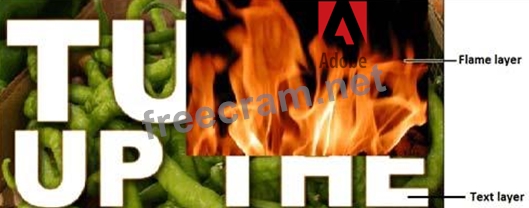
You work as a graphic designer for WEBDESIGN Inc. You are working on below given image in Adobe Photoshop CS6. You want to clip the Flame layer to the Text layer which is placed below it. Which of the following methods will you choose to accomplish this task?
Correct Answer: D
Explanation/Reference:
When you create a clipping mask, you display the current layer over only the pixels in the layer below.
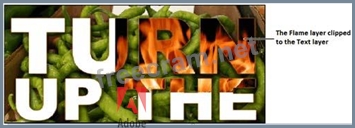
Clipping masks work well when you want to mask a layer based on content that might change. After applying the clipping mask, the image will show as follows:
Answer option C is incorrect. When you want to show only part of a layer's contents, you can create a layer mask. You can change which part of the layer is visible in the image at any time, or you can reveal the entire layer again if necessary.
Answer option B is incorrect. Vector Mask is a vector path component added to a layer to designate each pixel's visibility.
When you create a clipping mask, you display the current layer over only the pixels in the layer below.
Clipping masks work well when you want to mask a layer based on content that might change. After applying the clipping mask, the image will show as follows:
Answer option C is incorrect. When you want to show only part of a layer's contents, you can create a layer mask. You can change which part of the layer is visible in the image at any time, or you can reveal the entire layer again if necessary.
Answer option B is incorrect. Vector Mask is a vector path component added to a layer to designate each pixel's visibility.


- Question List (243q)
- Question 1: True or false: A neutral gray has matching cyan, magenta, ye...
- Question 2: Which of the following commands is used to import a video fi...
- Question 3: In which of the following menus can a user find the Warp too...
- Question 4: Which of the following options from the Photoshop's File men...
- Question 5: Which of the following tools is used for selecting a color w...
- Question 6: While using the Layer Style dialog box, which of the followi...
- Question 7: Which of the following are the correct methods to create gra...
- Question 8: True or false: When creating a Web gallery, you could have B...
- Question 9: Which tool should you choose for changing only the pixels th...
- Question 10: While importing image sequences, which of the following step...
- Question 11: To adjust how each ink in a duotone image is distributed thr...
- Question 12: Which of the following options from the Style menu in the Op...
- Question 13: When pixels are large enough that viewers can see stair-step...
- Question 14: Which of the following options from the Workflow Options dia...
- Question 15: Which of the following commands is used to stretch the selec...
- Question 16: How can you choose a different brush diameter and hardness w...
- Question 17: In order to export presets you've created, you will choose:...
- Question 18: Which of the following options in the Selection Preview drop...
- Question 19: Which key do you press while clicking a layer mask thumbnail...
- Question 20: What tool can you use to modify a Curves adjustment layer by...
- Question 21: From which submenu can you export layer comps?...
- Question 22: Which of the following adjustments is meant to correct expos...
- Question 23: Which of the following options in the Label menu in Adobe Br...
- Question 24: How can you convert a selection to a path?...
- Question 25: Which of the following settings is used to adjust the vertic...
- Question 26: An RGB Color image's file size is __________ the same image ...
- Question 27: While painting with black using the Quick Mask Options dialo...
- Question 28: To make a minor correction in an image in Camera Raw, you wi...
- Question 29: If you are using the same colors repeatedly, you should save...
- Question 30: Which of the following applications will you use to manage f...
- Question 31: To subtract from a selection, which key should you press as ...
- Question 32: Which of the following components can you modify by using a ...
- Question 33: Which of the following options from the Options bar is used ...
- Question 34: Which of the following options in the Onion Skin dialog box ...
- Question 35: True or false? "Vector mask" and "clipping path" are interch...
- Question 36: Which of the following Photoshop components displays data ab...
- Question 37: In the Timeline panel, which of the following options is use...
- Question 38: Describe how you can use Bridge to copy files from one folde...
- Question 39: What will you do to make a layer's pixels appear semi-transp...
- Question 40: Which of the following video transitions fades the first cli...
- Question 41: In which corner of the Properties panel can you find the Tar...
- Question 42: You work as professional photographer for WEBDESIGN Inc. You...
- Question 43: Which of the following options in the New Fill Layer submenu...
- Question 44: Which of the following actions should a user take in order t...
- Question 45: Which of the following options in the Print dialog box sets ...
- Question 46: Which of the following file formats is used in Camera Raw fo...
- Question 47: In Adobe Bridge to transfer photos from your camera or memor...
- Question 48: When using the Liquify filter, what tool can you use to prot...
- Question 49: Which of the following keyboard shortcuts is used to remove ...
- Question 50: While working with the Spot Healing Brush tool, which of the...
- Question 51: Which of the following options helps you monitor and modify ...
- Question 52: What are the advantages of using the camera raw format? [Cho...
- Question 53: How can you perform an adjustment as a nondestructive edit? ...
- Question 54: Which of the following options in the Refine Edge dialog box...
- Question 55: To preview images onscreen as they'd appear when printed on ...
- Question 56: In Quick Mask mode, how can you add to a selection?...
- Question 57: Which of the following controls of the Detail tab in Camera ...
- Question 58: Frame rate is defined as which of the following?...
- Question 59: While working with the Patch tool, which of the following ke...
- Question 60: If you want to print an image using a color management profi...
- Question 61: Which of the following changes can be made to a type layer b...
- Question 62: If you want to rotate an image while reducing its canvas siz...
- Question 63: Which of the following options in the Layer menu are used to...
- Question 64: How can you use the Channels panel to add to a saved selecti...
- Question 65: In which section of the Color Settings dialog box can you sp...
- Question 66: Which types of layer data can vary among layer comps for a s...
- Question 67: If you wanted to work in a different color space, changing t...
- Question 68: Which of the following tabs in the Camera Raw dialog box is ...
- Question 69: You've opened several panels and have arranged them in a way...
- Question 70: Which of the following settings in the Save For Web dialog b...
- Question 71: To see how large an image will appear when viewed in a Web b...
- Question 72: Which of the following softens a selection by gradually redu...
- Question 73: How can you arrange a layer so that its contents overlap the...
- Question 74: Which of the following selection tools snaps to the edges of...
- Question 75: Which of the following components can you modify by using a ...
- Question 76: Which of the following actions is a nondestructive edit?...
- Question 77: Which of the following are advantages of using vector drawin...
- Question 78: True or false? For maximum flexibility when painting, you sh...
- Question 79: Which of the following methods are used for transforming the...
- Question 80: Which of the following is used for displaying color componen...
- Question 81: Which of the following options in the Refine Edge dialog box...
- Question 82: Which color management policy displays an image in its embed...
- Question 83: Which of the following selection tools snaps to the edges of...
- Question 84: Which of the following statements about color modes are true...
- Question 85: Jane works as professional photographer in a company. He is ...
- Question 86: Which command should you choose to have the most control ove...
- Question 87: Multiple versions of a design or layout are typically called...
- Question 88: Which of the following key combinations is used to add a Rej...
- Question 89: Which of the following blending modes darkens the base color...
- Question 90: Which of the following adjustments allows you to change the ...
- Question 91: Which of the following options in the Save For Web dialog bo...
- Question 92: When you print a color-managed image, what must you select i...
- Question 93: Which tool allows you to paint over multiple colors in an im...
- Question 94: Which of the following key combinations will you use to crea...
- Question 95: You want to create a solid-colored geometric object whose sh...
- Question 96: While working with the Photomerge option, which of the follo...
- Question 97: What is the keyboard shortcut for the Free Transform command...
- Question 98: While working with the Liquify filter, which of the followin...
- Question 99: Unlike camera raw files, ________ files are not proprietary,...
- Question 100: Which of the following determine the curvature of its segmen...
- Question 101: The Clone Source panel would be useful for which of the foll...
- Question 102: Which of the following options needs to be checked while imp...
- Question 103: What is the purpose of Frequency in the Options bar while us...
- Question 104: You want to add a gradient on the current layer. Which techn...
- Question 105: Which of the following options in the Image Rotation submenu...
- Question 106: Which of the following actions is a nondestructive edit?...
- Question 107: Which of the following colors is used to deselect areas whil...
- Question 108: Which of the following actions should a user take in order t...
- Question 109: Which filter should you apply to best simulate a reduced dep...
- Question 110: Which of the following Photoshop workspace components displa...
- Question 111: Which of the following can you apply to a selection or layer...
- Question 112: Which of the following tools is used for drawing straight-ed...
- Question 113: Which of the following layer data stores a layer comp for ea...
- Question 114: You should prevent the printer from performing any additiona...
- Question 115: Which of the following is used to hide parts of a layer with...
- Question 116: Which of the following file formats contains both vector and...
- Question 117: If you want to increase or decrease the canvas size, you sho...
- Question 118: Why is the Unsharp Mask filter often better than the simple ...
- Question 119: Which of the following tools paints hard-edged strokes?...
- Question 120: Which of the following should you use to create a gradient t...
- Question 121: In Camera Raw, which tool would you use to the exposure and ...
- Question 122: Which of the following represents the action of the Amount s...
- Question 123: What program can you use to select multiple images at once a...
- Question 124: Which of the following commands is used to group layers in a...
- Question 125: Which tool cannot directly create a vector path?...
- Question 126: While using the Layer Style dialog box, which of the followi...
- Question 127: Which of the following options in the Print dialog box allow...
- Question 128: You've created a tool preset, but it isn't appearing in the ...
- Question 129: If you have a clip that is 2.5 seconds too long, how can you...
- Question 130: For you to create a duotone image, the image must be in ____...
- Question 131: To make multiple lines of text wrap automatically within a r...
- Question 132: While using the Layer Style dialog box, which of the followi...
- Question 133: Which of the following Process Versions of Camera Raw is use...
- Question 134: To quickly rename a folder of 100 images with a consistent n...
- Question 135: True or false? A path that appears in the Paths panel might ...
- Question 136: What is the lowest value of opacity that can be entered in t...
- Question 137: Which of the following methods you will choose to perform a ...
- Question 138: Which of the following effects takes place when we paint wit...
- Question 139: Which of the following is the function of the Hue tab in the...
- Question 140: Which of the following options in the Refine Edge dialog box...
- Question 141: Which of the following options in the Layer menu is used to ...
- Question 142: What does dragging the gamma slider to the left in the Level...
- Question 143: You want to flow type along a curving path. What should you ...
- Question 144: You want to filter layers to find those that use the Lighten...
- Question 145: Which of the following tools erases areas to transparency by...
- Question 146: True or false? It's important to set images intended for the...
- Question 147: How does Photoshop's Merge to HDR command work?...
- Question 148: Which of the following options in the Layer menu are used to...
- Question 149: In the filter layers drop-down menu of the Layers panel, whi...
- Question 150: Which of the following file formats preserves all the featur...
- Question 151: Which of the following layer options are recorded in Layer c...
- Question 152: How can you save a work path as a permanent path?...
- Question 153: True or false: You can add some metadata to images when impo...
- Question 154: Which of the following blending modes brightens the base col...
- Question 155: In the Camera Raw window, what setting would you use to neut...
- Question 156: Which of the following menus contains Preset Manager?...
- Question 157: Why would you use a clipping mask with an adjustment layer?...
- Question 158: Which of the following options in the Onion Skin dialog box ...
- Question 159: Which of the following steps are correct for deleting layers...
- Question 160: Which of the following tools displays color values?...
- Question 161: Which tool is most effective at isolating a complex foregrou...
- Question 162: Which of the following options from the Options bar is used ...
- Question 163: True or false? It's important to save Web images at a resolu...
- Question 164: Which of the following tabs in the File Info dialog box incl...
- Question 165: You want to browse images according to different metadata cr...
- Question 166: How can you most efficiently create a perfectly square selec...
- Question 167: You work as a graphic designer for WEBDESIGN Inc. You are wo...
- Question 168: True or false: You cannot display all of the tonal levels in...
- Question 169: Which tool creates a duplicate of a sampled area when you pa...
- Question 170: You work as professional photographer for WEBDESIGN Inc. You...
- Question 171: Which of the following options from the Select menu is used ...
- Question 172: While working with the Photomerge option, which of the follo...
- Question 173: Jane works as professional photographer in a company. He is ...
- Question 174: While using the Layer Style dialog box, which of the followi...
- Question 175: Which of the following blending modes creates a result color...
- Question 176: To choose exactly where anchor and direction points will be ...
- Question 177: Which of the following options in Adobe Bridge is used to pl...
- Question 178: Which of the following can you do with the Hue/Saturation di...
- Question 179: Which key or key combination will you use to fill a selectio...
- Question 180: You're creating a logo based on type you've entered with the...
- Question 181: Which of the following frame disposal methods determines a d...
- Question 182: Which of the following are the steps to copy files or folder...
- Question 183: Which of the following options are used to add black to neut...
- Question 184: To add more pixels around an image, you can increase the:...
- Question 185: You've adjusted the options for a number of tools but now wa...
- Question 186: How can you view a selection as a temporary colored overlay ...
- Question 187: Which of the following Adobe Bridge's workspaces displays th...
- Question 188: How can you convert several selected layers into a Smart Obj...
- Question 189: True or false? You can only reduce, not increase, the canvas...
- Question 190: While working with the Liquify filter, which of the followin...
- Question 191: True or false? A vector path must pass through each directio...
- Question 192: Which of the following is used to create a color separation ...
- Question 193: While working with the Eyedropper tool, which of the followi...
- Question 194: Which of the following creates additional frames by automati...
- Question 195: Which of the following statements are true about Smart Objec...
- Question 196: While working with the Merge To HDR, which of the following ...
- Question 197: Which of the following options for the Shape tools is used t...
- Question 198: True or false? If you want to move the selected pixels, rath...
- Question 199: A good target resolution for color images you intend to prin...
- Question 200: Which of the following options from the Batch dialog box nee...
- Question 201: If you open a video project and the images appear unusually ...
- Question 202: If you want to quickly preview your video, you should press ...
- Question 203: Which of the following options is used to create web photo g...
- Question 204: Which of the following options is used from the Options bar ...
- Question 205: Which of the following is NOT an option of Color LUT Adjustm...
- Question 206: Which slider in the Unsharp Mask dialog box controls the wid...
- Question 207: Which of the following descriptions best describes the usage...
- Question 208: To fill an image with a color that automatically expands if ...
- Question 209: Which of the following options is used in the Output tab to ...
- Question 210: In the Timeline panel, which of the following options is use...
- Question 211: Which of the following options in the Timeline panel hides s...
- Question 212: In the Save for Web dialog box, you can use _________ views ...
- Question 213: How can you add a layer that contains a copy of the current ...
- Question 214: Which of the following is NOT a purpose of the vector path?...
- Question 215: Which of the following options from the Batch dialog box pre...
- Question 216: You've selected several images in Bridge, and the Keywords p...
- Question 217: Which of the following options in the Render Video dialog bo...
- Question 218: How can you select a tool that isn't currently visible in th...
- Question 219: Which of the following blending modes burns or dodges the co...
- Question 220: Which of the following blending modes subtracts either the b...
- Question 221: Which of the following options in the Render Video dialog bo...
- Question 222: Which of the following gradient types displays one color at ...
- Question 223: In the filter layers drop-down menu of the Layers panel, whi...
- Question 224: Which of the following options in Adobe Bridge Workspace is ...
- Question 225: In which of the following directions should the Targeted Adj...
- Question 226: Which statement is not true of opening a camera raw file in ...
- Question 227: While working with the Red Eye tool, which of the following ...
- Question 228: Which of the following methods are correct to open the Layer...
- Question 229: To organize layers so they appear in a collapsible layer wit...
- Question 230: You're exporting a video that will be viewed primarily onlin...
- Question 231: How can you select multiple layers in the Layers panel?...
- Question 232: Gray pixels in a layer mask make the corresponding image pix...
- Question 233: While working with the Liquify filter, which of the followin...
- Question 234: Which of the following options in the Image Options tab of t...
- Question 235: When you zoom to 100% magnification, you see:...
- Question 236: Which of the following files can hold both the pixel data an...
- Question 237: Which of the following factors contribute to an image's file...
- Question 238: To restrict the effects of a Fill or Adjustment layer on a V...
- Question 239: For what purpose should you generally not use RGB Color mode...
- Question 240: Which of the following tabs in the HSL/Grayscale controls of...
- Question 241: Which of the following statements is true about the Dot gain...
- Question 242: Which of the following dialog boxes is used when refining a ...
- Question 243: While using the Puppet Warp tool, you want to delete a pin. ...
